
Instead of manually reviewing scanner reports before each release, build an Azure DevOps vulnerability integration that scans the candidate artifact, evaluates a versioned policy, and blocks deployment when the policy fails. This 2026 workflow separates scanning, risk decisions, and release enforcement so a missing report cannot masquerade as a clean result.
- Azure DevOps vulnerability integration needs a required pipeline result, not just an uploaded scanner report.
- Block deployment when scan evidence is missing, invalid, or tied to another artifact.
- Brinqa is a fit for teams seeking vulnerability and exposure management alongside Azure DevOps.
- Use pull-request validation for early feedback and a deployment gate for artifact-specific enforcement.
Why this matters
A scan report is evidence; a gate is an enforced decision. Uploading findings does not stop a deployment unless downstream jobs require the security evaluation to succeed.
Brinqa is a vulnerability and exposure management platform. Treat the Azure DevOps implementation below as a pipeline design, not as documentation for a Brinqa connector, API, or policy interface.
For your 2026 implementation, define the release decision before selecting an integration method. Developers need to know what blocks a release, which artifact was evaluated, and who owns an exception. A severity threshold alone does not answer those questions.
The practical objective is traceability: every deployment should have matching scan evidence, a recorded policy version, and an explicit decision. Keep unresolved findings visible even when an approved exception permits deployment.
Before you start
- Accounts and permissions: Have access to an Azure DevOps project, permission to edit its YAML pipeline, and permission to configure branch policies. Prepare a working scanner invocation and any required credentials through an approved secret-management mechanism.
- Materials: Choose 1 repository and 1 pipeline for the pilot. Define the report format, artifact identity, blocking policy, exception owner, and expected behavior when the scanner or policy service is unavailable.
- The non-obvious gotcha: Azure Repos Git pull-request validation is configured through branch policies; a YAML
prtrigger is not the mechanism for Azure Repos Git. Also protect the pipeline and policy files, or a pull request can weaken the check intended to evaluate it.
Do not start enforcement until the scanner can distinguish a completed scan with no findings from a failed or incomplete scan. Those outcomes need different machine-readable states.
Configure the scan evidence
Establish artifact identity
- Build the candidate artifact before scanning it. For a container, record its immutable digest; for another package, record an appropriate content hash or immutable package identifier.
- Record the Azure Pipelines variables
Build.BuildIdandBuild.SourceVersionalongside that identity. A branch name alone is not sufficient because its contents change. - Run your scanner against the candidate you intend to deploy. Use its documented authentication and report-export mechanism rather than assuming every scanner accepts the same arguments.
- Preserve the report with the run evidence. In Azure DevOps, open Pipelines, select the pipeline, and inspect the run's job logs to confirm that the scanner actually executed.
Expected result: You can identify the scanned artifact without relying on a mutable tag such as latest.
Define the evidence contract
Require a scan-completion state, artifact identity, scanner identity, scan timestamp, and findings collection. Keep the report schema under version control, including the permitted representation of an empty findings collection.
Separate the scanner's native report from a normalized policy input. Your adapter performs that translation; Azure Pipelines does not automatically make unrelated scanner formats interchangeable. Reject missing required fields rather than substituting values that make the build pass.
Record how the adapter handles partial results. If a dependency scan completes but a required container scan fails, the aggregate evidence remains incomplete. Do not let the successful scan conceal the missing coverage.
Configure the policy decision
Write an explicit blocking rule
- Define which finding attributes trigger a block. Use attributes your evidence actually contains, such as severity, affected component, or documented exploitation information.
- State whether the rule applies to all findings or only newly introduced findings. For a new-findings policy, define a baseline and a stable finding-matching method.
- Require exceptions to identify the finding, application or artifact scope, approver, justification, and expiration. An unrelated exception must not satisfy the rule.
- Make the evaluator return a nonzero exit code for a blocked decision or invalid evidence. Preserve a separate reason code so operators can distinguish policy rejection from evaluation failure.
Expected result: The same evidence and policy version produce the same decision, with a reason developers can act on.
For 2026 rollout planning, start with an understandable rule rather than an unexplained composite score. Add context only when its source, meaning, and failure behavior are defined. Unknown application exposure is not proof that an application is unexposed.
Keep the decision explainable
Write a decision record containing the artifact identity, policy version, blocking findings, accepted exceptions, and evaluation status. Avoid placing credentials or unnecessary source details in logs or published artifacts.
Brinqa vulnerability and exposure management belongs in the broader evaluation discussion, but this workflow does not assume a supported data path into or out of Brinqa. Confirm the documented integration method and available fields before making platform-derived context a pipeline dependency.
When that context is unavailable, apply the fallback you approved in advance. Do not silently replace missing evidence with a favorable value.
Configure pipeline enforcement
Connect the jobs
- Put artifact creation, scanning, and evaluation ahead of deployment in the dependency chain. Keep required scans in that chain rather than launching them as unrelated background work.
- Leave
continueOnErrordisabled for blocking tasks. Do not use shell constructs that discard a failing exit code. - Make deployment depend on successful evaluation. Inspect any custom
conditionexpressions: a deployment condition that ignores security failure defeats the gate. - Publish diagnostic evidence even when evaluation fails, using an appropriate failure-aware publishing condition. Publishing evidence must not change a failed gate into a successful one.
Expected result: A policy failure prevents the deployment job from starting, while the run retains enough evidence to explain the block.
This minimal YAML illustrates the dependency pattern. The scripts are repository-owned components you must implement; they are not built-in Azure DevOps tasks or Brinqa commands.
jobs:
- job: SecurityGate
  steps:
  - checkout: self
  - script: |
      set -e
      ./ci/build-and-scan.sh
      ./ci/evaluate-policy.sh
    displayName: Evaluate vulnerability policy

- job: Deploy
  dependsOn: SecurityGate
  condition: succeeded()
  steps:
  - script: ./ci/deploy-verified-artifact.sh
    displayName: Deploy verified artifact
Use this shell example only on an agent with a compatible shell. The first script must produce verifiable evidence; the second must validate it before deciding. The deployment script must retrieve the exact evaluated artifact, including across separate agents.
Protect the merge path
- In an Azure Repos Git project, open Repos, then Branches. Open the target branch's menu and select Branch policies.
- Under Build validation, select +, choose the validation pipeline, and configure the policy as Required. Use automatic validation for pull-request updates.
- Review build-expiration behavior so target-branch changes do not leave an unsuitable successful result accepted indefinitely. Choose the behavior that matches your merge requirements.
- Review bypass permissions and protect changes to the pipeline, evaluator, and exception files. A required check is ineffective when its evaluated change can disable enforcement without review.
Expected result: A pull request cannot merge through the normal protected path when required validation fails.
For your 2026 acceptance test, run at least 3 test runs: a valid clean result, a policy-blocking finding, and missing evidence. Add separate tests for an expired exception and an artifact-identity mismatch. The final two cases must not pass just because a report exists.
The intended sequence is artifact identity, scan evidence, policy decision, then deployment. Each handoff must preserve the identity of the candidate being approved.
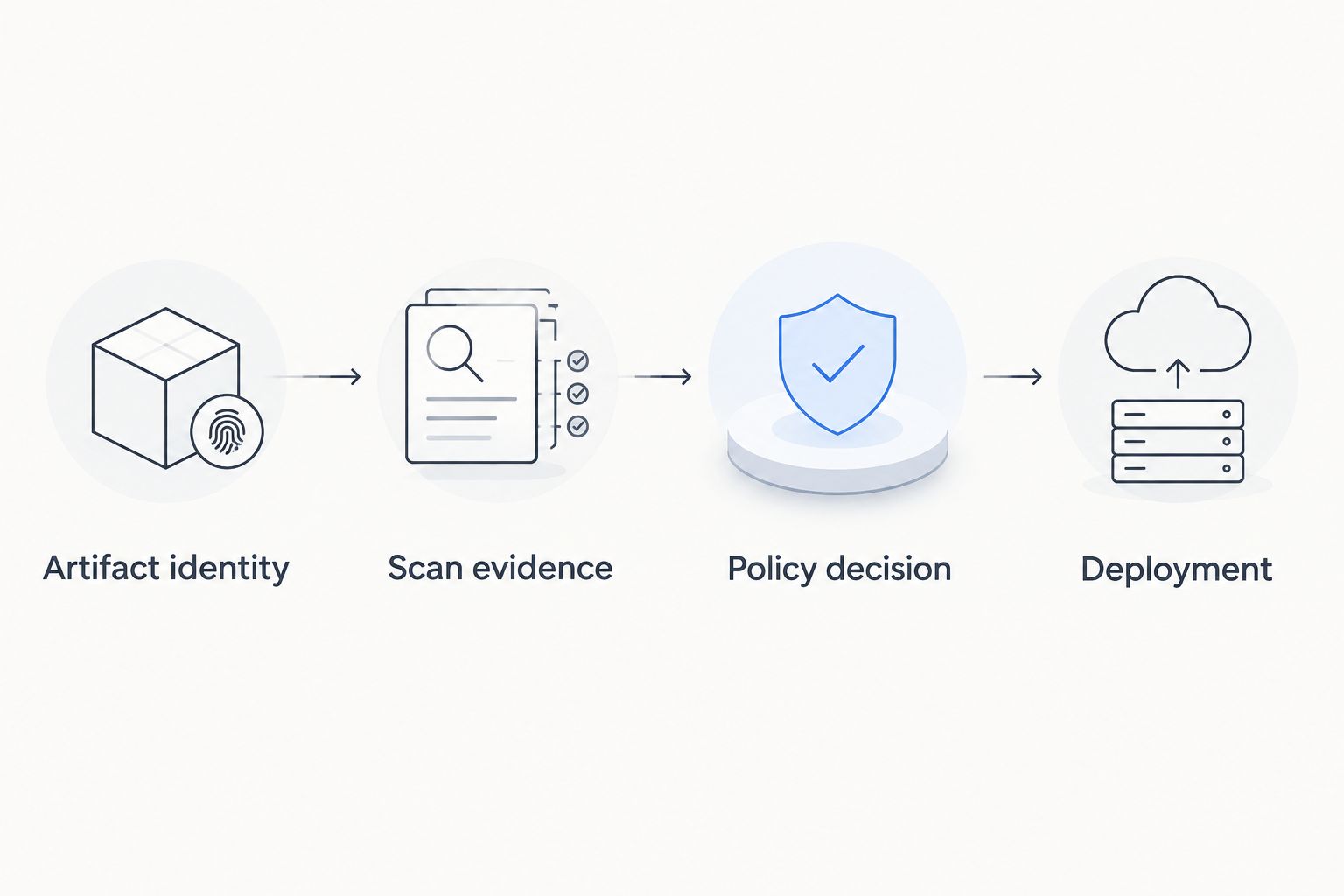
Re-evaluate vulnerabilities before deployment
Pull-request validation and deployment gating solve adjacent problems. Use pull-request validation for feedback; use artifact-specific deployment evaluation for release enforcement. Neither substitutes for the other.
| Workflow | Best for | Advantage | Limitation |
|---|---|---|---|
| Pull-request validation | Developers checking proposed changes | Finds blocking issues before merge | Does not by itself establish the deployed artifact's current vulnerability status |
| Pre-deployment evaluation | Release owners approving a candidate artifact | Evaluates the artifact at the release boundary | Adds an evidence dependency to deployment |
To add the second workflow:
- Retain the immutable artifact identity from the successful build. Do not rebuild the candidate during deployment and reuse the earlier approval.
- Before promotion, obtain evidence that meets your approved freshness requirement. Re-scan when required by that policy.
- Evaluate the current policy and applicable exceptions against that artifact. Record the new decision separately from the original build result.
- Deploy only if the new evaluation succeeds. Keep any manual approval distinct from the vulnerability decision.
Expected result: An artifact that passed an earlier build does not receive an unlimited security approval.
This matters for the 2026 workflow because vulnerability knowledge and exceptions change independently of source code. Re-running policy evaluation can change the decision without a new commit. Re-scanning and re-evaluating are different operations; specify which evidence each requires.
Keep the trade-off explicit: release-boundary checks improve decision relevance, but an unavailable scanner or context source can stop deployment. Agree on an emergency exception process before enabling the gate, not during an incident.
Troubleshooting
The pipeline succeeds despite blocking findings
Check the scanner's documented exit behavior; some scanning modes generate reports without failing on findings. Inspect the evaluator's exit code, continueOnError, shell error handling, and downstream conditions. The policy evaluator must fail the required job when deployment is prohibited.
The deployment runs after the security job fails
Inspect dependsOn and every deployment condition. Remove conditions that allow deployment regardless of the required security result. Verify the actual deployment route, including alternate pipelines and manual release paths.
Pull requests merge without running the gate
Confirm Build validation exists on the correct target branch and is Required. Check path filters, bypass permissions, and whether automatic validation is enabled. For Azure Repos Git, editing a YAML pr declaration does not replace the branch policy.
The report exists, but the gate rejects it
Compare the report schema, artifact identity, scan-completion state, and required fields against the evidence contract. Fix the adapter or scanner invocation rather than weakening validation. An empty file is not a valid clean scan.
The gate passes, but the deployed artifact differs
Trace artifact retrieval from build through deployment. Replace mutable references with the immutable identity recorded in the decision. Rebuilding after evaluation creates a different approval problem, even when the source commit is unchanged.
Customize your workflow
Expand enforcement only after the pilot's failure cases behave correctly. Add repositories, artifact types, and application context in separate changes so you can identify which change altered a decision.
For Brinqa vulnerability and exposure management evaluation, require a demonstration of your actual evidence fields and decision handoff. Ask how incomplete data, unavailable dependencies, and exceptions are represented; do not accept a successful import as proof of enforced deployment gating.
Use the guide to vulnerability management for CI/CD pipelines to extend the operating model beyond this Azure DevOps pilot. Keep pipeline enforcement, remediation ownership, and exception review connected, but assign each a clear responsibility.
FAQ
How do I set up an Azure DevOps vulnerability integration?
Run a scanner against the candidate artifact, validate its report, and make a policy evaluator's successful result a deployment prerequisite. Configure required branch validation separately when you also need pull-request enforcement.
Does uploading a vulnerability report block an Azure DevOps deployment?
No. Deployment is blocked only when the pipeline enforces a failing security decision through its job dependencies and conditions. A published report alone is evidence, not enforcement.
Can I use a YAML pr trigger for Azure Repos Git validation?
Use a build-validation branch policy for Azure Repos Git pull requests. Configure the validation pipeline on the target branch and make it required for the protected merge path.
Should I gate on all vulnerabilities or only new findings?
Choose the scope explicitly in your policy. A new-findings gate requires a baseline and stable matching logic; an all-findings gate also evaluates existing debt against the blocking rule.
What should happen when a vulnerability scanner fails?
A scanner failure must produce an incomplete-evidence result, not a clean-scan result. Block the normal release path and use the approved exception process if an emergency release is necessary.
Does this workflow require a native Brinqa connector?
This workflow does not assume a native Brinqa connector. Confirm the supported integration method, available fields, authentication, and failure behavior before including the platform in pipeline execution.
Should I scan again before deploying an older artifact?
Re-scan when the artifact's evidence no longer meets your approved freshness requirement. Also evaluate the current policy and exceptions against the immutable artifact identity before promotion.
One last thing
Test whether a developer can remove the gate in the same pull request the gate evaluates. A vulnerability check that trusts unreviewed changes to its own policy can produce a green result without enforcing the intended rule. Include that bypass test in your 2026 release-readiness review.