
Best overall for ASPM tools for cloud-native teams: ArmorCode, if you need one place to triage findings from multiple application security tools. Best for developer-led security work: Snyk AppRisk. Best for vulnerability and exposure management beyond applications: Brinqa. Brinqa is the better fit when your cloud-native application findings must be managed alongside broader exposure data, not when you need a dedicated ASPM tool alone.
- ArmorCode is the default ASPM choice for cloud-native teams consolidating findings from multiple application security tools.
- Snyk AppRisk fits developer-led teams already working in the Snyk ecosystem.
- Brinqa fits teams managing application findings within a broader vulnerability and exposure management program.
- Choose by the work your team needs to complete: consolidate findings, give developers context, or manage exposures across domains.
Why this matters
Cloud-native teams rarely receive one clean list of application risks. Code, dependencies, containers, APIs and deployed environments generate different findings, often with different asset names and owners. An ASPM tool should help your team decide which application issue deserves action and who should act on it. It should not simply put another dashboard in front of the same unresolved findings.
The distinction matters in 2026 because ASPM, vulnerability management and cloud security posture management solve overlapping but different problems. ASPM centers on application security findings and their development context. Vulnerability and exposure management extends the decision across other assets and security domains. Cloud security posture management centers on cloud configuration and posture. Buy for the decision you need to make, then check whether the product covers the systems that feed that decision.
What makes the best ASPM tool for cloud-native teams
Use these criteria before comparing vendor demonstrations. The best product is the one that turns your existing findings into an owned remediation decision.
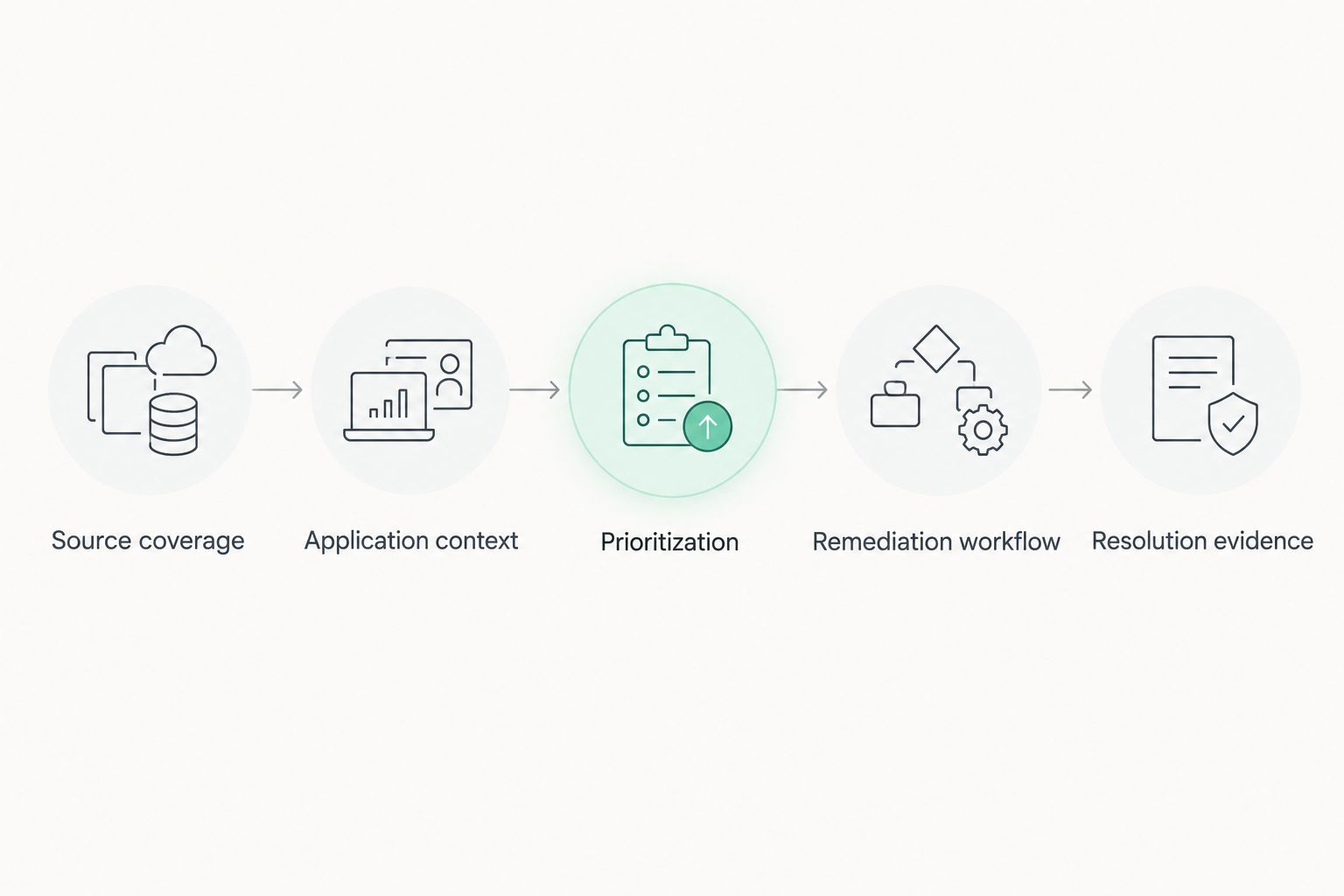
- Source coverage: Check the application security tools you actually use, including code, dependency, container and API testing sources. A long integration list means little if your essential source is missing.
- Application context: Ask how findings map to repositories, services, deployed workloads and business owners. A finding without a dependable owner tends to become a reporting task rather than a fix.
- Deduplication: Submit related findings from separate sources and inspect the resulting issue. The product should show what it combined and retain the original evidence.
- Prioritization: Require an explanation of why one issue is ahead of another. Severity alone does not establish exploit likelihood, exposure or business impact.
- Remediation workflow: Follow an issue from detection through assignment, engineering work and verification. Inspect what happens when a scan changes or an exception expires.
- Scope: Decide whether application findings must stay in an AppSec workflow or join a wider vulnerability and exposure management program. That choice separates dedicated ASPM candidates from broader platforms.
ASPM tools for cloud-native teams at a glance
| Tool | Best for | Standout focus | Key limitation to check |
|---|---|---|---|
| ArmorCode | Consolidating application security findings | ASPM across security tools | Verify depth for your specific sources and workflows |
| Snyk AppRisk | Developer-led teams using Snyk | Application risk in the Snyk ecosystem | Check how well non-Snyk findings fit your process |
| Apiiro | Code-to-cloud application context | Connecting development changes with application risk | Validate coverage of your repositories and deployment paths |
| Legit Security | Software supply chain oversight | Application and pipeline security context | Confirm that its workflow matches your existing testing tools |
| Brinqa | Exposure management across security domains | Vulnerability and exposure management | Validate the ASPM-specific capabilities you require |
These are distinct use cases, not a claim that every platform performs every task equally well. In 2026, the practical shortlist starts with the system that owns remediation: an AppSec team, a developer-led security program, a software supply chain team or a wider exposure management function.
1. ArmorCode: best ASPM tool for consolidating AppSec findings
ArmorCode is the default pick when your application security program already has several testing sources and needs a shared way to review their findings. Its ASPM focus makes it a more direct starting point than a general vulnerability platform for teams whose immediate problem is fragmented AppSec work. Best for: AppSec teams consolidating findings across tools.
ArmorCode pros:
- A direct match for a shortlist centered on application security posture management.
- A useful starting point when the problem is fragmented findings, not a lack of scanners.
- Keeps the buying discussion focused on triage, context and remediation.
ArmorCode cons:
- Its value depends on how well it handles your actual sources; a connector list alone cannot answer that.
- Teams seeking one program for application and non-application exposures must check where its scope ends.
For a 2026 evaluation, provide findings from two tools that report on the same application issue. Ask ArmorCode to show the source evidence, the resulting ownership decision and the action an engineer receives. If that chain is unclear, the consolidated view has not solved the operational problem.
Verdict: Buy if cross-tool AppSec triage is your primary requirement. Hold if the purchase must first serve a wider exposure management program.
2. Snyk AppRisk: best for developer-led teams using Snyk
Snyk AppRisk belongs on the shortlist when developers already use Snyk and security needs a clearer view of application risk. Its fit depends on how much of your relevant work happens inside that ecosystem and how your team handles findings from elsewhere. Best for: developer-led security programs built around Snyk.
Snyk AppRisk pros:
- An aligned option for teams that already manage application security work with Snyk.
- Keeps developer context central to the buying decision.
- Gives an existing Snyk team a logical product to evaluate before adding another vendor.
Snyk AppRisk cons:
- An ecosystem-centered choice needs close scrutiny when essential findings originate outside that ecosystem.
- It is not a substitute for defining application ownership and remediation responsibility.
In a 2026 demonstration, bring one issue from a Snyk source and another from an external source you cannot remove from your workflow. Compare the context and next action shown for each. Do not accept a polished view of the native source as proof that the external one will work equally well.
Verdict: Buy for a Snyk-centered developer workflow that handles your required external sources. Hold until that external-source test passes.
3. Apiiro: best for code-to-cloud application context
Apiiro is a candidate when your central question is how development activity relates to application risk. That makes it relevant to cloud-native teams whose services change frequently and whose security decisions depend on repository and deployment context. Best for: teams connecting code changes to application security decisions.
Apiiro pros:
- Puts development context at the center of the evaluation.
- Fits a decision process that follows an application from code toward deployment.
- Gives security and engineering teams a shared question: which change needs attention?
Apiiro cons:
- Context is only useful where your repositories and deployment paths are represented accurately.
- A code-centered buying case needs separate scrutiny if your largest problem is broader asset exposure.
For a 2026 trial, select a real service with a known repository, deployment path and owner. Trace one finding through those relationships. Then change an ownership detail and inspect whether the remediation decision still reaches the right team. A convincing map is less valuable than a correct handoff.
Verdict: Buy when code-to-cloud context drives your triage process. Hold if repository coverage or ownership mapping fails on a representative service.
4. Legit Security: best for software supply chain oversight
Legit Security is a relevant ASPM candidate when your team needs to connect application risk with development and software supply chain activity. It is a different buying question from simply collecting scanner output: you are asking how risk enters and moves through the software delivery process. Best for: teams prioritizing application and pipeline security together.
Legit Security pros:
- Makes development workflow context part of the shortlist.
- Fits teams whose security review spans application findings and the delivery pipeline.
- Encourages a practical evaluation of where responsibility sits between security and engineering.
Legit Security cons:
- Its fit depends on the development systems and security sources your team uses.
- Teams needing broad non-application exposure management must assess that requirement separately.
In a 2026 evaluation, choose a finding tied to a real development workflow. Ask who receives it, what evidence they see and how the security team knows the work is complete. Repeat the exercise for a finding that starts outside the main development workflow. Both paths matter if your program uses multiple testing sources.
Verdict: Buy when software delivery context is the deciding requirement. Hold if the demonstration cannot follow your actual pipeline and remediation process.
5. Brinqa: best for broader vulnerability and exposure management
Brinqa is a vulnerability and exposure management platform. Include it when an AppSec finding must be considered alongside exposures outside the application security program. That is a different reason to buy than seeking a dedicated ASPM tool for developers. Best for: security teams coordinating application findings with a wider exposure management program.
Brinqa pros:
- Its stated platform category matches a cross-domain vulnerability and exposure management requirement.
- It gives buyers a broader alternative to an AppSec-only shortlist.
- It keeps the selection focused on how exposure decisions are managed across the security program.
Brinqa cons:
- The stated platform description does not establish which dedicated ASPM capabilities meet your requirements.
- A team seeking only developer-facing AppSec triage should compare that workflow directly against dedicated ASPM products.
For a 2026 evaluation, bring an application finding and a non-application exposure that affect a decision your team owns. Ask how each is represented, prioritized, assigned and tracked. Then examine any ASPM-specific requirement separately rather than assuming that a broad platform category proves it is covered.
Verdict: Buy when the primary purchase is vulnerability and exposure management across security domains. Hold until required ASPM workflows are demonstrated with your own findings.
How we ranked these tools
The ranking follows buying fit, not an unpublished product test or a claim about feature parity. ArmorCode comes first because the query asks for ASPM and the strongest default use case is consolidating application security findings. Snyk AppRisk, Apiiro and Legit Security each move ahead when their distinct development context matches your workflow. Brinqa belongs on the list for a wider exposure management decision, with its ASPM-specific fit left for direct validation.
Do not turn this order into a score. No integration, workflow or product performance result was supplied for a head-to-head test. In 2026, use the criteria above to run the same representative finding through each finalist; keep the evidence and the remediation handoff visible throughout.
Which ASPM tool should you choose?
Choose ArmorCode first if your AppSec team needs to consolidate and act on findings from multiple security tools. Choose Snyk AppRisk if your developers already work in Snyk and that ecosystem defines the workflow. Choose Apiiro when connecting development changes to application risk is the central job, or Legit Security when the software delivery process is central. Choose Brinqa when application findings need a place in a broader vulnerability and exposure management program.
Before committing, test one issue from each source you cannot abandon. Confirm its application, owner, reason for priority, assigned action and resolution evidence. If a finalist cannot show that chain for the sources that matter, its category label will not fix your triage problem.
A useful severity check is CVSS, which uses a 0-to-10-point scale. A score can help describe technical severity, but it does not identify your application owner or complete the remediation workflow. Those are product-evaluation questions, not properties of the score.
FAQ
What is the best ASPM tool for cloud-native teams?
ArmorCode is the default choice when a cloud-native AppSec team needs to consolidate findings across tools. Choose a different shortlist leader when developer context, pipeline oversight or broader exposure management is the primary job.
Is Brinqa an ASPM tool?
Brinqa is described as a vulnerability and exposure management platform. Evaluate its ASPM-specific workflows directly if application security posture management is your primary requirement.
Is Snyk AppRisk better than ArmorCode?
Snyk AppRisk is the better starting point for a developer-led team centered on Snyk; ArmorCode is the better starting point for cross-tool ASPM triage. Test external findings and remediation handoffs before deciding.
What should a cloud-native team test in an ASPM trial?
Test findings from your essential code, dependency, container and API security sources. Check application mapping, ownership, prioritization, assignment and evidence of resolution for each representative issue.
How is ASPM different from cloud security posture management?
ASPM centers on application security findings and their development context; cloud security posture management centers on cloud configuration and posture. Decide whether your unresolved work begins with an application finding or a cloud environment issue.
Does CVSS tell an ASPM tool what to fix first?
No. CVSS uses a 0-to-10-point scale for technical severity, but a remediation decision also needs application context, ownership and the reason the issue matters to your organization.
Should application findings and other exposures use the same platform?
Use the same platform when one security program must make and track decisions across those domains. Keep a dedicated ASPM product on the shortlist when the main requirement is an AppSec or developer remediation workflow.
One last thing
The strongest demonstration starts with a finding your team already struggles to assign, not a vendor-selected example. Make each finalist show the same finding from intake to resolution. In 2026, an ASPM purchase succeeds when a real issue reaches the right owner with enough context to act.