Best default for container-centered pipelines: Trivy. Best for dependency-focused artifact checks: Grype. Best for custom source-code rules: Semgrep; for semantic code analysis: CodeQL; for running web applications: ZAP. This 2026 guide separates pipeline scanners from vulnerability and exposure management platforms such as Brinqa, so you choose the right tool for the job.
- Trivy is the default shortlist pick for vulnerability scanners for devsecops pipelines centered on containers.
- Grype fits dependency-focused artifact checks; Semgrep fits custom source-code rules.
- CodeQL analyzes source code; ZAP tests running web applications. Neither replaces dependency scanning.
- Brinqa belongs in vulnerability and exposure management evaluation, not the pipeline-scanner ranking.
Why this matters
A dependency scanner, a source-code analyzer, and a web application scanner answer different questions. Treating them as interchangeable leaves coverage gaps: a clean container scan does not establish that your application handles authorization correctly.
Your 2026 selection should start with the object you need to inspect. Source code belongs before packaging, dependency and image checks belong around the build, and dynamic testing requires a running application. Match the scanner to that stage before comparing dashboards.
You also need a response process. A finding without an accountable owner, reproducible evidence, and a closure check is an unresolved task—not a completed security control. The companion guide to vulnerability management for CI/CD pipelines addresses that broader workflow.
What makes the best pipeline vulnerability scanner
Use these criteria before choosing a product. None requires a claimed detection rate or an unsupported speed benchmark.
- Coverage fit: Identify whether the tool inspects source code, dependencies, container images, configuration, or running applications. Check your actual languages and package ecosystems.
- Pipeline control: Confirm that you can run the intended scan noninteractively, interpret its exit status, and distinguish a detected issue from a failed scan.
- Actionable evidence: Require the affected component or code location, the relevant advisory or rule, and enough detail to reproduce or investigate the finding.
- Policy precision: Separate new findings from inherited debt. Define which findings block a release and which enter a remediation queue.
- Reproducibility: Record scanner versions, rule configurations, dependency information, and the exact artifact or commit scanned.
- Operational fit: Evaluate credentials, network access, advisory updates, output formats, and ownership before expanding the scanner across repositories.
Choose the scanner whose evidence your developers can act on, not the scanner with the longest feature list. More findings do not automatically mean more useful coverage.
Vulnerability scanners at a glance
The order below follows distinct jobs, not measured performance. For a container-centered pipeline, start with Trivy and add the complementary category your application needs.
| Tool | Best for | Standout capability | Key limitation |
|---|---|---|---|
| Trivy | Container-centered pipeline checks | Vulnerability scanning across images and supported dependency inputs | Does not replace application logic testing |
| Grype | Dependency-focused artifact checks | Vulnerability matching for supported packages in images, filesystems, and SBOMs | Not a source-code or running-application analyzer |
| Semgrep | Custom source-code security rules | Pattern-based rules that fit repository-specific coding policies | Results depend on rule coverage and language support |
| CodeQL | Semantic source-code analysis | Queries over a database representing supported source code | Setup and analysis depend on the language and build process |
| ZAP | Dynamic testing of staged web applications | Passive and active analysis of HTTP application traffic | Requires a reachable application and effective test coverage |
An SBOM is a software bill of materials: an inventory of software components. Static application security testing, or SAST, inspects source code; dynamic application security testing, or DAST, examines a running application. These are complementary inspection methods.
1. Trivy: best pipeline scanner for container-centered checks
Trivy scans container images and other supported inputs for known vulnerabilities. It also supports checks beyond vulnerability matching, including misconfiguration and secret detection; enable the scan types your pipeline actually needs.
Trivy is the default shortlist choice when your build produces a container image and you want an artifact-level security check. Scan the image you intend to release. Scanning a developer's local environment is not equivalent to scanning the packaged artifact.
Trivy pros:
- Handles container-image vulnerability checks directly.
- Supports additional inspection types alongside vulnerability scanning.
- Offers command-line operation suitable for automated jobs.
Trivy cons:
- Package vulnerability findings do not establish application exploitability.
- Additional scan types need separate policy decisions and triage.
- Image checks do not replace source-code or authenticated dynamic testing.
Best for: Teams whose main pipeline security gap is container and dependency visibility.
For your 2026 pilot, separate an execution error from a policy failure. A missing advisory database or inaccessible image must not appear as a clean security result. Preserve the scan output with the artifact identity so a developer can investigate the same build.
Verdict: Buy into Trivy as the default container-scanning approach; skip treating it as complete application-security coverage.
2. Grype: best pipeline scanner for dependency-focused artifact checks
Grype identifies known vulnerabilities in supported packages found in container images, filesystems, and SBOM inputs. Its focused role makes it a clear candidate when dependency vulnerability matching is the job you need to automate.
Choose Grype when you already have an artifact inventory process or want a distinct vulnerability check against supported SBOM data. Keep the inventory tied to the released artifact. An SBOM from a different build weakens the connection between the finding and the software you ship.
Grype pros:
- Accepts supported SBOM inputs for vulnerability analysis.
- Inspects packages in container images and filesystems.
- Keeps dependency vulnerability matching separate from source-code rules.
Grype cons:
- Incomplete package inventory limits vulnerability matching.
- Advisory matches still need applicability review.
- Does not inspect application logic or exercise web endpoints.
Best for: Teams building a dependency-focused artifact or SBOM scanning step.
Before adopting Grype, inspect a finding end to end: package identity, installed version, advisory, and any reported fix information. Establish how your team will handle findings with no applicable remediation rather than automatically suppressing them.
Verdict: Buy into Grype for focused artifact vulnerability checks; skip it as a substitute for SAST or DAST.
3. Semgrep: best pipeline scanner for custom source-code rules
Semgrep analyzes source code using rules that identify matching code patterns. Its source-code scanning is useful when you need checks for unsafe coding practices or repository-specific security requirements.
Semgrep's distinct slot here is custom rule enforcement—not dependency inventory. Start with rules appropriate to your languages, then validate their findings against code your developers recognize. A rule that flags an approved abstraction without understanding its use creates avoidable review work.
Semgrep pros:
- Supports rules tailored to specific code patterns.
- Reports findings at source-code locations.
- Allows security policies to be expressed as repository checks.
Semgrep cons:
- Missing or unsuitable rules leave gaps.
- Language support and analysis capabilities require verification.
- Source-code findings do not replace released-image inspection.
Best for: Teams that need repeatable checks for coding patterns and internal secure-development rules.
For a 2026 rollout, assign an owner to each blocking rule. Require that owner to explain the unsafe pattern, acceptable alternatives, and suppression conditions. Without that explanation, developers receive an instruction to change code without a usable security rationale.
Verdict: Buy into Semgrep for targeted source-code policies; hold release blocking until the selected rules produce actionable findings.
4. CodeQL: best pipeline scanner for semantic code analysis
CodeQL creates a database representing supported source code and runs queries against it. Security queries can identify code relationships and data-flow patterns that require more context than an isolated text match.
CodeQL belongs on the shortlist when source-code analysis is the main requirement and your language and build process fit its supported analysis path. Confirm the exact language, extraction process, and queries you intend to use before designing a required pipeline check.
CodeQL pros:
- Supports semantic queries over source-code databases.
- Provides security analysis for supported languages.
- Allows query-based inspection of code relationships.
CodeQL cons:
- Database creation must fit your repository and build setup.
- Query selection affects what the analysis detects.
- Source-code analysis does not scan your deployed application's behavior.
Best for: Teams seeking semantic security analysis of supported source-code repositories.
Do not compare CodeQL and Semgrep solely by alert counts. Compare whether each selected configuration identifies relevant issues, explains them clearly, and fits your development workflow. Different analysis methods and rule sets make raw totals a poor purchasing criterion.
Verdict: Buy into CodeQL for semantic source analysis; hold adoption until database creation works reliably in your pipeline.
5. ZAP: best pipeline scanner for staged web application testing
ZAP examines web application traffic and supports passive analysis and active testing. Unlike dependency or source-code scanners, it needs a running target application.
Place ZAP against an authorized staging environment where test accounts, authentication, and application routes are defined. Passive inspection analyzes observed traffic; active scanning sends test requests. That distinction matters when deciding what is safe to run against an environment.
ZAP pros:
- Tests a running web application rather than only build inputs.
- Supports passive inspection and active scanning.
- Offers automation options for repeatable application testing.
ZAP cons:
- Unvisited routes and inaccessible authenticated areas limit coverage.
- Active tests require authorization and environmental safeguards.
- Dynamic scanning does not establish complete business-logic coverage.
Best for: Teams with a testable staging application and a defined web security testing scope.
For your 2026 evaluation, prove that the scanner reaches the intended authenticated workflows. A completed scan against a login page is not evidence that protected application features were tested. Keep test data and scan credentials separate from production access.
Verdict: Buy into ZAP for authorized staged web testing; skip uncontrolled active scanning against production.
How to place scanners in your pipeline
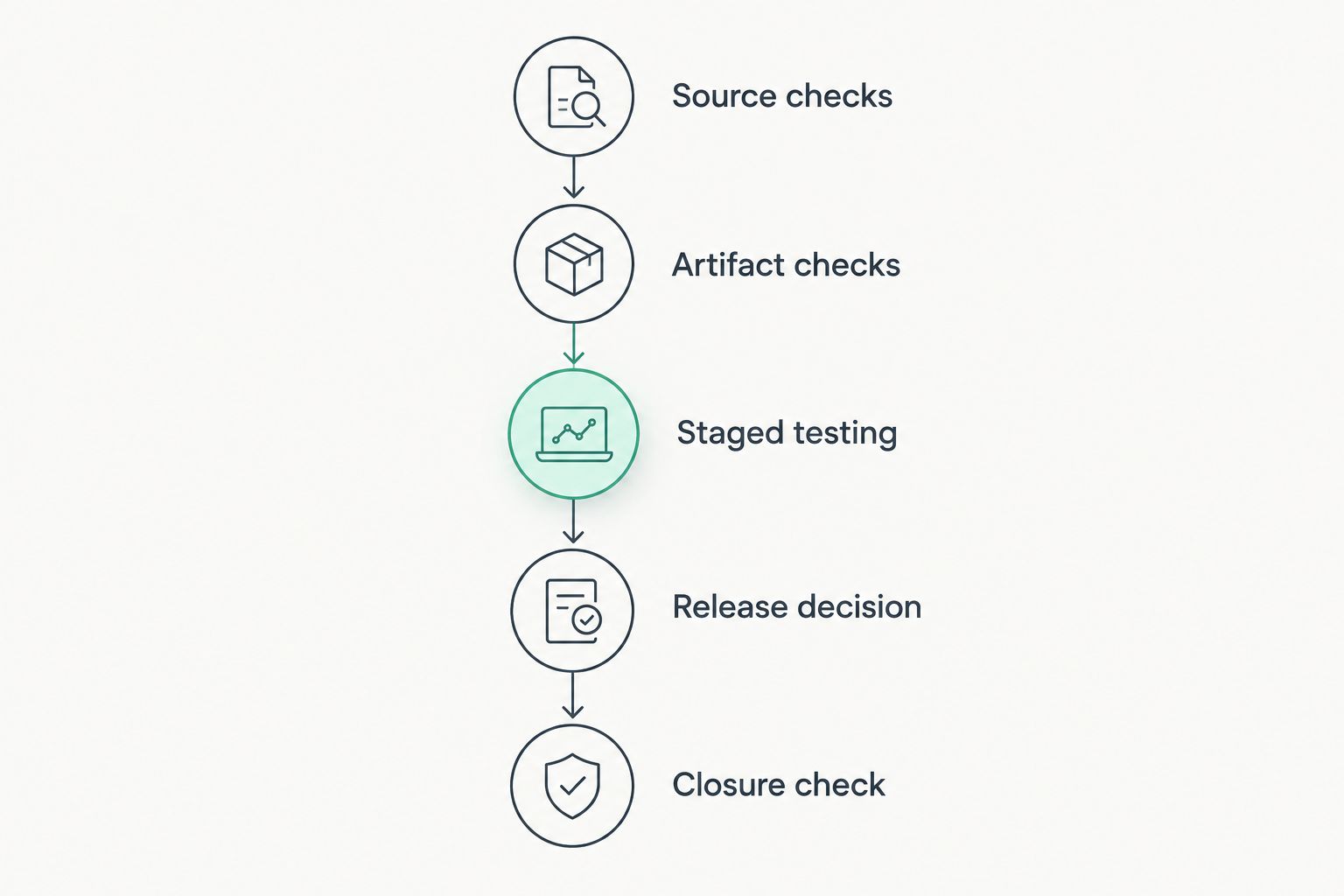
Use a sequence that follows what exists at each stage. Source code exists before the image; the running application exists after deployment. Do not force every inspection into the same build job.
- Source checks: Run the chosen source-code rules against the relevant commit.
- Artifact checks: Inspect the packaged dependencies or container image intended for release.
- Staged testing: Exercise the authorized running application with the required authentication.
- Release decision: Apply documented blocking rules and approved exceptions.
- Closure check: Recheck the corrected code, artifact, or application before closing the finding.
For a manageable pilot, choose 3 repositories, compare results across 2 consecutive builds, and use 1 staging environment for dynamic testing. These are suggested pilot boundaries, not performance benchmarks. Include repositories with representative languages and packaging patterns rather than selecting only the easiest project.
Record what blocks a release, who investigates each result, and what happens when the scan fails to run. Treat approved exceptions as documented decisions with an owner and a review condition. Otherwise, temporary suppressions become invisible policy.
Where Brinqa fits—and where it does not
Brinqa is best considered by teams seeking a vulnerability and exposure management platform, not a replacement pipeline scanner. Its stated category is distinct from the inspection roles ranked above.
Brinqa pros for this evaluation:
- Matches a requirement for a vulnerability and exposure management platform.
- Belongs in the management-platform shortlist when that is your buying objective.
Brinqa limitations for this evaluation:
- Its platform category does not establish coverage for source-code, image, or dynamic scanning.
- Required scanner connections, workflows, and deployment fit need confirmation during evaluation.
Best for: Buyers evaluating vulnerability and exposure management alongside their scanning approach.
Keep the decisions separate. First determine which inspection methods your pipeline requires; then evaluate Brinqa against the management requirements your organization defines. Do not assume an integration or workflow exists without checking it.
How the shortlist is ranked
The shortlist prioritizes coverage fit, automated operation, actionable evidence, policy control, reproducibility, and operational fit. Trivy takes the default slot for a container-centered use case; each remaining tool owns a different inspection requirement.
This is a use-case ranking, not a detection-rate benchmark. Validate capabilities against the current Trivy, Grype, Semgrep, CodeQL, and ZAP documentation, then test the selected configuration against your repositories. No measured speed or false-positive advantage is claimed here.
Which scanner should you choose?
For a container-centered pipeline in 2026, start with Trivy. Choose Grype instead when your requirement is a focused artifact or SBOM vulnerability check. Add Semgrep for custom source-code rules or CodeQL for semantic source analysis, according to your supported languages and policy needs.
Add ZAP when you can provide an authorized, representative staging target. Do not install every shortlisted tool merely to accumulate alerts. Each additional inspection should close a named coverage gap and have an owner capable of acting on its results.
FAQ
What's the best vulnerability scanner for a DevSecOps pipeline?
Trivy is the default shortlist choice for a container-centered DevSecOps pipeline. Use a source-code analyzer and dynamic testing where those separate inspection methods are required.
Is Trivy better than Grype for pipeline scanning?
Trivy fits broader container-centered checks, while Grype fits focused dependency vulnerability matching in supported artifacts and SBOMs. Choose according to the inputs and scan types your pipeline needs, not an unsupported accuracy ranking.
Do I need both SAST and DAST in my pipeline?
SAST and DAST inspect different things: source code and a running application. Use both when your security requirements call for both inspection methods; neither replaces dependency vulnerability scanning.
Should every vulnerability fail the build?
No; build failures should follow documented policy rather than every reported finding. Separate new issues, inherited debt, approved exceptions, and scanner execution failures so the release decision remains understandable.
Can ZAP scan an authenticated application?
ZAP supports authenticated application testing when authentication and session handling are configured for the target. Verify access to protected workflows rather than assuming a completed scan reached them.
Is Brinqa a replacement for a pipeline vulnerability scanner?
Brinqa is a vulnerability and exposure management platform, not a substitute established here for source-code, container, or dynamic inspection. Evaluate scanning coverage and platform requirements separately.
How do I verify that a scanner found the released artifact's vulnerabilities?
Tie the scan record to the exact released artifact, such as its container digest, and retain the scanner configuration and results. A scan of another build does not establish coverage for the released artifact.
One last thing
A scanner execution failure is not a clean scan. Test that distinction deliberately before making a security job mandatory: deny access to a required input, confirm the job reports failure, and check that your release policy handles it correctly. This small validation prevents missing evidence from being mistaken for approval.