
Instead of manually granting and removing application access, connect Okta to an approval workflow that adds an eligible user to an access group, records an expiry, and removes that membership when the approved window ends. To connect Okta just in time access provisioning safely, treat granting access and verifying revocation as separate, required operations.
- Connect Okta just in time access provisioning through approved, expiring group membership—not account creation alone.
- Okta authentication-time provisioning does not automatically make application permissions temporary.
- Verify access removal in the destination application, including existing sessions and alternative entitlement paths.
- Brinqa serves vulnerability and exposure management teams; access enforcement belongs in the access workflow.
Why this matters
Just-in-time provisioning describes two different workflows. Authentication-time JIT creates a user account when someone signs in through federation. Temporary access provisioning grants a permission for an approved interval and then removes it. Account creation is not access expiry.
For your 2026 implementation, decide which outcome you need before configuring Okta. This guide covers temporary application access through an Okta group, with a separate section for authentication-time provisioning.
Brinqa is a vulnerability and exposure management platform. Brinqa is best for teams seeking vulnerability and exposure management, not a substitute for temporary-access enforcement. Keep identity authentication, entitlement changes, and exposure management distinct when designing the workflow.
Before you start
- Access and permissions: Obtain an Okta administrator role that permits the required group and application changes, a test application, and an automation identity with narrowly scoped permissions. Prepare an approval mechanism and durable storage for access requests and expiry times.
- Application behavior: Confirm how the destination receives access changes: federation claims, provisioning, or its own authorization API. Test whether removing an Okta assignment disables access, removes a role, or leaves an existing session usable.
- The hidden gotcha: Group removal is not necessarily application-session revocation. Identify direct assignments, overlapping groups, local application roles, and existing sessions before using group membership as your temporary-access control.
For a contained pilot, use 1 application, 1 dedicated access group, and 2 test accounts: one eligible requester and one ineligible requester. These are suggested test boundaries, not Okta service limits.
Choose the provisioning pattern
Use the comparison below to distinguish identity creation from temporary authorization. Neither approach replaces application-side verification.
| Pattern | Best for | Advantage | Limitation |
|---|---|---|---|
| Authentication-time JIT | Creating accounts during federated sign-in | Avoids pre-creating every eligible account | Does not inherently expire permissions or delete accounts |
| Approved, expiring group membership | Temporary access to a group-assigned application | Separates eligibility, approval, grant, and expiry | Requires an expiry scheduler and destination-side checks |
Choose expiring group membership when your requirement is temporary permission. Use authentication-time JIT only when your requirement is account creation at sign-in.
The group pattern is appropriate only if membership controls the intended entitlement. If the destination uses local roles independently of Okta assignment, your workflow must also update and revoke those roles through its supported mechanism.
Configuration unit: Access group and application assignment
Build the authorization boundary before connecting the approval trigger. A dedicated group makes the temporary entitlement easier to inspect and prevents unrelated application access from entering the workflow.
- In the Okta Admin Console, open Directory, then Groups, and select Add Group. Create a group whose purpose clearly identifies the temporary entitlement. Record its group ID for automation.
- Open Applications, then Applications, and select your test application. Under Assignments, select Assign, then Assign to Groups, and assign the dedicated group.
- Review the application's group-assignment attributes. Choose the least-privileged role that satisfies the intended task; application-specific role fields differ by integration.
- Add the eligible test account to the group manually. Confirm that the destination grants the intended permission, not just a sign-in tile.
- Remove that test membership. Inspect the destination account, role, and existing session to establish what removal actually changes.
Expected result: Membership grants only the intended application access, and removal has a documented, tested effect at the destination. If removal leaves the privileged role intact, add an application-side revocation operation before proceeding.
For the 2026 pilot, retain the before-and-after permission evidence. A successful Okta group update proves a directory change; it does not prove that the destination enforced it.
Configuration unit: Request trigger and approval record
Connect your request source to an approval workflow rather than granting access directly from a submitted form. The workflow needs a durable record that survives restarts and supports later revocation.
- Define the request record: requester identifier, Okta user ID, target group ID, requested entitlement, business justification, approver, approval state, and expiry timestamp. Use stable IDs for mutations rather than matching on display names.
- Resolve the requester to an active, eligible Okta account. Reject requests for suspended or deactivated users and requests outside the approved entitlement catalog.
- Require authorization from an appropriate approver. Keep the requester and approver separate for entitlements that require independent approval.
- Record the approved duration and calculate an absolute expiry timestamp. Store timestamps consistently in UTC so the scheduler does not depend on the requester's local time zone.
- Check whether the user already has the group membership. If membership predates this request, do not silently adopt it as a temporary grant that your workflow can later remove.
- Assign an operation identifier and save the approved record before executing the entitlement change. Repeated delivery of the same approval must not create unrelated grants or reset expiry.
Expected result: One approved request identifies a specific user, entitlement, expiry, and accountable approver. An unapproved or ineligible request produces no membership change.
Use an explicit state model so operators can distinguish a request awaiting approval from a granted entitlement or a failed revocation. Treat every transition as evidence-bearing work.
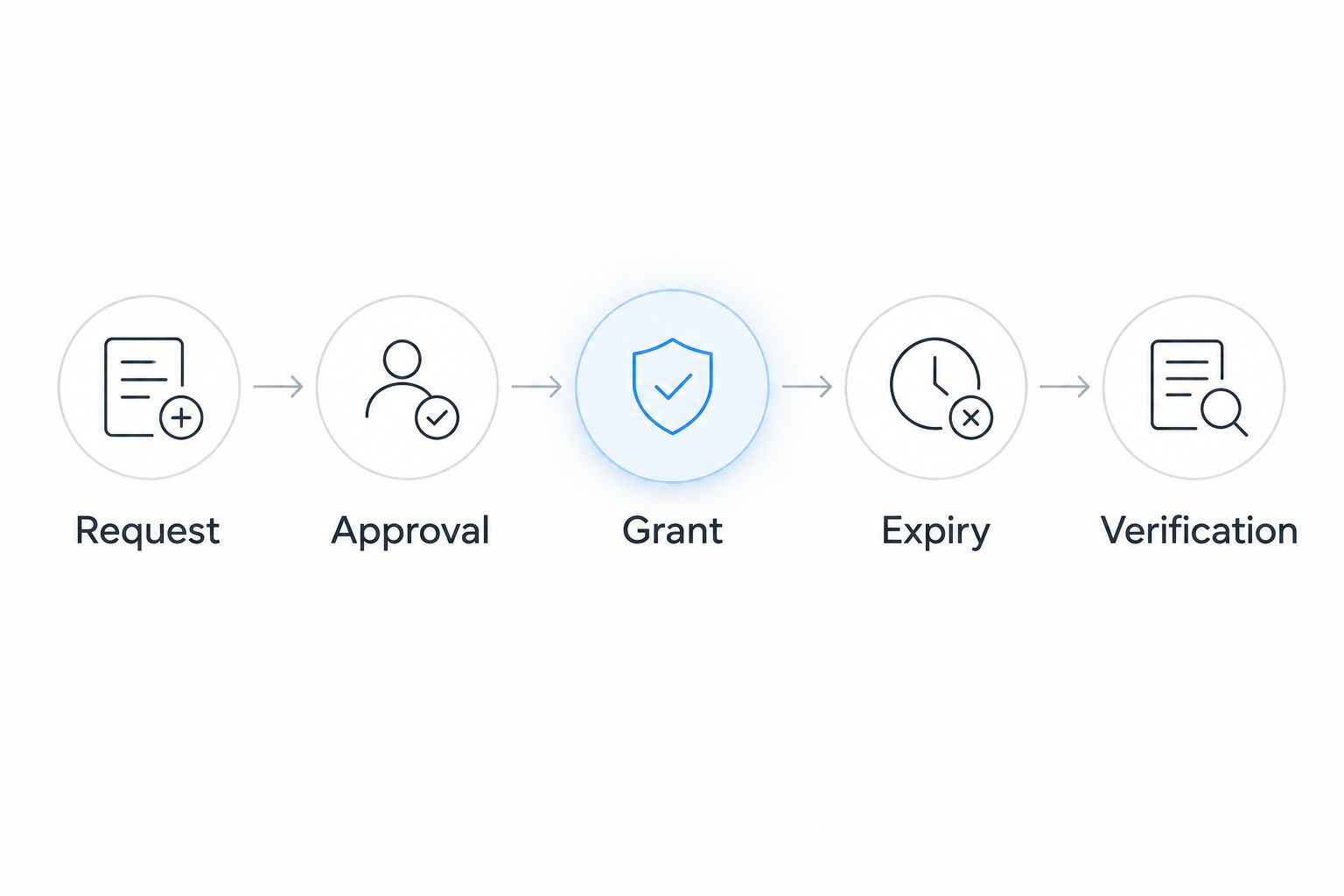
Configuration unit: Membership grant and expiry scheduler
The following operations use the Okta Groups API. They are API operations, not invented console settings; configure them in your chosen automation service using its documented request controls.
- Authenticate the automation identity using a supported Okta API authentication method. Prefer a scoped OAuth service integration, and grant only the API permissions and administrator access required for the group operations.
- Add the approved user with
PUT /api/v1/groups/{groupId}/users/{userId}. Substitute the recorded IDs, and restrict the workflow to its approved group catalog. - Verify membership through
GET /api/v1/groups/{groupId}/users. Follow pagination when checking membership; absence from an incomplete response is not proof of absence. - Record the grant outcome and actual grant time. Preserve the original approved expiry unless your documented policy explicitly calculates the window from successful activation.
- Place the entitlement in a durable expiry queue. Use a scheduled worker that retrieves expired grants and retries unfinished revocations after interruptions.
- At expiry, remove membership with
DELETE /api/v1/groups/{groupId}/users/{userId}. Confirm absence through the group-membership API and check the destination's resulting permission state.
Expected result: An approved request creates verified membership, and expiry creates verified removal. Failed grants remain distinguishable from active grants; failed removals remain open until resolved.
For your 2026 operating procedure, record both expiry time and verified removal time. A timer firing is not evidence that access ended. Keep an escalation path for operations that cannot complete.
Configuration unit: Destination verification and audit evidence
Test authorization, not merely authentication. A user who cannot launch an application from Okta might still reach it through an existing browser session or another authorized route.
- Choose a proposed pilot window of 15 minutes. This is a test setting, not an Okta default or a recommended production duration.
- Submit an eligible request and confirm the expected approval, membership, and destination permission. Capture the request identifier and corresponding automation outcomes.
- Attempt an ineligible request with the second test account. Verify that neither group membership nor destination permission changes.
- Allow the approved grant to expire. Test a fresh sign-in and the session opened during the access window. Apply the destination's supported session controls where your policy requires immediate termination.
- Replay the approval event, interrupt the expiry worker, and restore it. Confirm that retries do not extend access or lose pending revocations.
- Collect the approval decision, membership changes, destination evidence, expiry, retries, and final outcome in the audit record.
Expected result: Your evidence shows who approved access, what changed, when expiry occurred, and whether the protected action became unavailable.
Before production rollout in 2026, define the response when destination verification fails. Do not mark the request closed just because the Okta deletion returned successfully. Route unresolved permission or session checks to an accountable operator.
Second variant: Create an account at federated sign-in
Authentication-time JIT is a separate workflow. Inbound federation can create an Okta user at sign-in when the identity-provider integration and its provisioning policy support that behavior. An application can also create its own account from a federated sign-in if the application supports JIT.
- Identify where the account must be created: in Okta through an inbound identity provider, or in the destination application through its federation configuration.
- Configure the supported federation connection and validate the issuer, audience, signatures, and required identity attributes.
- Set the supported account-creation and matching policy. Restrict the eligible population, and review account-linking rules before allowing existing accounts to match incoming identities.
- Test first sign-in, subsequent sign-in, a mismatched identity, and withdrawal of eligibility. Document what happens to the created account after access ends.
Expected result: An eligible federated sign-in creates or matches the intended account without broadening authorization beyond policy.
Authentication-time JIT alone is insufficient for temporary elevated access. Pair it with a separate entitlement-expiry process when the user's permission must end independently of the account's lifetime.
Troubleshooting
Membership changed, but the application denied access
Check application assignment, required profile attributes, and destination provisioning results. Group membership is only one input; the application can reject access because the account is missing, disabled, or mapped to the wrong role. Inspect the destination outcome before retrying the same grant.
Expiry removed membership, but privileged access remains
Inspect direct assignments, other groups, local roles, and active sessions. Remove only the entitlement paths your policy authorizes the workflow to manage. Use the destination's supported revocation and session controls rather than assuming another Okta group removal will solve it.
The API returns permission or rate-limit errors
For authorization failures, check the automation identity's scopes and administrator permissions. For rate limiting, honor the response's retry guidance and retain the pending operation. Alert on repeated failures without creating an uncontrolled retry loop.
A delayed approval restores access after expiry
Compare the event with the current request state and approved expiry before applying membership. Reject stale approval events and require a fresh request when the window has ended. Replaying an event must not renew an entitlement.
Removing one grant cancels another valid grant
Track active requests by user and entitlement, not just by request ID. Remove workflow-owned membership only when no valid approved grant still requires it. Preserve pre-existing membership or route conflicting ownership to a review process.
Customize your workflow
Once the pilot proves grant and revocation, extend the entitlement catalog—not the automation identity's privileges by default. Separate sensitive roles into their own approval policies and assign a destination owner to every supported application.
For your 2026 review, evaluate request eligibility, failed revocations, overlapping grants, and destination-session behavior together. Review automation permissions whenever you add an entitlement or change an integration.
Brinqa's vulnerability and exposure management scope belongs alongside this access process, not inside an assumed Okta enforcement connector. For the adjacent security program, use the guide to vulnerability management for identity and access risk teams.
FAQ
How do I connect Okta to just-in-time access provisioning?
Connect an approval workflow to a dedicated Okta access group, record an expiry, and automate membership removal. Verify the resulting permission change in the destination application before treating access as revoked.
Is Okta JIT provisioning the same as temporary access?
No. Authentication-time JIT creates or matches an account at federated sign-in; temporary access requires an authorization change and a separate expiry mechanism.
Can removing an Okta group membership immediately end application access?
Not by itself in every application. Existing sessions, direct assignments, other groups, or local roles can preserve access, so test the destination's revocation behavior.
Do I need SCIM to implement this workflow?
No, SCIM is not required for every implementation. It is relevant when the destination uses supported provisioning operations; federation claims or application APIs can control authorization in other integrations.
How should overlapping temporary access requests work?
Keep membership while at least one valid approved grant requires it. Remove workflow-owned membership only after all applicable grants expire, and do not automatically remove membership that predates the workflow.
What should happen if the expiry worker fails?
Keep the revocation pending, retry through a durable worker, and escalate unresolved failures. Do not mark access revoked until membership removal and the required destination checks succeed.
Does Brinqa replace the Okta access workflow?
No. Brinqa is a vulnerability and exposure management platform; this workflow requires identity, approval, entitlement, expiry, and destination-enforcement mechanisms.
One last thing
Test revocation before you automate approval. A rejected request is visible; access that silently survives expiry is harder to detect. Start with the destination's protected action, prove that it becomes unavailable, and then connect the request and grant steps.