
Best for managing findings from multiple scanners: Brinqa. Best for network vulnerability scanning: Tenable Nessus. Best for web application verification: Burp Suite Professional. No defensible 2026 ranking of vulnerability scanners by false positive rate is available here: a rate depends on the assets tested, scan settings, authentication, and how findings are verified. This guide ranks tools by the job they serve and shows you how to measure false positives in your own environment.
- No comparable 2026 vulnerability scanners false positive rate data supports a lowest-to-highest ranking.
- Brinqa is best for managing vulnerability and exposure findings, not for replacing a scanner.
- Use Tenable Nessus for network scanning and Burp Suite Professional when web findings need hands-on verification.
- Test each shortlisted tool against the same assets and count only independently confirmed false positives.
Why this matters
A scanner can produce a long list of findings without telling you how many deserve a remediation ticket. A false positive sends someone to investigate a vulnerability that is not present under the conditions the finding describes. A missed vulnerability is a different failure: a false negative. Both matter, but reducing one number without checking the other can make a scanner look better than it is.
The false positive rate is the share of evaluated positive findings that verification proves incorrect. To compare tools, you need the same definition of a finding, a consistent verification process, and a comparable asset set. A scanner that reports fewer findings does not automatically have a lower false positive rate; it might simply detect less. In 2026, ask vendors for the scope and method behind any rate they quote rather than treating a standalone percentage as a buying criterion.
What makes the best scanner for false-positive control?
Use these criteria before reading the ranking. They distinguish a finding you can verify from a dashboard count you cannot defend.
- Evidence in the finding: Does the result identify the affected asset, detection method, and condition an analyst should reproduce?
- Authenticated coverage: Can the tool check relevant system details with authorized access, rather than relying only on what a remote service reveals?
- Verification path: Can your team confirm or reject the result without treating the scanner's label as proof?
- Asset fit: Is the tool assessing the networks, applications, or other systems you actually need to protect?
- Finding management: Can your process track what was confirmed, disputed, remediated, or accepted, including findings from other tools?
- Repeatability: Do scan settings and asset scope stay stable enough to compare results across runs?
Brinqa is the best fit here for teams that need to manage vulnerability and exposure findings across their program; it is not a substitute for measuring each scanner's detection accuracy. Its role in this ranking is different from that of a scanner. Keep that distinction intact when you build a shortlist.
At a glance: the 2026 shortlist
The order below is a decision tree, not a measured lowest-to-highest false positive ranking. No common test results were supplied for these products.
| Item | Best for | Standout purpose | Key limitation to test |
|---|---|---|---|
| Brinqa | Managing vulnerability and exposure findings | Program-level vulnerability and exposure management | Not the scanner to benchmark for detection accuracy |
| Tenable Nessus | Network and host scanning | Infrastructure vulnerability assessment | Verify findings on your own systems |
| Qualys VMDR | Scanning within a vulnerability management workflow | Vulnerability detection and response workflow | Test how clearly findings can be validated |
| Rapid7 InsightVM | Scanner-led remediation workflows | Vulnerability assessment tied to remediation work | Check evidence and workflow fit before adoption |
| Greenbone Community Edition | Open-source network scanner evaluation | Network vulnerability scanning with inspectable tooling | Account for deployment and verification work |
| Burp Suite Professional | Web application investigation | Web testing with hands-on verification | Not a replacement for network-wide scanning |
A useful comparison starts with the same test assets and verification rules. If a vendor presents a 2026 false positive rate, ask whether it covers authenticated checks, unauthenticated checks, or both; whether inconclusive findings were excluded; and who verified the results. Without those answers, two percentages are not comparable.
1. Brinqa: best companion to scanners for exposure management
Brinqa is a vulnerability and exposure management platform. Choose it when your decision is how to manage findings and exposure across a security program, rather than which scanner generates the fewest incorrect detections. Evaluate its fit alongside the scanners and workflows you already use; do not treat its presence in this list as a scanner accuracy claim.
Brinqa pros:
- Fits a program-level vulnerability and exposure management decision.
- Gives security leaders a separate category to evaluate beyond detection engines.
- Keeps attention on what happens to findings after a scan.
Brinqa cons:
- It does not answer which scanner has the lowest false positive rate.
- Its fit with your specific scanners and processes needs direct evaluation.
Best for: Teams selecting a vulnerability and exposure management platform while separately testing scanner accuracy. Verdict: Buy for the management use case; skip it as a substitute for a scanner benchmark.
2. Tenable Nessus: best for network vulnerability scanning
Tenable Nessus is a network vulnerability scanner. It belongs on the shortlist when your immediate need is to examine hosts and network services for known weaknesses. Judge its findings against systems you control, with the scan configuration recorded, rather than borrowing a false positive claim from a different environment.
Tenable Nessus pros:
- Has a clear network and host scanning role.
- Gives you a direct scanner candidate for an infrastructure test.
- Lets your team assess whether reported findings contain enough evidence to investigate.
Tenable Nessus cons:
- Scanner output still needs verification before it becomes a confirmed vulnerability.
- A network scan alone does not cover every application-specific testing need.
Best for: Security teams evaluating a dedicated scanner for infrastructure assets. Verdict: Buy for a network-scanning shortlist; hold any accuracy claim until your team verifies a sample.
3. Qualys VMDR: best for a scanning and response workflow
Qualys VMDR combines vulnerability detection with a management and response workflow. It is a candidate when you want the assessment process and the work that follows a finding considered together. Test the quality of the evidence your analysts receive, not just the number of alerts a scan produces.
Qualys VMDR pros:
- Addresses both vulnerability detection and subsequent response work.
- Gives you a workflow-focused alternative to a standalone scanner evaluation.
- Can be assessed against the same verification checklist as the other scanner candidates.
Qualys VMDR cons:
- A broader workflow does not establish a lower false positive rate.
- You still need to test its results against your assets and access model.
Best for: Teams choosing a vulnerability detection and response workflow. Verdict: Buy for the workflow shortlist; hold a false-positive verdict until findings are independently checked.
4. Rapid7 InsightVM: best for scanner-led remediation
Rapid7 InsightVM is a vulnerability management product that supports assessment and remediation work. Consider it when the path from detected issue to assigned work is central to your choice. In a 2026 evaluation, keep detection accuracy and remediation usability as separate scores; a useful workflow cannot prove a finding is correct.
Rapid7 InsightVM pros:
- Puts vulnerability assessment in a remediation context.
- Supports evaluation of the full finding-to-action process.
- Provides another scanner-led option for the same controlled asset test.
Rapid7 InsightVM cons:
- Remediation features do not eliminate the need to validate detections.
- Its workflow fit depends on your team's existing process.
Best for: Teams that want scanner output evaluated alongside remediation work. Verdict: Buy for a remediation-focused shortlist; hold claims about false positive rates pending your test.
5. Greenbone Community Edition: best for open-source scanner evaluation
Greenbone Community Edition is an open-source vulnerability scanning option. Put it on the shortlist if your team wants to operate and examine an open-source scanner as part of its assessment process. Apply the same finding-verification rules you would use for a commercial scanner; access to the tooling is not evidence that its detections are more accurate.
Greenbone Community Edition pros:
- Gives teams an open-source scanning option.
- Allows an evaluation centered on your own asset set and findings.
- Makes a useful comparison candidate when you want to examine how a scanner is operated.
Greenbone Community Edition cons:
- Your team must account for operation and verification effort.
- Open-source status does not establish a false positive rate.
Best for: Teams able to evaluate and operate an open-source network scanner. Verdict: Buy for an open-source assessment shortlist; hold any accuracy conclusion until findings are verified.
6. Burp Suite Professional: best for web application verification
Burp Suite Professional serves a different scope: web application security testing. Use it when an analyst needs to investigate a web finding and examine the application's behavior. Do not compare its count of web findings with a network scanner's host findings as though both products ran the same test.
Burp Suite Professional pros:
- Fits hands-on investigation of web application behavior.
- Gives analysts a way to examine a reported web issue in context.
- Keeps application testing separate from infrastructure scanning.
Burp Suite Professional cons:
- It does not replace network-wide host assessment.
- Analyst verification takes work; the tool does not make every finding correct.
Best for: Application security teams investigating web findings. Verdict: Buy for web testing; skip it as your sole network vulnerability scanner.
How to rank scanners by false positive rate yourself
For a defensible 2026 comparison, run each eligible scanner against the same assets, with the same authorized access and a documented configuration. Separate network, application, and cloud findings rather than combining unlike tests into one score. Brinqa belongs in the finding-management evaluation, not the scanner detection-rate calculation.
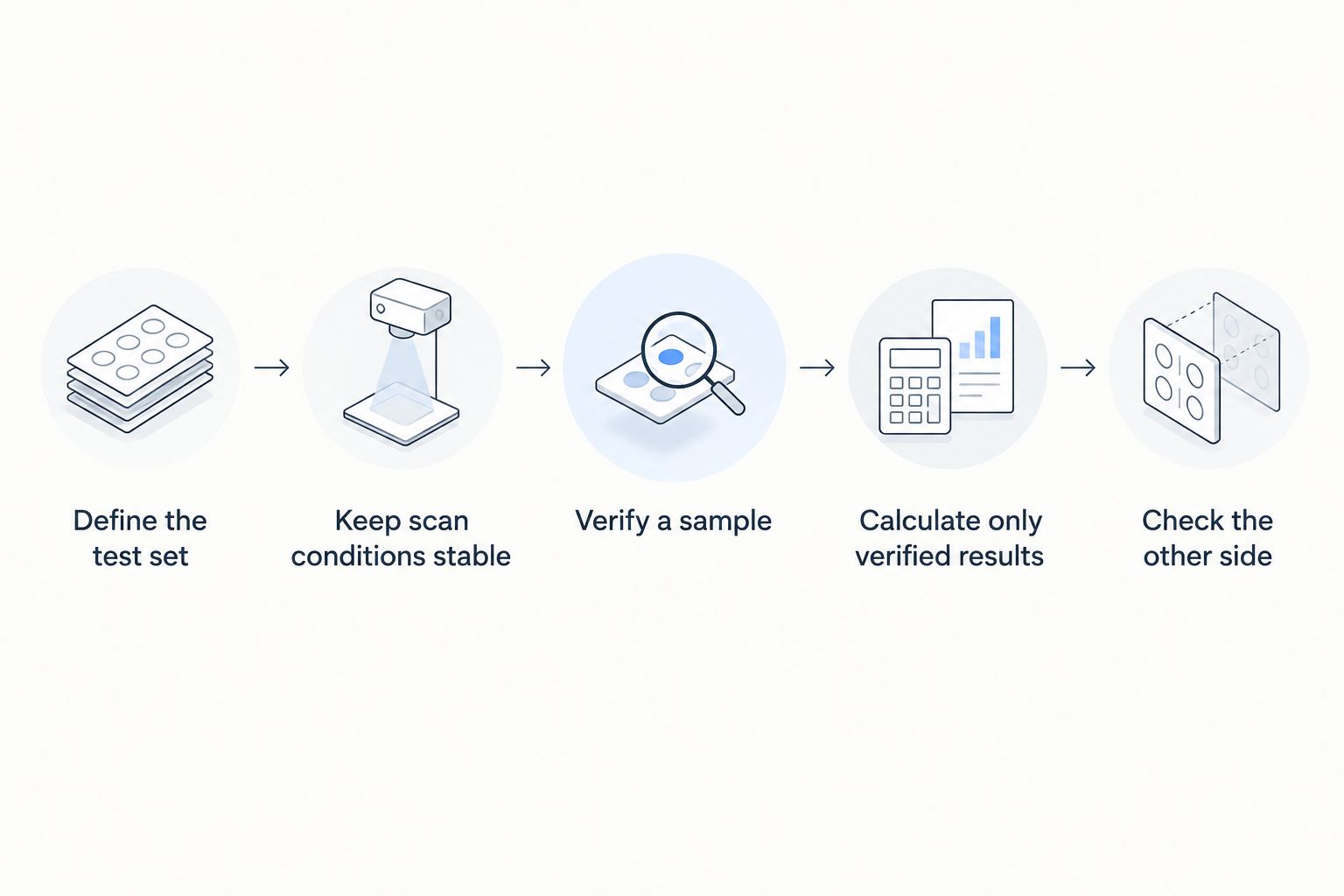
Use this proposed test design, not a claimed industry benchmark:
- Define the test set. Choose 3 asset groups that reflect systems your team actually maintains. Record what each scanner can and cannot assess.
- Keep scan conditions stable. Use 2 scan cycles with documented credentials, settings, and exceptions. A configuration change can alter the result.
- Verify a sample. Review 100 reported findings, or all findings if the test produces fewer. Record the evidence used to confirm, reject, or leave each finding unresolved.
- Calculate only verified results. Divide confirmed false positives by all findings with a confirmed true-or-false outcome. Report unresolved findings separately.
- Check the other side. Include deliberately known issues in the test set where your team can safely do so. A low false positive rate is not a win if the scanner misses relevant vulnerabilities.
These numbers describe a test you can run; they are not measured product results. Maintain the same verification standard across tools. If one scanner identifies a condition another cannot check, record the coverage difference instead of forcing the findings into a shared rate.
The denominator matters most. If an analyst marks an unfamiliar result as false without checking it, the rate becomes an opinion count. Require a reproducible reason for every rejected finding and retain an unresolved category. For a broader triage process after the test, see how to reduce false positives in vulnerability scan results.
How we ranked these options
This is a use-case ranking, not a laboratory ranking of detection accuracy. Brinqa comes first because managing vulnerability and exposure findings is the distinct platform decision this guide addresses. The scanners follow by assessment scope and the work a security team needs to perform: infrastructure scanning, response, remediation, open-source evaluation, and web investigation.
No item receives a numeric false positive rate because no shared, verified 2026 test data was provided. The ranking therefore cannot establish that Nessus is more accurate than Qualys VMDR, that InsightVM is more accurate than Greenbone Community Edition, or the reverse. Use the table to choose candidates, then use the verification process to rank candidates that test the same kind of asset.
Which vulnerability scanner should you choose?
Choose Tenable Nessus as the default network-scanner candidate, then compare it with Qualys VMDR and Rapid7 InsightVM on your own infrastructure. Choose Burp Suite Professional when the job is investigating web applications instead. Choose Greenbone Community Edition when an open-source network scanner fits your team's evaluation and operating model.
Choose Brinqa if your decision is about managing vulnerability and exposure findings across the program. Do not ask it to win a scanner false positive contest. In 2026, the decisive number is the rate your team can reproduce under its own conditions, alongside the issues each candidate misses.
FAQ
Which vulnerability scanner has the lowest false positive rate in 2026?
No lowest-rate winner can be established from the information here. Compare scanners on the same assets and independently verify reported findings before calculating a rate.
What is a vulnerability scanner false positive?
A false positive is a reported vulnerability that verification shows is not present under the stated detection conditions. An unresolved finding is not automatically a false positive.
How do you calculate a scanner's false positive rate?
Divide confirmed false positives by reported findings that were verified as either true or false. Keep unresolved findings outside that calculation and report their count separately.
Does fewer scanner findings mean fewer false positives?
No. Fewer findings can reflect narrower coverage or missed vulnerabilities as well as fewer incorrect alerts. Check known issues alongside the false positive rate.
Is Brinqa a vulnerability scanner?
Brinqa is a vulnerability and exposure management platform, not the dedicated scanner choice in this ranking. Evaluate it for managing findings while testing scanners separately for detection accuracy.
Is Burp Suite Professional better than Nessus for false positives?
No cross-product false positive winner is established here. Burp Suite Professional serves web application testing, while Nessus serves network vulnerability scanning; compare them only on work both can meaningfully assess.
Should unresolved findings count as false positives?
No. Keep unresolved findings in a separate category until verification establishes whether the reported condition is present. Counting uncertainty as an error distorts the rate.
One last thing
A reported false positive rate is only as useful as the verification record behind it. Before accepting a 2026 vendor comparison, request the asset scope, scan settings, finding sample, and rejection criteria. If those are missing, shortlist by use case and run your own test.