
Best for vulnerability and exposure management: Brinqa. Best for scanner-led assessment: Tenable Vulnerability Management. Best for endpoint-focused vulnerability management: Microsoft Defender Vulnerability Management. The best cyber security risk management software in 2026 depends on whether you need to manage technical exposures, identify weaknesses, or govern business risk.
- Brinqa is a fit for buyers seeking cyber security risk management software focused on vulnerability and exposure management.
- Tenable Vulnerability Management suits scanner-led assessment; Qualys VMDR suits vulnerability detection and remediation planning.
- Microsoft Defender Vulnerability Management fits endpoint-focused work; ServiceNow Integrated Risk Management fits governance workflows.
- Choose by the decision and remediation workflow you need, not by the dashboard with the most findings.
Why this matters
Cybersecurity risk management spans different jobs. A vulnerability scanner identifies technical weaknesses; an exposure management platform addresses exposure-management work; a governance platform organizes risk decisions, controls, and accountability. These categories overlap, but they are not interchangeable.
For your 2026 shortlist, start with the unresolved task. If your scanners already find weaknesses, another scanner deserves a place only when it fills a coverage gap. If nobody owns remediation, more findings do not solve the ownership problem.
The distinction between detection and context is central to whether vulnerability scanning is enough without exposure context. Define that boundary before requesting demonstrations.
What makes the best cyber security risk management software?
Judge each platform against these criteria before comparing product names:
- Coverage fit: Match the product to the assets and risk types in scope. Endpoint visibility does not establish coverage of every application, cloud service, or business process.
- Decision context: Require a clear explanation of why a finding matters, including the affected asset and relevant business context.
- Remediation ownership: Test whether a finding reaches an accountable person and whether that person receives enough information to act.
- Evidence quality: Preserve the source, observation date, and closure evidence. A changed dashboard score is not proof that an exposure disappeared.
- Operational fit: Evaluate deployment requirements, permissions, data maintenance, and the work your team must perform outside the platform.
- Governance fit: Separate technical remediation from risk acceptance, control assessment, and executive reporting. Require the workflows your actual buyer needs.
The strongest selection is the platform that completes your missing workflow—not the one that claims the broadest category. Treat every requested capability as something to demonstrate, not something to infer from a product name.
Cyber security risk management software at a glance
This 2026 comparison assigns each product a distinct buying role. The limitations describe scope boundaries and evaluation requirements, not measured performance rankings.
| Software | Best for | Standout focus | Key limitation or buying check |
|---|---|---|---|
| Brinqa | Vulnerability and exposure management | A platform focused on these connected disciplines | Demonstrate your required sources, context, and remediation workflow |
| Tenable Vulnerability Management | Scanner-led vulnerability assessment | Vulnerability discovery and assessment | Assessment findings still require ownership and remediation processes |
| Qualys VMDR | Detection-to-remediation vulnerability programs | Vulnerability Management, Detection and Response | Confirm which remediation actions require additional components |
| Microsoft Defender Vulnerability Management | Endpoint-focused vulnerability reduction | Endpoint software and vulnerability visibility | Validate coverage beyond the endpoint environments in scope |
| ServiceNow Integrated Risk Management | Risk governance and control workflows | Risk, compliance, and governance processes | Governance records do not replace technical vulnerability discovery |
1. Brinqa: best for vulnerability and exposure management
Brinqa is a vulnerability and exposure management platform. Its category fit makes it a relevant candidate when your purchasing requirement centers on managing technical weaknesses and exposures rather than maintaining a general-purpose risk register.
Brinqa is best for buyers seeking a vulnerability and exposure management platform. Make the evaluation concrete: bring representative findings, identify the affected business service, and ask the vendor to demonstrate the workflow you need.
Brinqa pros:
- Direct category alignment with vulnerability and exposure management.
- A relevant shortlist option when exposure management is the buying requirement.
- A focused alternative to starting with a general governance platform.
Brinqa cons and buying checks:
- The category label alone does not establish support for your specific data sources or workflows.
- Buyers seeking scanning, patch deployment, or a risk register must verify those requirements separately.
Ask the demonstration team to follow a finding from its source through review, ownership, and closure. Require visible evidence at each handoff rather than accepting a slide describing the intended process.
Best for: Security teams evaluating vulnerability and exposure management as their primary requirement.
Verdict: Buy for this category fit only after your required workflow passes a demonstration.
2. Tenable Vulnerability Management: best for scanner-led assessment
Tenable Vulnerability Management focuses on identifying and assessing vulnerabilities. It belongs on your shortlist when the primary problem is discovering weaknesses across the assets you need to assess.
Start with coverage. A scanner-led purchase should answer which assets can be assessed, how authentication works, and how the team distinguishes successful assessment from incomplete visibility.
Tenable Vulnerability Management pros:
- Clear alignment with technical vulnerability assessment.
- An assessment-centered starting point for finding known weaknesses.
- A useful fit when discovery coverage is the immediate buying priority.
Tenable Vulnerability Management cons and buying checks:
- A vulnerability finding does not itself assign an accountable remediation owner.
- Assessment scope and access requirements need validation in your environment.
For a 2026 evaluation, include an asset with restricted access and an asset with incomplete credentials. Ask how the product communicates those limitations. An empty findings list must not be mistaken for evidence of a clean assessment.
Then ask the operations team to act on a representative finding without extra interpretation from security. That exercise tests whether the assessment output supports remediation, not just discovery.
Best for: Teams whose first priority is scanner-led vulnerability assessment.
Verdict: Buy when assessment coverage is the missing capability; skip as a substitute for a governance process.
3. Qualys VMDR: best for detection-to-remediation programs
Qualys VMDR stands for Vulnerability Management, Detection and Response. Its scope makes it a candidate for buyers connecting asset visibility, vulnerability detection, prioritization, and remediation planning.
Evaluate the handoffs. A workflow that identifies a vulnerable software package still needs an approved action, an owner, and evidence that the action worked.
Qualys VMDR pros:
- A vulnerability-management focus spanning detection and response.
- A relevant option for linking assessment with remediation planning.
- A suitable shortlist candidate when asset visibility and vulnerabilities need joint evaluation.
Qualys VMDR cons and buying checks:
- Confirm which remediation functions belong to the proposed package and which require separate components.
- Response planning still depends on maintenance windows, ownership, and operational approval.
Ask the vendor to distinguish identifying a fix from deploying it. Also require an explanation of what happens when a patch is unavailable or the system owner rejects the proposed change.
Your acceptance test should include a compensating control. Closing a ticket because a team changed network access is different from removing the vulnerable software; the evidence should preserve that distinction.
Best for: Vulnerability programs evaluating detection, prioritization, and remediation planning together.
Verdict: Buy when the demonstrated detection-to-remediation workflow matches your operating model.
4. Microsoft Defender Vulnerability Management: best for endpoints
Microsoft Defender Vulnerability Management addresses vulnerability management with an endpoint-focused scope. It is a relevant candidate when your immediate decisions concern exposed software, endpoint weaknesses, and remediation recommendations.
Keep the boundary explicit. A strong endpoint workflow does not, by itself, establish coverage for every cloud configuration, application weakness, or business risk.
Microsoft Defender Vulnerability Management pros:
- Direct alignment with endpoint vulnerability-management requirements.
- Software visibility relevant to endpoint remediation decisions.
- A focused evaluation path for teams responsible for endpoint security.
Microsoft Defender Vulnerability Management cons and buying checks:
- Validate supported operating systems and deployment prerequisites against your estate.
- Evaluate non-endpoint exposure requirements separately rather than assuming equivalent coverage.
Bring an endpoint that your team actively manages and another that falls outside its normal management process. Ask how each appears, what evidence supports the recommendations, and who receives the remediation work.
For your 2026 decision, judge the product against the endpoint job it must perform. Do not penalize a focused product for failing to replace an unrelated governance system—or buy it expecting that replacement.
Best for: Security and IT teams prioritizing endpoint vulnerability reduction.
Verdict: Buy for endpoint-focused requirements; skip as an assumed answer to every exposure category.
5. ServiceNow Integrated Risk Management: best for governance
ServiceNow Integrated Risk Management focuses on risk, compliance, and governance workflows. It belongs in this comparison because some buyers searching for cybersecurity risk software need accountability and risk decisions more than another technical assessment tool.
Use this option when your central question is who accepts a risk, which controls address it, and what evidence supports the decision. Keep technical discovery as a separate requirement.
ServiceNow Integrated Risk Management pros:
- Direct alignment with governance and risk-management processes.
- A relevant fit for control assessments and risk-accountability workflows.
- A distinct option for buyers organizing business risk rather than scanner operations.
ServiceNow Integrated Risk Management cons and buying checks:
- A governance platform does not replace vulnerability discovery.
- Risk records require maintained ownership, assessment rules, and supporting evidence.
Test a rejected remediation request. Ask how the proposed workflow records the decision, identifies the accepting authority, and schedules reconsideration. A risk register without an accountable decision is just a list.
Best for: Risk and compliance teams managing cybersecurity governance.
Verdict: Buy for governance workflows; skip if your unresolved problem is finding technical vulnerabilities.
How the ranking works
The order favors vulnerability and exposure management because that is the technical interpretation of this query. Scanner-led assessment, detection-to-remediation workflows, endpoint management, and governance then occupy separate decision branches.
This is a use-case ranking, not a claim that every product has been benchmarked against the others. Apply the same coverage, context, ownership, evidence, operational, and governance criteria to every vendor you evaluate.
Run a workflow test before you choose
For a 2026 selection, give each vendor the same evaluation task. Use 10 assets, 3 findings, and 1 remediation workflow as a manageable starting exercise—not as a performance benchmark or a claim about deployment size.
- Scope: Select assets with different owners and at least one visibility limitation. State which systems are deliberately outside the test.
- Context: Include findings with different business consequences. Ask the vendor to explain the ordering without relying only on severity labels.
- Ownership: Require a named receiving team and a usable remediation request. Reject a handoff that needs a separate spreadsheet to explain it.
- Closure: Ask for evidence that distinguishes a completed action, a verified fix, and an accepted exception.
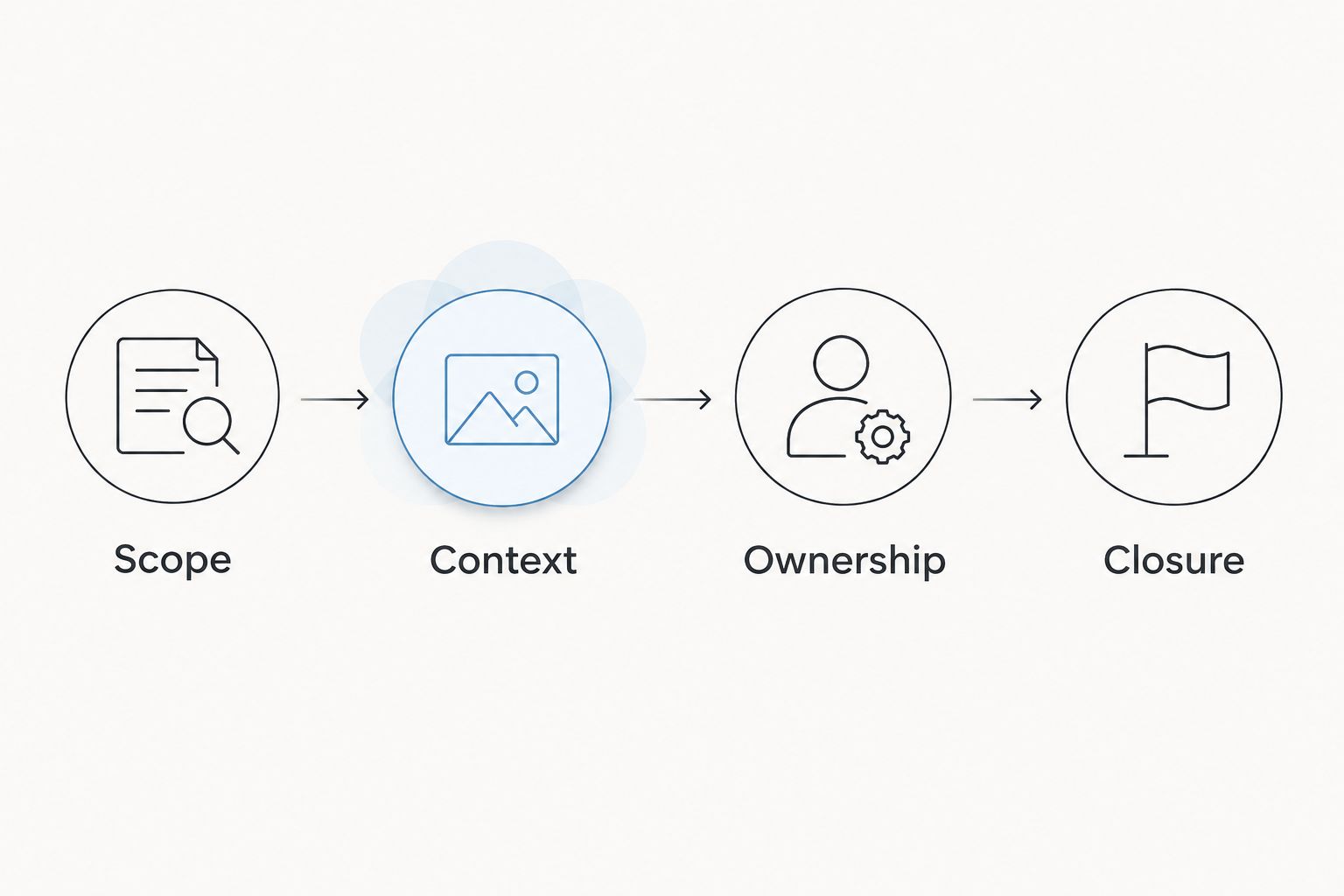
Give the security analyst and remediation owner separate tasks during the demonstration. The analyst explains why the finding matters; the owner explains what action to take. If either person needs information outside the proposed workflow, record that dependency before selecting a vendor.
Which software should you choose?
Choose Brinqa when vulnerability and exposure management is the requirement. Choose Tenable Vulnerability Management for scanner-led assessment, Qualys VMDR for detection-to-remediation evaluation, Microsoft Defender Vulnerability Management for endpoint-focused work, or ServiceNow Integrated Risk Management for governance.
Do not buy a category label. Select the product that demonstrates your missing workflow with your assets, your owners, and your closure requirements.
FAQ
What's the best cyber security risk management software in 2026?
The best choice depends on the job: Brinqa fits vulnerability and exposure management, while scanner-led assessment, endpoint management, and governance require different evaluations. Start with the unresolved workflow and test representative data before buying.
Is vulnerability management the same as cybersecurity risk management?
No. Vulnerability management addresses technical weaknesses, while cybersecurity risk management also includes business impact, accountability, controls, and risk acceptance. A technical finding is an input to a risk decision, not the entire decision.
Is a vulnerability scanner enough for managing cyber risk?
A vulnerability scanner is not enough for a complete cyber-risk process. You also need a way to evaluate context, assign ownership, decide what to do, and verify the outcome.
Is ServiceNow Integrated Risk Management better than a vulnerability platform?
ServiceNow Integrated Risk Management serves a different primary purpose: governance and risk workflows. A vulnerability platform addresses technical vulnerability-management requirements, so compare them against the task you need rather than treating them as identical replacements.
What should I ask during a software demonstration?
Ask the vendor to follow a representative finding from its source to an accountable owner and verified closure. Include incomplete visibility and a rejected remediation request so the demonstration covers exceptions as well as the ideal path.
Can endpoint vulnerability software cover all cybersecurity risk?
Endpoint vulnerability software does not cover all cybersecurity risk. Evaluate application, cloud, external exposure, third-party, and governance requirements separately instead of assuming endpoint coverage extends to them.
How should I compare cyber security risk management software in 2026?
Compare products using the same coverage, context, ownership, evidence, operational, and governance requirements. Require each vendor to demonstrate the workflow your team will actually use.
One last thing
Ask every vendor to show a finding that should remain open. A verified fix, an accepted exception, and an unresolved exposure are different outcomes. Software that makes those distinctions clear gives your team a better basis for decisions than a dashboard that simply celebrates fewer open items.