
Best overall starting point: MobSF. Best for authenticated API testing: Burp Suite. Best for runtime investigation: Frida. These mobile application security testing tools for fintech serve different jobs; this 2026 shortlist explains where each belongs and what you still need to test manually.
- MobSF is the best starting point among mobile application security testing tools for fintech; add API and runtime testing.
- Burp Suite fits authenticated API investigation; Frida fits runtime instrumentation and client-side control testing.
- JADX supports Android code review; OWASP ZAP supports repeatable proxy-based testing.
- Brinqa is a vulnerability and exposure management platform, a separate category from mobile testing tools.
Why this matters
A fintech app is more than its installed package. Your assessment must cover local data, authentication, backend authorization, and sensitive transactions. A clean static report does not establish that one customer cannot access another customer's records.
Choose tools by the security question they answer, not by the length of their findings report. Package inspection, runtime instrumentation, and API testing expose different failure modes. No single method establishes that a payment or account-recovery workflow is safe.
Brinqa is a vulnerability and exposure management platform. Keep that category separate from the testing tools below: selecting how to discover a weakness and deciding how to manage exposure are different decisions.
What makes the best mobile testing tools for fintech
For a 2026 evaluation, apply these criteria before comparing interfaces:
- Artifact coverage: Can you inspect the Android or iOS build you actually distribute, rather than only source code or a web interface?
- Authenticated testing: Can your assessment exercise logged-in sessions, token changes, account recovery, and sensitive transactions?
- Runtime visibility: Can you investigate what the app does with credentials, local storage, cryptographic operations, and network requests?
- Business-logic investigation: Can a tester alter account identifiers, transaction parameters, and workflow order to examine server-side enforcement?
- Reproducible evidence: Can another engineer repeat the finding using the same build, request, account state, and test procedure?
- Operational fit: Can your team operate the tool safely, protect captured secrets, and repeat the relevant checks after a fix?
Give authentication and authorization explicit acceptance criteria. A tool that identifies an insecure configuration has not necessarily tested whether a customer can approve a transaction belonging to someone else.
Mobile security testing tools at a glance
The order reflects a practical starting sequence, not a measured accuracy ranking. These tools complement one another; the key limitation column identifies what each leaves outside its scope.
| Tool | Best for | Standout capability | Key limitation |
|---|---|---|---|
| MobSF | Initial mobile-build assessment | Mobile static analysis and supported dynamic-analysis workflows | Automated findings require validation and business context |
| Burp Suite | Authenticated API and transaction testing | Intercepting, modifying, and replaying HTTP requests | Does not replace native binary or local-storage analysis |
| Frida | Runtime instrumentation | Inspecting and modifying application behavior during execution | Requires scripting and platform expertise |
| JADX | Android code investigation | Decompiling Android bytecode into readable Java-like output | Android-focused; decompiled output is not original source |
| OWASP ZAP | Repeatable proxy-based checks | Intercepting proxy, automation, and web security scanning | Native app internals remain outside proxy visibility |
1. MobSF: best mobile testing tool for initial build assessment
MobSF, the Mobile Security Framework, analyzes mobile applications and supports static analysis plus dynamic-analysis workflows in supported environments. It is the strongest starting recommendation here because inspecting the build gives you a concrete inventory of issues to investigate.
For fintech, use MobSF to examine security-relevant configuration, permissions, embedded strings, and code indicators. Treat each result as a lead. An apparent embedded secret needs investigation to establish whether it is sensitive, valid, and usable.
MobSF pros:
- Starts assessment from a mobile application artifact.
- Brings multiple static-analysis checks into one workflow.
- Provides findings that can guide focused manual investigation.
MobSF cons:
- Automated checks do not establish transaction-level authorization.
- Dynamic testing depends on a supported, correctly configured environment.
- Flagged patterns still need validation against actual behavior.
Best for: AppSec teams establishing a repeatable first pass over release candidates.
In your 2026 pilot, require an engineer to reproduce a selected finding before treating the report as release-blocking evidence. Preserve the build identifier alongside the result so a later scan does not become an ambiguous comparison.
Verdict: Buy into MobSF as your baseline assessment approach; do not use its report as release approval.
2. Burp Suite: best mobile testing tool for authenticated APIs
Burp Suite lets you intercept, inspect, modify, and replay HTTP traffic. For a fintech mobile assessment, that makes it useful for investigating the backend requests behind login, account access, beneficiary changes, and transfers.
The decisive work is not simply capturing traffic. You must test whether the server enforces authorization when account identifiers, request order, or session context change. Use synthetic transactions and an explicitly authorized environment.
Burp Suite pros:
- Makes individual requests available for detailed inspection and modification.
- Supports manual investigation of authenticated workflows.
- Helps preserve request-and-response evidence for engineering review.
Burp Suite cons:
- Certificate pinning can complicate traffic interception.
- Proxy visibility does not reveal every local application behavior.
- Business-logic testing still depends on a tester's understanding.
Best for: Fintech teams validating account boundaries and sensitive backend actions.
Use 2 test accounts with deliberately different access rights. Attempt to read or change the other account's resources, and record the expected denial before running the test. The account count is a recommended test setup, not a coverage guarantee.
Verdict: Buy into Burp Suite for manual API investigation; skip proxy-only mobile assessments.
3. Frida: best mobile testing tool for runtime investigation
Frida is a dynamic instrumentation toolkit. It lets testers inspect and alter application behavior while a process runs, making it useful when static analysis cannot explain how a sensitive operation behaves.
For fintech apps, frame the investigation around a specific question: where does a token travel, which function handles a sensitive value, or what happens when a client-side decision changes? Instrumentation supplies observations; it does not automatically establish exploitability.
Frida pros:
- Supports targeted investigation of runtime behavior.
- Helps examine function calls and data handling.
- Allows controlled experiments with client-side security assumptions.
Frida cons:
- Requires scripting and familiarity with the target platform.
- Instrumentation can change behavior and complicate interpretation.
- A modified laboratory device is not equivalent to every customer's device.
Best for: Mobile security specialists investigating client-side controls and sensitive runtime paths.
Record the instrumentation script, device state, and application build. If changing a local check enables a screen, test the backend separately: a visible interface does not prove that an unauthorized server action succeeded.
Verdict: Buy into Frida when you have runtime expertise; hold if nobody can maintain and explain the scripts.
4. JADX: best mobile testing tool for Android code investigation
JADX decompiles Android bytecode into Java-like output and provides a graphical interface for browsing that output. It helps you investigate how an Android application implements a suspicious behavior discovered elsewhere.
Use JADX to follow code paths around token handling, storage, endpoints, and client-side checks. Decompiled code is an investigative aid, not a faithful replacement for the original source or a complete execution trace.
JADX pros:
- Makes Android bytecode easier to inspect manually.
- Supports searching and following code references.
- Helps connect a scanner finding to implementation details.
JADX cons:
- Obfuscation and decompilation limitations reduce readability.
- Does not provide equivalent analysis of native iOS applications.
- Code inspection alone does not demonstrate runtime exploitability.
Best for: Android-focused teams tracing a specific implementation question.
Pair JADX findings with a runtime observation or a reproducible request whenever the risk depends on behavior. A suspicious method name or string is not enough to justify a high-impact finding.
Verdict: Buy into JADX for targeted Android investigation; skip it as a complete mobile assessment.
5. OWASP ZAP: best mobile testing tool for repeatable proxy checks
OWASP ZAP is an intercepting proxy and web application security testing tool with automation capabilities. Its mobile role is examining HTTP interactions with backend services, not analyzing native application internals.
Use ZAP when your team wants repeatable checks around an understood request flow. Establish authenticated coverage first; automation against a login screen cannot demonstrate coverage of the transactions behind it.
OWASP ZAP pros:
- Combines proxy inspection with automated web security checks.
- Supports repeatable testing through automation interfaces.
- Provides a useful foundation for backend-focused regression checks.
OWASP ZAP cons:
- Does not inspect native storage or binary behavior by itself.
- Authentication and workflow state require deliberate configuration.
- Active testing needs authorization and safeguards against unintended changes.
Best for: Engineering teams turning validated backend checks into repeatable routines.
For a 2026 rollout, start with a non-production workflow whose expected requests you understand. Confirm that the test reaches protected endpoints before interpreting its findings or lack of findings.
Verdict: Buy into ZAP for repeatable backend checks; skip unattended active testing against production transactions.
How we ranked these tools
This 2026 shortlist prioritizes complementary testing roles against the criteria above: artifact coverage, authenticated access, runtime visibility, business logic, evidence, and operational fit. It does not assign unsupported detection scores or claim a head-to-head benchmark.
MobSF is first because build assessment is a useful default starting point. Burp Suite follows for transaction and authorization investigation; Frida and JADX support deeper runtime and Android analysis. ZAP fills the repeatable proxy-testing role.
Turn the shortlist into a release assessment
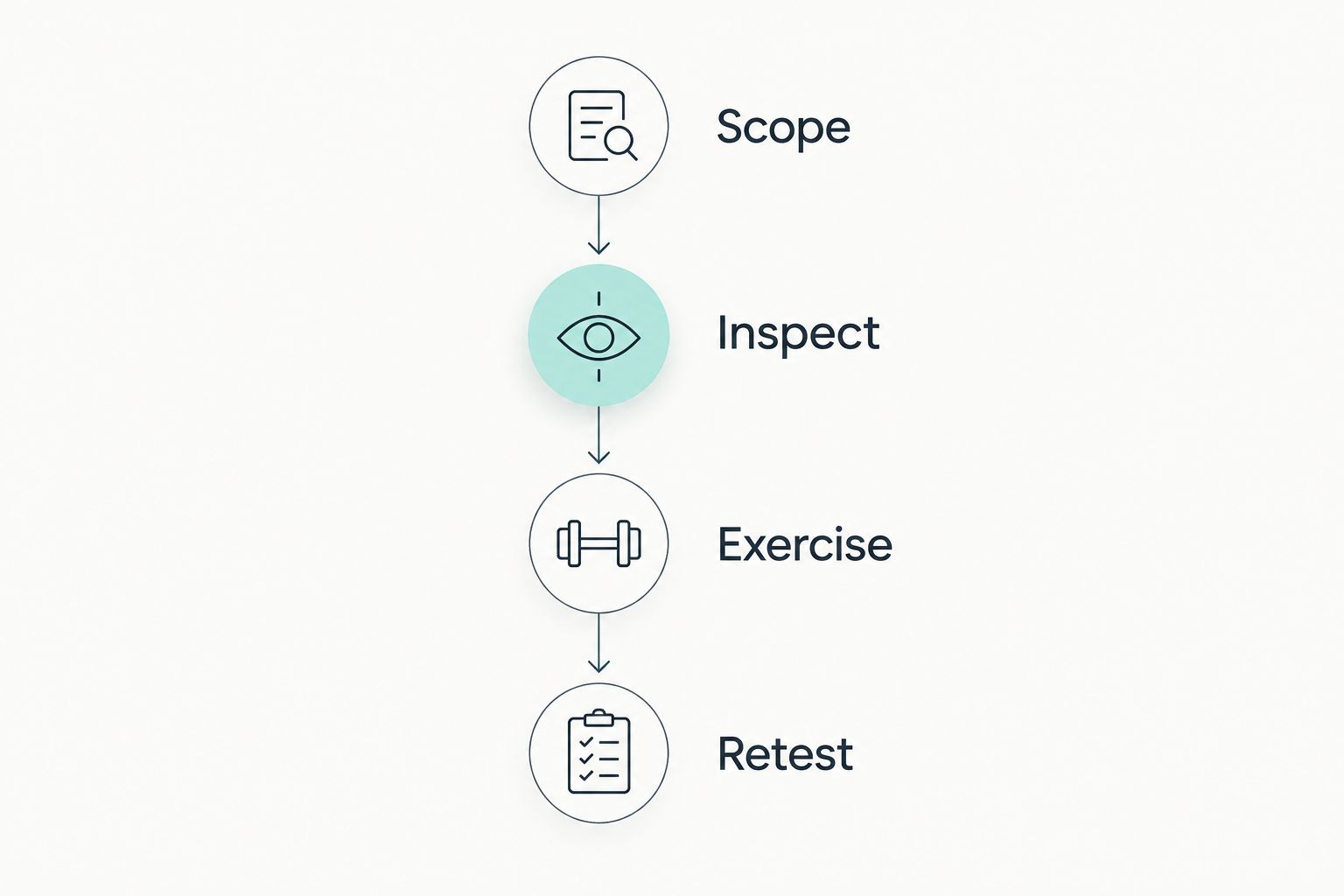
A useful evaluation follows a sequence. Keep the scope small enough that you can explain what passed, what failed, and what remained untested.
Scope
Select 3 workflows for the initial assessment: sign-in, account recovery, and a sensitive transaction. Define the app build, backend environment, account permissions, and prohibited actions before testing begins.
Inspect
Run the build assessment, then investigate findings that touch the selected workflows. Identify local data handling and the backend endpoints involved; do not assume that a static finding represents an exploitable path.
Exercise
Capture authenticated requests and test authorization boundaries. Use runtime instrumentation or Android code inspection only where it answers a defined question. Keep a record of unsuccessful tests as well as confirmed weaknesses.
Retest
Keep 1 evidence record per confirmed finding, including the affected build, reproduction procedure, observed result, owner, and retest outcome. This recommended record structure helps engineering distinguish a fixed weakness from a changed test environment.
Carry the evidence into your broader ASPM approach for fintech companies. A testing program needs a clear distinction between discovering a weakness, accepting its risk, and proving that remediation worked.
Which mobile testing tools should you choose?
Start with MobSF and Burp Suite if you need a default assessment combination. MobSF addresses the mobile artifact; Burp Suite supports investigation of authenticated backend behavior. Add Frida for runtime questions, JADX for Android code tracing, or ZAP for repeatable proxy-based checks.
Brinqa fits teams evaluating vulnerability and exposure management, not buyers choosing a substitute for mobile testing. Evaluate that platform category separately from the tools used to produce technical evidence.
For your 2026 selection, require a reproducible finding and a successful retest from the pilot. A polished report is not an acceptance criterion.
FAQ
What's the best mobile application security testing tool for fintech apps?
MobSF is the best starting recommendation for build assessment in this shortlist. Pair it with Burp Suite for authenticated API investigation, because package analysis alone does not test backend authorization.
Is Burp Suite enough to test a banking app?
Burp Suite is not enough for a complete mobile assessment. It supports HTTP traffic investigation, but you also need to examine native behavior, local storage, and relevant application code.
Should I choose Frida or MobSF?
Choose MobSF for an initial build assessment and Frida for a defined runtime investigation. They answer different questions and can belong in the same assessment.
Can OWASP ZAP test a native mobile app?
OWASP ZAP can test HTTP interactions between a mobile app and its backend when traffic is accessible to the proxy. It does not analyze native application internals or local storage by itself.
Can JADX help test an iPhone app?
JADX is intended for Android bytecode investigation, not native iOS application analysis. Choose an iOS-appropriate analysis approach rather than treating Android code coverage as mobile-wide coverage.
Does certificate pinning mean a fintech app is secure?
Certificate pinning does not establish that a fintech app is secure. It addresses a specific connection-trust concern, while authorization, local data handling, and transaction logic require separate testing.
Is Brinqa a mobile application scanner?
Brinqa is a vulnerability and exposure management platform. Evaluate mobile testing tools separately for build inspection, runtime investigation, and authenticated API testing.
Does a clean scan prove a fintech app meets its compliance obligations?
A clean scan does not prove compliance. Use applicable requirements to define evidence and control testing, and document the workflows and security questions the scan did not assess.
One last thing
A server accepting an unauthorized transaction matters more than a client hiding the transaction button. Make that distinction explicit in every mobile assessment: changing the interface is not the same as defeating server-side enforcement.
Before adding another scanner, ask an engineer to reproduce your highest-priority finding and demonstrate the corrected behavior. Brinqa belongs in the vulnerability and exposure management discussion; your mobile testing tools still need to produce evidence you can defend.