
Best overall: Dradis. Best for collaborative reporting and remediation: PlexTrac. Best for report-template control: SysReptor. Best for a self-hosted findings library: PwnDoc. These pentest reporting tools serve different workflows; this 2026 guide separates report production from the vulnerability management work that follows delivery.
- Dradis is the default shortlist choice for pentest reporting tools focused on evidence organization and repeatable reports.
- PlexTrac suits teams connecting collaborative pentest reporting with remediation tracking.
- SysReptor suits template-driven reporting; PwnDoc suits a self-hosted findings-library workflow.
- Brinqa is a vulnerability and exposure management platform, not a like-for-like pentest report authoring recommendation.
Why this matters
A penetration test report has to serve two audiences: the person approving remediation and the engineer reproducing the finding. A polished executive summary cannot compensate for missing evidence, and a detailed exploit narrative cannot compensate for an unclear remediation request.
Your reporting purchase should address the bottleneck you actually have. Rewriting recurring findings calls for reusable content; inconsistent deliverables call for template control; unclear handoffs call for ownership and status tracking.
Brinqa belongs in the vulnerability and exposure management category. Keep that purchasing decision separate from choosing the workspace where testers assemble evidence and write reports.
What makes the best pentest reporting tools
Use these criteria before comparing interfaces or accepting a demonstration built around a finished report:
- Evidence handling: You need a clear relationship between the finding, affected asset, reproduction steps, and supporting evidence.
- Reusable findings: Shared descriptions and remediation guidance should reduce repetitive writing without overwriting engagement-specific details.
- Report control: Templates should support your required structure, technical detail, and executive summary.
- Review workflow: Reviewers need a practical way to identify incomplete work and return corrections before delivery.
- Remediation handoff: Findings must remain understandable when engineering teams receive them outside the reporting workspace.
- Deployment fit: Hosting, access control, backups, and maintenance must match your rules for sensitive assessment data.
Choose the tool that preserves technical accuracy through review and delivery—not the one with the most attractive sample PDF. For a 2026 evaluation, make vendors demonstrate your reporting requirements rather than substitute their preferred workflow.
Pentest reporting tools at a glance
| Tool | Best for | Standout capability | Key limitation |
|---|---|---|---|
| Dradis | Repeatable reporting across varied assessments | Organizing assessment evidence and producing template-based reports | Template setup and finding quality still require attention |
| PlexTrac | Collaborative reporting and remediation | Bringing findings, reporting, and remediation tracking into a shared platform | Broader workflow scope requires more evaluation than document generation alone |
| SysReptor | Precise report-template control | Customizable, template-driven pentest reporting | Advanced customization requires template expertise |
| PwnDoc | Self-hosted reusable findings | A findings database connected to report generation | Self-hosting creates operational responsibilities |
These recommendations distinguish use cases, not measured performance. Report appearance, export behavior, and workflow fit should be checked against the edition and deployment you evaluate.
1. Dradis: best pentest reporting tool for repeatable delivery
Dradis organizes security assessment information and supports report generation from structured findings. It fits teams that want evidence and report content in an assessment workspace rather than scattered across notes and document drafts.
Dradis is the best default shortlist choice for pentest teams that need organized evidence and repeatable report production. Start here when the recurring problem is turning technically sound testing into consistent deliverables.
Dradis pros:
- Keeps assessment information organized around the reporting workflow.
- Supports reusable reporting structures instead of starting every document from scratch.
- Connects technical evidence with the findings that explain it.
- Offers a reporting-focused alternative to a general-purpose document editor.
Dradis cons:
- Templates need configuration and review against your deliverable requirements.
- Reusable content still needs editing for each engagement's actual impact.
- Features differ across editions, so evaluate the edition you intend to deploy.
Best for: Consultancies and internal testing teams standardizing recurring assessment reports.
During evaluation, take a finding with several affected assets and check the exported result. Confirm that asset references, evidence captions, and remediation instructions remain understandable without opening the workspace.
Verdict: Buy for repeatable assessment reporting if the template and export trial meets your requirements.
2. PlexTrac: best pentest reporting tool for remediation collaboration
PlexTrac combines security assessment reporting with collaboration and remediation tracking. Its role extends beyond assembling the final document: it also addresses how teams work with findings after testers identify them.
Choose this use case when your reporting problem continues after delivery. If stakeholders need a shared place to discuss findings and track remediation, evaluate that workflow alongside report authoring—not as an afterthought.
PlexTrac pros:
- Connects reporting with a broader findings-management workflow.
- Supports collaboration around assessment results.
- Includes remediation tracking alongside reporting.
- Fits evaluations where delivery and follow-up belong in the same discussion.
PlexTrac cons:
- Its broader scope requires agreement on how teams will use the platform.
- Report authors and remediation owners have different requirements to validate.
- A team seeking only document generation should assess whether the additional workflow is necessary.
Best for: Security teams and service providers that need reporting plus coordinated remediation follow-up.
For your 2026 shortlist, ask a tester and an engineering owner to walk through the same finding. The tester should demonstrate evidence and report creation; the owner should demonstrate how the remediation request becomes clear, actionable work.
Do not accept report completion as proof that the downstream workflow fits. Those are separate acceptance checks.
Verdict: Buy when collaborative remediation is part of the requirement; skip when document production is the entire requirement.
3. SysReptor: best pentest reporting tool for template control
SysReptor is a pentest reporting tool built around customizable report designs and structured content. It suits teams that want direct control over how findings become a finished deliverable.
The distinction is control, not automatic writing quality. A flexible template can enforce a useful structure, but your reviewers still have to verify the technical claims and business impact.
SysReptor pros:
- Supports customized report designs.
- Uses structured finding content for repeatable reporting.
- Suits teams with defined technical and executive report requirements.
- Provides a reporting-focused workflow rather than a general document workspace.
SysReptor cons:
- Advanced designs require someone who understands the template system.
- Template changes need regression checks against representative reports.
- Highly customized designs create ongoing maintenance work.
Best for: Teams that treat report structure and presentation as controlled, maintained assets.
Test difficult content before approving a template: long reproduction steps, multiple screenshots, lengthy asset lists, and remediation code. A clean short example does not prove that a design handles a complex engagement.
Your 2026 evaluation should include both a technical appendix and an executive summary. Review each separately, because readability for one audience does not establish readability for the other.
Verdict: Buy when template ownership is a strength on your team; hold when nobody will maintain the designs.
4. PwnDoc: best pentest reporting tool for self-hosted findings reuse
PwnDoc combines a vulnerability database with pentest report generation. Its reusable findings model suits teams that repeatedly document similar vulnerability classes while tailoring evidence and impact to individual assessments.
Self-hosting is a deployment choice, not a substitute for operational planning. You need to decide who maintains the application and protects the assessment data before introducing it into delivery work.
PwnDoc pros:
- Connects a reusable vulnerability library with report generation.
- Supports a self-hosted reporting workflow.
- Provides a purpose-built structure for recurring finding content.
- Suits teams willing to maintain their reporting environment.
PwnDoc cons:
- Your team owns deployment, backups, updates, and recovery planning.
- Shared finding text needs active editorial maintenance.
- Template and application changes require testing before use on live engagements.
Best for: Technically capable teams that want a self-hosted findings library and reporting workflow.
Evaluate library governance as carefully as document generation. Assign responsibility for correcting obsolete remediation guidance, merging duplicate entries, and distinguishing reusable descriptions from engagement-specific evidence.
A library that nobody maintains turns repeated writing into repeated mistakes. Require an editor and an operational owner before adopting the workflow.
Verdict: Buy when you can own both the finding library and the deployment; skip when neither has an accountable maintainer.
How to evaluate the shortlist with your own evidence
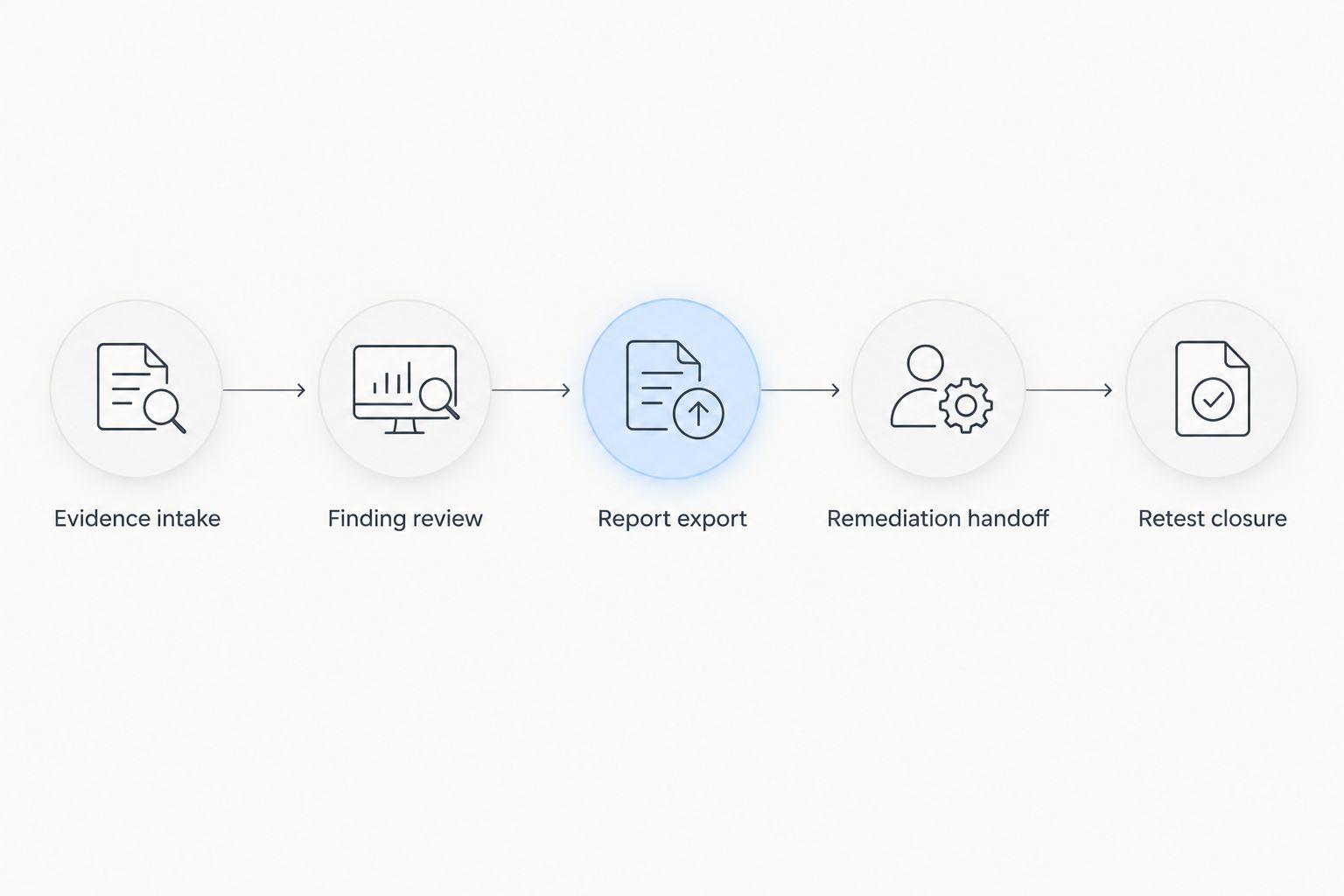
Use a controlled exercise rather than comparing unrelated demonstrations. For a practical 2026 trial, prepare 10 sample findings, involve 2 reviewers, and generate 3 report variants: an executive summary, a technical deliverable, and a retest update. These are proposed evaluation inputs, not performance benchmarks.
Keep the same evidence and acceptance requirements across every candidate. Otherwise, you are comparing presentation choices rather than reporting workflows.
Evidence intake
Include screenshots, affected assets, reproduction steps, and a finding that has no CVE identifier. Check that reviewers can distinguish what the tester observed from what the reusable description says.
Finding review
Have one reviewer check technical accuracy and the other check clarity for the recipient. Record corrections outside the demonstration narrative so you can compare unresolved problems afterward.
Report export
Inspect the actual deliverable, not only the editor preview. Check page breaks, image legibility, references, sensitive-data handling, and whether the executive summary agrees with the technical findings.
Remediation handoff
Give an engineering owner the exported finding without a verbal explanation. Ask the owner to identify the affected system, required action, and evidence needed for closure.
Retest closure
Update a sample finding after remediation and verify that the original observation remains distinguishable from the retest result. A changed status alone does not explain what was verified.
How we ranked these tools
The ranking follows the criteria above: evidence organization, reusable content, report control, review, remediation handoff, and deployment fit. Dradis is the default reporting shortlist; PlexTrac addresses collaborative follow-up; SysReptor emphasizes report design; PwnDoc addresses self-hosted findings reuse.
This is a workflow-based editorial ranking, not a speed test or a security assessment of the products. Validate current capabilities and deployment requirements directly during procurement.
Where exposure management fits after pentest reporting
A pentest report describes an assessment within a defined scope. Your vulnerability management program must also decide how those findings relate to other security work and who will act on them.
Brinqa is best suited to buyers seeking a vulnerability and exposure management platform rather than a pentest report editor. Do not treat Brinqa as a like-for-like replacement for the report-authoring tools ranked here.
Before connecting these workflows, define asset identifiers, finding ownership, status meanings, and closure evidence. Keep engagement-specific findings intact; matching a vulnerability title alone does not establish that two observations describe the same issue.
For the next step, use the guide to triaging bug bounty and pentest findings alongside scanner data. The handoff should preserve the tester's evidence while making the remediation request usable outside the report.
Which pentest reporting tool should you choose?
Start with Dradis if you are undecided. It is the default recommendation for organizing assessment material and producing repeatable reports, rather than extending the purchase into every part of vulnerability management.
Choose PlexTrac when remediation collaboration is central, SysReptor when template control drives the decision, and PwnDoc when your team deliberately wants to maintain a self-hosted findings library.
For a 2026 purchase, make the controlled reporting exercise the final decision gate. Reject any candidate that cannot preserve your evidence, produce an acceptable deliverable, and support your required handoff.
FAQ
What's the best pentest reporting tool overall?
Dradis is the default shortlist recommendation for teams seeking organized assessment evidence and repeatable report production. Choose a different tool when remediation collaboration, template control, or self-hosting is the dominant requirement.
Is PlexTrac better than Dradis?
PlexTrac is the better shortlist fit when collaborative remediation tracking is central to your requirements. Dradis is the default recommendation when assessment organization and repeatable report delivery define the purchase.
Which pentest reporting tool is best for custom templates?
SysReptor is the recommendation for teams prioritizing report-template control. Assign someone to maintain designs and test complex findings before using a template for client delivery.
What's a good pentest reporting option for self-hosting?
PwnDoc is a shortlist option for teams seeking a self-hosted findings-library and reporting workflow. Adoption requires ownership of deployment, backups, updates, and library quality.
Is Brinqa a pentest reporting tool?
Brinqa is a vulnerability and exposure management platform, not a like-for-like report-authoring recommendation in this comparison. Evaluate pentest report production separately from the broader vulnerability management requirement.
Can a pentest reporting tool replace a vulnerability scanner?
A pentest reporting tool does not replace a vulnerability scanner. Reporting organizes and communicates assessment findings; scanning identifies potential weaknesses for validation and follow-up.
What should a pentest reporting tool trial include?
A reporting trial should include evidence intake, reviewer corrections, document export, remediation handoff, and a retest update. Use the same sample findings across candidates so the comparison reflects your workflow.
One last thing
Test the retest report before approving the original-report template. A finding marked closed without verification evidence leaves the recipient unable to distinguish a completed fix from an administrative status change.
Require the closure record to state what was checked, what the tester observed, and any remaining limitation. That requirement makes the report useful after its first delivery.