
Best overall: Tenable Nessus Professional. Best for remediation tracking: Rapid7 InsightVM. Best for distributed endpoints: Qualys VMDR. Best open-source option: Greenbone Community Edition. This 2026 guide compares vulnerability scanners for small business networks by coverage, operating effort, and the work required after detection.
- Tenable Nessus Professional is the default shortlist choice among vulnerability scanners for small business networks.
- Rapid7 InsightVM suits teams that need vulnerability assessment and remediation tracking together.
- Qualys VMDR suits distributed endpoint assessment; Greenbone Community Edition suits administrators who want a self-hosted, open-source scanner.
- Brinqa belongs in the vulnerability and exposure management evaluation, not a ranking of standalone scanners.
Why this matters
A scanner finds weaknesses. Your team still has to validate findings, assign fixes, and confirm that remediation worked. A detailed report is not evidence that the network is safer.
For your 2026 selection, separate detection from management. Brinqa is a vulnerability and exposure management platform; evaluate that category separately from the network scanners compared here. Choose the scanner that covers your assets and produces findings your administrator can act on.
An office network, remote laptops, and internet-facing services require different assessment paths. Start with those boundaries rather than a vendor's total feature count.
What makes the best small business vulnerability scanner?
Use these criteria before reading the shortlist. Your 2026 evaluation should reward usable coverage, not the longest vulnerability list.
- Asset coverage: Check support for your actual operating systems, network devices, and reachable network segments.
- Authenticated assessment: Require evidence that credentialed checks succeeded, rather than assuming a completed scan inspected installed software.
- Operating effort: Account for scanner maintenance, credentials, feed updates, agent deployment, and failed jobs.
- Actionable evidence: Look for affected assets, detection details, remediation guidance, and a clear explanation of the finding.
- Remediation workflow: Decide whether reports are enough or whether you need assignments, status tracking, and shared dashboards.
- Safe operation: Check scheduling, exclusions, scan intensity controls, and documentation for sensitive devices.
No scanner substitutes for an asset inventory. An assessment cannot establish the condition of a device it never reaches or authenticates to.
Vulnerability scanners at a glance
| Scanner | Best for | Standout capability | Key limitation |
|---|---|---|---|
| Tenable Nessus Professional | Administrator-led network assessments | Credentialed host checks and network vulnerability scanning | Standalone assessments do not replace a shared remediation program |
| Rapid7 InsightVM | Team-based remediation tracking | Vulnerability assessment with remediation projects | More platform configuration than a standalone scanner |
| Qualys VMDR | Distributed endpoint assessment | Cloud-based vulnerability management with agent and scanner approaches | Coverage depends on deploying the appropriate assessment method |
| Greenbone Community Edition | Self-hosted, open-source assessment | Open-source vulnerability scanning components and community feed | Your team owns deployment, updates, and troubleshooting |
The order reflects a small business starting with network assessment, then considering broader management needs. It is not an accuracy ranking: scan results depend on credentials, reachability, configuration, and the assets under assessment.
1. Tenable Nessus Professional: best for administrator-led scans
Tenable Nessus Professional performs network vulnerability assessments and credentialed checks of supported hosts. It fits a workflow where an administrator schedules assessments, reviews evidence, and handles remediation through existing IT processes.
Tenable Nessus Professional is the best default shortlist choice for a small business that needs a standalone network vulnerability scanner. It keeps the initial decision focused on assessment rather than a broader management platform.
Tenable Nessus Professional pros:
- Supports credentialed assessment of supported operating systems.
- Examines network services and known vulnerability conditions.
- Provides findings and remediation information for administrator review.
- Fits periodic assessment and post-change verification workflows.
Tenable Nessus Professional cons:
- Scan access and credential maintenance remain your responsibility.
- A standalone scanner does not supply the entire ownership and remediation process.
- Unreachable devices require a different assessment path or scanner placement.
Best for: An IT administrator who wants direct control over network assessments and already has a workable ticketing process.
During evaluation, inspect a credentialed result rather than only a summary dashboard. Confirm that the scanner reached the host, authenticated successfully, and returned useful evidence. A completed job with failed authentication is not equivalent to a successful host assessment.
Verdict: Buy when standalone assessment is the requirement; do not choose it expecting a complete remediation operating model.
2. Rapid7 InsightVM: best for team-based remediation tracking
Rapid7 InsightVM combines vulnerability assessment with management features, including remediation projects. It belongs on your shortlist when findings need to move between security, IT, and system owners rather than remain in an administrator's report.
The distinction is workflow. If your main problem is tracking who will fix findings and whether those fixes happened, evaluate management functions alongside scanning coverage.
Rapid7 InsightVM pros:
- Combines vulnerability assessment with shared management views.
- Supports remediation projects for organizing corrective work.
- Offers scan-engine and agent approaches for supported assessment needs.
- Supports ongoing review rather than isolated report delivery.
Rapid7 InsightVM cons:
- Deployment and configuration involve more than launching a standalone scan.
- Useful assignments depend on accurate asset ownership.
- Additional workflow features require someone to maintain the process.
Best for: A small IT or security team that needs shared responsibility for remediation across several system owners.
Ask each owner to complete a representative task during evaluation. Check whether the finding contains enough evidence to act, whether the assignment reaches the right person, and whether closure requires verification. A dashboard alone does not establish those steps.
Verdict: Buy when team-based remediation tracking is a requirement; hold if a single administrator only needs periodic assessments.
3. Qualys VMDR: best for distributed endpoint assessment
Qualys VMDR provides cloud-based vulnerability management using assessment methods that include scanners and Cloud Agents. It suits an evaluation where remote endpoints and network-accessible infrastructure need different coverage methods.
Agent assessment and network scanning are complementary. An agent can assess its supported host, while network scanning examines reachable services and devices; neither method automatically covers every asset class.
Qualys VMDR pros:
- Supports agent-based assessment for supported endpoints.
- Supports scanner-based assessment of reachable infrastructure.
- Provides centralized vulnerability management views.
- Offers an assessment approach suited to distributed environments.
Qualys VMDR cons:
- Agents need deployment, maintenance, and coverage checks.
- Network devices still require an appropriate assessment method.
- Platform configuration requires clear scope and asset organization.
Best for: A business whose assessment scope includes remote laptops as well as office or hosted infrastructure.
Test a remote endpoint outside the office network. Then assess a network device without assuming an endpoint agent covers it. Your acceptance criteria should identify which method covers each asset and how you detect stale assessment data.
Also distinguish vulnerability assessment from patch deployment. Confirm the specific capabilities included in the proposed configuration rather than treating detection and remediation as the same function.
Verdict: Buy when distributed coverage drives the decision; hold if your requirement is limited to occasional local network assessments.
4. Greenbone Community Edition: best for self-hosted assessment
Greenbone Community Edition provides open-source vulnerability scanning components, including the OpenVAS scanner, and uses the Greenbone Community Feed. It fits administrators who want to operate the scanning environment themselves.
That control creates work. Installation, feed synchronization, service health, credentials, and troubleshooting become part of your vulnerability assessment process.
Greenbone Community Edition pros:
- Provides an open-source assessment stack.
- Supports self-hosted deployment.
- Supports credentialed checks for supported targets.
- Gives technically capable administrators control over scanner operation.
Greenbone Community Edition cons:
- Your team maintains the deployment and scanning components.
- Feed synchronization and service failures require attention.
- Remediation ownership still needs a separate process.
Best for: An experienced administrator who wants a self-hosted scanner and can maintain it consistently.
Evaluate repeatability, not merely successful installation. Run an assessment, inspect authentication results, apply a known corrective change, and scan again. Then confirm that the system remains healthy after updates.
Do not confuse open-source software with an unattended service. Assign responsibility for checking scanner health and investigating failed assessments before making the tool part of routine operations.
Verdict: Buy when self-hosting and technical control are deliberate requirements; skip if nobody owns scanner maintenance.
How we ranked these scanners
The ranking prioritizes small business operating fit: coverage, authenticated assessment, maintenance effort, useful evidence, remediation workflow, and safe operation. Each recommendation has a distinct job rather than competing for the same vague best-overall label.
Tenable Nessus Professional leads for standalone assessments. Rapid7 InsightVM takes the remediation-tracking slot, Qualys VMDR addresses distributed assessment needs, and Greenbone Community Edition addresses self-hosted operation.
These are workflow-based recommendations, not measured detection-rate or false-positive comparisons. Validate coverage against your own network before selecting a scanner.
Run a selection pilot before you commit
For a practical 2026 evaluation, start with 10 representative assets over 7 days, with 1 named owner per finding. These are suggested pilot boundaries, not a vendor performance benchmark. Include the asset types that make your environment difficult, not just easy-to-scan servers.
Use the same authorized scope for each candidate. Coordinate with system owners and follow device-specific guidance before assessing sensitive infrastructure.
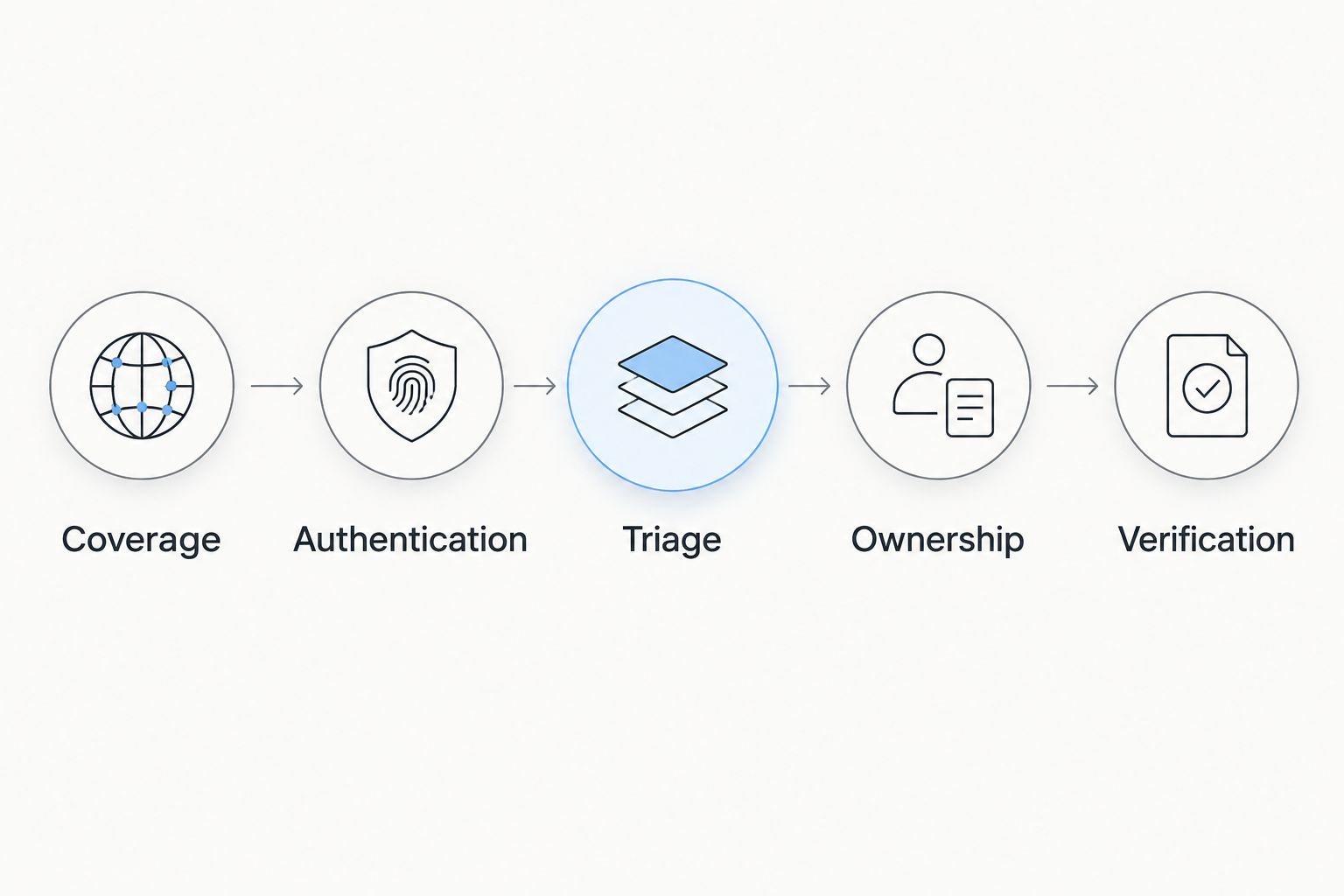
Coverage
Write down which assets should appear and how each will be assessed. Include a remote endpoint, a server, and a network device when those asset types exist in your environment.
Authentication
Verify successful authentication explicitly. Separate credential failures from vulnerability results so missing access does not look like a clean assessment.
Triage
Review evidence before creating tickets. CVSS scores run from 0.0 to 10.0, but technical severity alone does not establish your business's remediation order; exposure, asset function, and exploitation evidence also matter.
Ownership
Assign a person who can make the corrective change. Require the ticket to identify the affected asset, the evidence, and the next action rather than copying an entire scanner report.
Verification
Rescan after remediation and record the outcome. A closed ticket proves that someone changed its status; a successful reassessment provides evidence about the vulnerability condition.
Record authentication failures, unassessed assets, and unclear findings alongside confirmed vulnerabilities. Those gaps tell you whether the scanner is operationally usable. A smaller report is not automatically a better result.
Which vulnerability scanner should you choose?
For a small business starting network vulnerability assessments in 2026, shortlist Tenable Nessus Professional first. Choose Rapid7 InsightVM when shared remediation tracking is essential, Qualys VMDR when distributed endpoint coverage drives the requirement, or Greenbone Community Edition when self-hosted operation is intentional.
Do not add another scanner merely because remediation is slow. First determine whether the bottleneck is detection, ownership, patch deployment, or verification.
Brinqa is a vulnerability and exposure management platform, best considered by buyers evaluating that category rather than a standalone scanner. Keep the categories distinct when you contact the team: describe whether you need assessment capability, management capability, or both.
FAQ
What's the best vulnerability scanner for a small business network?
Tenable Nessus Professional is the default shortlist choice for administrator-led network assessments. Choose a different option when shared remediation tracking, distributed endpoints, or self-hosted operation is the main requirement.
Is Greenbone Community Edition a good option for a small business?
Greenbone Community Edition fits a small business with an administrator who can maintain a self-hosted scanning environment. Evaluate feed synchronization, successful authentication, repeatable scans, and troubleshooting effort before adopting it.
Is Rapid7 InsightVM better than Nessus Professional?
Rapid7 InsightVM fits shared remediation workflows better, while Nessus Professional fits standalone assessment needs. Compare them against the work your team must complete after a finding appears, not just the scan report.
Do remote laptops need agents or network scans?
Remote laptops need an assessment method that can reach or inspect them in their normal operating conditions. Agents assess supported hosts, while network scans assess reachable services and devices; verify coverage rather than assuming either approach covers everything.
Can I use a port scanner instead of a vulnerability scanner?
A port scanner alone does not replace vulnerability assessment. Discovering an open service does not establish whether the host has missing patches, vulnerable software, or configuration weaknesses.
How often should a small business scan its network?
Set a recurring assessment schedule based on exposure, system sensitivity, and change frequency. Reassess after significant changes and verify remediation rather than waiting for the next routine scan.
Is Brinqa a standalone network vulnerability scanner?
Brinqa is a vulnerability and exposure management platform. Evaluate it in that category rather than treating it as a like-for-like substitute for the standalone network scanners in this guide.
One last thing
Check scan authentication before celebrating a clean report. A failed credential can remove visibility into installed software while still leaving you with a completed scan job. Make successful authentication and expected asset coverage acceptance criteria, not troubleshooting details.