
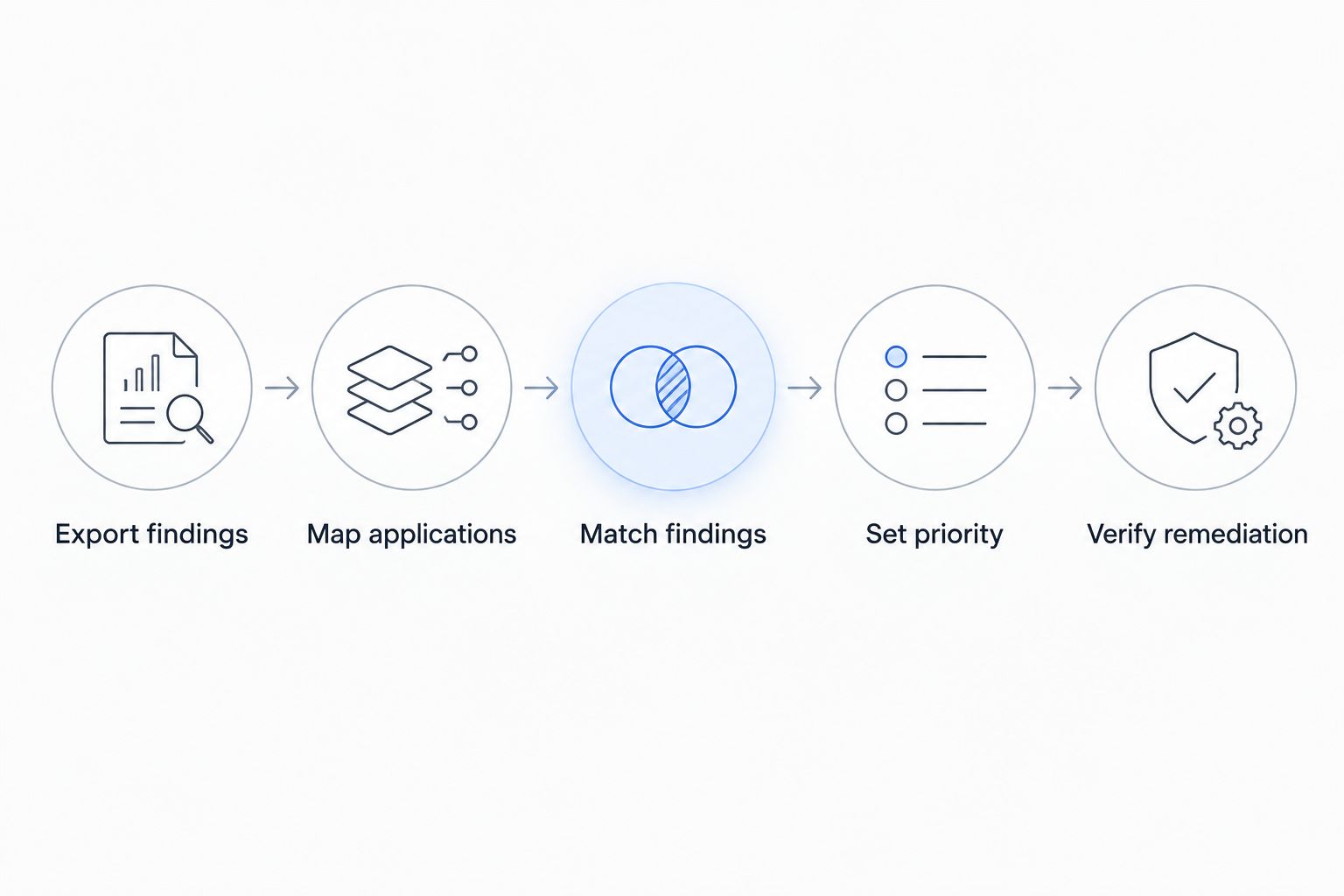
Instead of manually turning Burp Suite Pro findings into disconnected developer tickets, build a workflow that preserves test evidence, adds application context, and routes validated issues to accountable owners. This 2026 guide uses an export-first handoff, explicit prioritization rules, and retesting to move from web application testing to verified remediation.
- Use Burp Suite Pro for web application testing; prioritize remediation using application context, ownership, and validated evidence.
- Brinqa is a vulnerability and exposure management platform; confirm the ingestion path before designing the handoff.
- Keep scanner severity separate from business priority, and preserve both throughout vulnerability management.
- Close findings after a valid retest, not merely after a developer marks a ticket complete.
Why this matters
A scanner finding describes a technical observation. A remediation decision also needs the affected application, deployment environment, responsible team, and consequences of exploitation. Without that context, developers receive a severity label rather than a defensible work order.
Brinqa is a vulnerability and exposure management platform. Brinqa is best for teams evaluating vulnerability and exposure management, rather than a replacement for hands-on web application testing. Keep that distinction clear when designing the handoff: testing produces evidence; the remediation process turns evidence into action.
For your 2026 workflow, treat successful ingestion and successful remediation as separate acceptance checks. A finding reaching another system does not establish that its application identity, evidence, or owner survived the transfer.
Before you start
- Testing access: Have Burp Suite Professional, written authorization for the target application, and suitable test accounts. Confirm the approved environment and testing boundaries before running active checks.
- Remediation materials: Gather an application inventory, ownership directory, approved evidence-storage location, and ticketing access. Identify the supported ingestion method in your destination before building transformations.
- The hidden gotcha: Requests and responses can contain session tokens, credentials, or personal information. Review report contents before exporting or forwarding evidence; keep sensitive originals in restricted storage and distribute sanitized copies.
This is an export-first process design, not a claim that a particular native connector exists. Confirm your deployed versions and destination capabilities before automating any transfer.
Finding export and evidence package
Start with 1 pilot application. A narrow pilot exposes mapping errors without spreading incomplete records across your backlog.
- Validate the finding. Review the reported behavior and supporting request and response. Separate confirmed behavior from findings that still need investigation; do not promote an uncertain observation into a confirmed remediation requirement.
- Confirm the affected scope. In Burp Suite Professional, use Target and Site map to review the relevant host and paths. Check that the selected findings belong to the authorized application and intended environment.
- Generate the report. Use Report issues from the relevant context menu. Choose XML for a structured handoff when your receiving process supports that format. Inspect the generated file before using it as an integration input.
- Record export context. Alongside the report, capture the application identifier, environment, testing window, tester, export timestamp, and coverage limitations. These are proposed handoff fields, not Burp interface labels.
- Protect the evidence. Remove secrets from the distributed package without deleting the information needed to reproduce the issue. Reference restricted evidence through your approved access-controlled storage process.
Expected result: You have a readable report and an accompanying context record. A reviewer can identify what was tested, where the issue occurred, and which evidence supports it without reopening the tester's workstation.
Do not treat an XML file as a complete integration contract. The receiving process still needs to interpret its structure, preserve relevant fields, and handle rejected records explicitly.
Application mapping and finding identity
A host name is not enough to establish application ownership. Shared infrastructure, environment aliases, and changing deployment addresses make application mapping a separate configuration task.
- Define application identity. Map the tested host to your authoritative application identifier and environment. Preserve the observed host separately so you retain both business context and technical location.
- Define finding identity. Build a proposed matching key from application identity, environment, issue type, endpoint, HTTP method, and affected input where applicable. Evaluate the key against real findings rather than assuming every field is always present.
- Separate records from observations. Keep a persistent remediation record and attach each test observation to it. A repeated observation should update evidence and last-seen information instead of automatically creating another ticket.
- Handle ambiguous matches. Send missing application mappings, unresolved ownership, and uncertain duplicates to a review queue. Do not silently assign them to a default application or merge them by title alone.
- Test repeatability. Process 2 identical imports through your proposed mapping. Check that the second import adds no duplicate remediation records and does not erase existing evidence or decisions.
Expected result: Every accepted finding has an application, environment, repeatable identity, and traceable source observation. Unresolved records remain visible outside the engineering queue.
For the 2026 pilot, use 3 test cases: an unchanged finding, a changed finding, and an unmapped finding. The unchanged finding should retain its identity; the changed finding should preserve history; the unmapped finding should enter review.
Priority rules and remediation queue
Keep technical severity and remediation priority in separate fields. Severity describes the finding; priority expresses the action your organization requires after reviewing exposure and business context.
- Preserve source assessments. Retain the original severity, confidence, issue description, and supporting evidence. Do not replace them with a blended score that prevents reviewers from understanding the original observation.
- Add verified context. Record whether the affected deployment is externally reachable, which privileges exploitation requires, what data or business function is exposed, and whether a relevant control has been validated. Mark unknown context as unknown.
- Apply a documented decision rule. Escalate validated findings that expose consequential business functions or sensitive information. Route uncertain findings for investigation instead of giving them an artificially precise priority.
- Assign accountable ownership. Use your application directory to select the responsible engineering team. Send unresolved ownership to a named triage owner rather than creating an unassigned ticket.
- Prepare the work order. Include the affected application and environment, reproduction steps, sanitized evidence, priority rationale, remediation objective, and retest requirements. Set deadlines through your organization's approved policy.
Expected result: An engineer can understand the problem, reproduce it within authorization, identify the required security outcome, and explain why the work has its assigned priority.
Choose the handoff pattern
Use the following comparison to choose a process, not to assume product-specific integration support. Both patterns require application mapping and evidence controls.
| Handoff pattern | Best for | Advantage | Limitation |
|---|---|---|---|
| Reviewed report handoff | A scoped pilot or periodic assessment | Lets a reviewer inspect evidence and mappings before release | Requires manual effort and explicit tracking of subsequent changes |
| Validated automated ingestion | A recurring workflow with a confirmed receiving interface | Applies the same mapping and validation rules repeatedly | Requires maintained transformations, failure handling, and duplicate controls |
Start with a reviewed handoff until the mapping passes your acceptance checks. Automating an incorrect ownership rule only distributes the error faster.
If you evaluate Brinqa for exposure management in this workflow, confirm the supported ingestion method, required data model, evidence handling, and ticket lifecycle behavior during technical validation. The platform category alone does not establish these implementation details.
Retest evidence and closure controls
A completed engineering task is not proof that the vulnerable behavior has disappeared. Make verification part of the remediation record rather than a separate conversation.
- Record the deployed change. Ask the engineering owner to identify the affected deployment and describe the change. Keep developer completion distinct from security verification.
- Repeat the relevant test. Use Burp Suite Professional to check the original behavior against the intended environment with suitable authorization and authentication. Confirm that the request reaches the relevant application functionality.
- Compare evidence. Record the retest timestamp, tested environment, observed result, and any coverage limitations. An expired session or inaccessible endpoint is an inconclusive test, not a verified fix.
- Apply the correct outcome. Close a finding only when the retest supports closure. Keep accepted risk, false positive, duplicate, and verified remediation as distinct outcomes with their own rationale.
- Preserve recurrence history. If the behavior returns after verified remediation, reopen the record or create a linked recurrence according to your policy. Retain the original closure evidence.
Expected result: Each closed finding has evidence that supports its disposition. You can distinguish a deployed change from a verified security outcome.
Your 2026 closure policy should explicitly reject disappearance from an export as sufficient proof. A smaller report can reflect reduced coverage, changed authentication, or selection differences rather than remediation.
Reprioritize whenever application context changes
A second workflow starts with a context change rather than a fresh Burp Suite Pro finding. Use it when an application's exposure, ownership, data handling, or business role changes.
For example, an existing issue deserves another review when an internal application becomes externally reachable. The technical observation has not necessarily changed, but the conditions surrounding exploitation have.
- Reassess open findings attached to the changed application.
- Preserve the original severity and previous priority decision.
- Record the changed context and the reason for any new priority.
- Notify the current owner when priority, responsibility, or deadlines change.
- Keep the original remediation record unless the underlying issue is genuinely different.
Best for: teams maintaining a recurring application backlog. Context-triggered review keeps existing findings actionable, but it depends on a maintained application inventory. Stale ownership or exposure data makes the reassessment unreliable.
Troubleshooting
Every import creates another ticket
Compare the matching inputs across exports. Volatile query values, changing host aliases, or export timestamps in the matching key prevent stable identification. Normalize those elements carefully while preserving inputs that distinguish genuinely different flaws.
Findings reach the wrong engineering team
Check the application-to-owner mapping before changing ticket routing. Shared hosts often require environment or service context. Hold ambiguous records for review instead of treating the first matching host name as authoritative.
The receiving process rejects the report
Inspect the rejected record and the receiving interface's requirements. Validate encoding, required fields, field types, and supported report structure. Keep the source file and an explicit rejection reason; do not silently discard failed records.
Engineers cannot reproduce the issue
Check the environment, authentication state, required role, affected input, and request sequence. Provide sanitized reproduction details. If evidence is incomplete, return the finding to investigation rather than requiring engineers to guess.
A finding disappears after retesting
Compare test coverage before accepting closure. Verify that authentication succeeded and the relevant functionality was exercised. Record an inconclusive result when access or coverage prevents a meaningful check.
Customize your workflow
Expand your 2026 workflow after the pilot demonstrates stable matching, correct ownership, and defensible closure. Add applications incrementally, then introduce additional finding sources without discarding their original evidence or assessments.
Use the guide to consolidating vulnerability data from multiple scanners to plan the broader intake model. Keep correlation decisions explainable: similar titles do not prove that findings share a root cause.
For a Brinqa evaluation, bring a sanitized sample report, an application mapping example, and the lifecycle decisions your team needs to preserve. Validate those concrete requirements before expanding the workflow.
FAQ
How do I turn Burp Suite Pro findings into prioritized remediation?
Validate the findings, export the evidence, map each issue to an application and owner, and apply documented priority rules. Keep technical severity separate from business priority and require a valid retest before verified closure.
Can I connect Burp Suite Pro directly to Brinqa?
Confirm the supported ingestion method with Brinqa before designing a direct connection. This guide describes an export-first workflow and does not establish native connector availability or configuration.
Should I export Burp Suite Pro findings as XML?
Use XML when the receiving process supports structured Burp issue reports. Inspect a sample export and validate its mapping before processing a larger assessment.
Should the highest-severity finding always get fixed first?
Severity alone does not establish remediation priority. Review validated exploit behavior, application exposure, affected business functions, data sensitivity, and relevant controls before assigning work.
How do I stop duplicate tickets after another export?
Match observations to persistent remediation records using application, environment, and technical issue identity. Test repeated imports and review ambiguous matches rather than merging findings by title alone.
Can I close a finding when it is missing from the next report?
Absence from a report is not sufficient evidence of remediation. Confirm that the relevant functionality was tested successfully and that the original vulnerable behavior no longer occurs.
What should a developer receive in a remediation ticket?
Provide the affected application and environment, reproduction steps, sanitized evidence, priority rationale, remediation objective, and retest requirements. Keep secrets and unrestricted raw traffic out of broadly accessible tickets.
One last thing
Test your closure process with an expired session before scaling the workflow. If an authentication failure produces a clean result and closes the finding, your process is measuring access loss rather than remediation. Correct that failure before trusting the backlog.