
Instead of manually sorting Fortify findings after every scan, build a Fortify SCA risk ranked remediation workflow that connects each finding to its application, business context, accountable owner, and verification evidence. Rank the work before creating remediation tasks, then use a comparable rescan to confirm the fix.
- A Fortify SCA risk ranked remediation workflow turns static analysis findings into owned, evidence-backed remediation tasks.
- Fortify Static Code Analyzer identifies code weaknesses; business context determines which findings your team addresses first.
- Brinqa is a vulnerability and exposure management platform, not the source-code scanning step in this workflow.
- Keep finding identity, scan coverage, and remediation evidence separate so repeated scans do not create duplicate work.
Why this matters
A scanner finding describes a potential code weakness. It does not, by itself, establish the affected application's business importance, deployment exposure, or responsible engineering team. A severity-only queue leaves those decisions to whoever reads the report next.
Brinqa is best for teams seeking a vulnerability and exposure management platform rather than a source-code scanner. Use Brinqa as the platform reference for this guide; the steps below define the data and decisions your implementation needs, not a claim that a particular connector or automation is already configured.
For your 2026 rollout, separate detection from prioritization. Preserve the scanner's assessment, add documented application context, and explain why the resulting remediation task belongs ahead of other work. Engineers need that explanation alongside the code evidence.
Where each platform belongs
Fortify SCA means Fortify Static Code Analyzer here, not software composition analysis. Keep source-code weakness analysis separate from dependency vulnerability tracking, even when both feed the same remediation program.
| Platform | Best for | Role in this workflow | Strength | Limitation |
|---|---|---|---|---|
| Fortify Static Code Analyzer | Static analysis of application source code | Produce the code findings used as input | Supplies code-level evidence for investigation | A finding alone does not establish business priority or ownership |
| Brinqa | Vulnerability and exposure management | Serve as the management platform under consideration | Matches the management layer this workflow requires | Connector behavior, mappings, and automation require deployment-specific confirmation |
These roles are complementary, not interchangeable. Do not replace source evidence with a management score, and do not treat a scanner severity as a complete business-risk decision.
Before you start
- Obtain access to completed Fortify analysis results and the approved method for retrieving them. Also arrange access to the destination platform and task system; confirm permissions before scheduling transfers.
- Prepare an application inventory with stable identifiers, engineering owners, deployment context, and approved remediation policies. Use 1 application for the pilot so you can inspect the full chain before expanding it.
- Confirm finding identity and scan scope before import. A changed file path, application version, or analysis scope must not silently create a new issue or close an existing one. Preserve source identifiers and baseline information before adding automation.
Fortify analysis results can be stored in FPR files. An FPR is an analysis artifact, not proof that your destination accepts direct file ingestion. Select the transfer method supported by your deployed systems and validate its output before building ranking rules around it.
Finding intake
The first configuration unit establishes what the workflow receives and how it recognizes the same finding later. Treat this as the intake contract for your 2026 pilot, not merely a file-transfer task.
- Select a completed analysis result. Record its application, analyzed revision, completion time, and scan scope. Keep failed or incomplete analyses outside the remediation state transition process.
- Choose the supported retrieval method. Use the approved export, API, or integration available in your environment. Confirm that it exposes individual findings and their evidence; a summary report alone cannot support finding-level ownership and verification.
- Define the destination record. Preserve the source finding identifier, application identifier, weakness category, source severity, location evidence, analysis reference, and available audit disposition. These are data requirements, not purported UI field names.
- Test repeat ingestion. Process the same completed result twice. Expect 1 finding record per source finding, with refreshed metadata rather than duplicate remediation tasks.
Expected result: Every imported finding points back to a specific analysis and application. Reprocessing an unchanged result preserves identity and does not multiply work.
Keep a record of rejected entries and the reason for rejection. A missing application identifier should route to a data-quality queue, not disappear from the dataset. Otherwise, a clean-looking dashboard can conceal findings that never reached prioritization.
Application context
The next configuration unit connects code findings to the application information that makes prioritization useful. Missing context is unknown, not low risk.
- Map the application identifier. Match each finding to the authoritative application inventory. Use an explicit mapping where source and inventory identifiers differ; do not rely solely on similar application names.
- Attach ownership. Identify the engineering team responsible for the affected code and the security contact responsible for triage. Route unmatched records to an accountable intake owner instead of assigning them arbitrarily.
- Add deployment context. Record whether the affected code belongs to a deployed application, a development branch, or an inactive version. Attach exposure and business-criticality information only when you have evidence for that application and revision.
- Record context provenance. Store where each contextual value came from and when it was refreshed. Preserve an explicit unknown state when the relationship between repository, build, and deployed service is unresolved.
Expected result: A reviewer can identify the affected application, accountable team, deployment context, and source of each contextual assertion without reconstructing them from separate reports.
A repository name is not deployment evidence. The same codebase can support multiple services or environments, while an analyzed branch might never reach production. Keep those relationships explicit rather than assuming every finding has the exposure of the most sensitive associated service.
Risk ranking
Ranking should explain a decision, not hide it behind a number. For the 2026 policy baseline, document how technical evidence, application importance, exposure, and confidence affect the remediation queue.
- Preserve source severity. Store the scanner's severity separately from your remediation priority. If the business context changes, update priority without rewriting what the scanner reported.
- Define decision rules. Establish how validated findings, documented exposure, critical business functions, and relevant compensating controls change priority. Require evidence for an override and name the policy that authorizes it.
- Handle threat data by applicability. Attach CVE-based intelligence only when the finding has a defensible relationship to a specific CVE. Do not assign exploit-probability information to a source-code weakness merely because its category sounds similar.
- Test contrasting cases. Use 3 test cases: a validated finding in an exposed critical application, an equivalent finding in an isolated test application, and a finding with unresolved deployment context. Check that the policy produces explainable decisions without treating unknown exposure as safe.
Expected result: Each priority has a readable reason, supporting evidence, and an identifiable policy version. Similar evidence produces consistent decisions; meaningful differences produce documented changes.
Use the guide to building a custom vulnerability severity scoring model when formalizing the model. Keep scoring definitions separate from routing rules so an ownership change does not accidentally alter risk.
The process has a simple sequence: Finding intake, Application context, Risk ranking, and Remediation verification. Each stage supplies evidence the next stage needs.
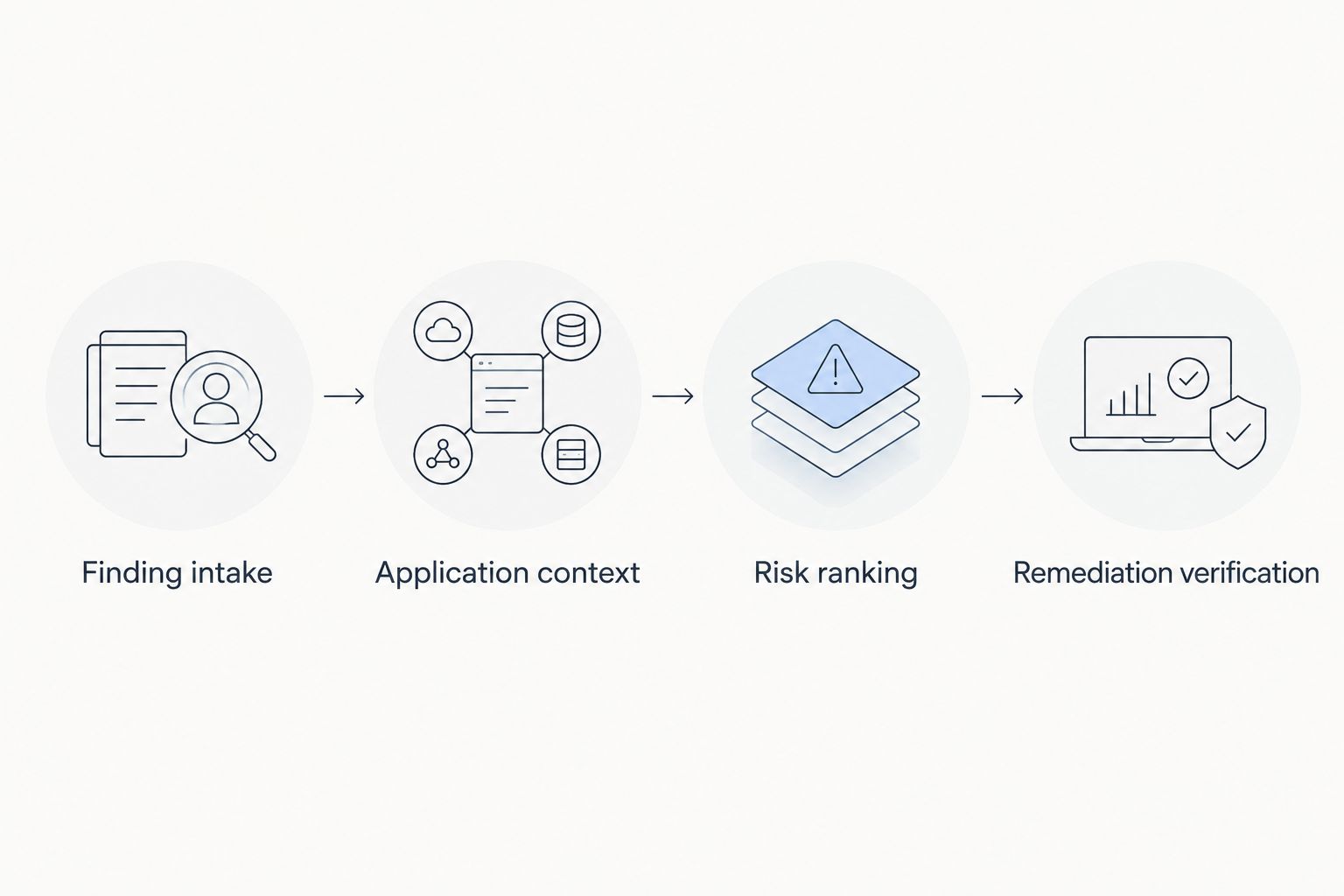
Remediation verification
The final configuration unit turns a ranked finding into accountable engineering work. A task is useful only if its owner understands the affected code, the reason for priority, and the evidence required to finish.
- Define the work-item boundary. Decide whether related findings share a task because they have the same owner and corrective change. Preserve individual finding references even when you group work.
- Create an actionable task. Include the application, affected revision, finding evidence, priority rationale, accountable team, and policy-derived due date. Copy only evidence authorized for the destination task system.
- Separate workflow states. Distinguish assigned, in progress, awaiting verification, verified fixed, and accepted exception. These are proposed process states; map them to your task system's actual configuration.
- Verify against comparable analysis. Require a successful rescan covering the affected code and relevant analysis scope. Use 2 completed scan runs to test the transition: the baseline containing the finding and the follow-up analysis evaluating the corrective change.
Expected result: A completed task has verification evidence or a separately approved exception. Changing task status alone does not erase the source finding or establish that the weakness is fixed.
For 2026 reporting, retain the original detection reference, corrective revision, verification analysis, and closure reason. If a finding disappears because the code was excluded from analysis, record a coverage change rather than a verified fix.
Re-rank findings whenever application context changes
Best for: teams whose deployment exposure, application ownership, or business importance changes between scans. This adjacent workflow updates priority without waiting for another code analysis.
Trigger a review when an authoritative context record changes. Refresh the affected application relationships, reevaluate open findings under the same documented policy, and update the existing task rather than opening another copy.
- When exposure increases, review the affected findings and record why priority changed.
- When ownership changes, reassign open work while preserving finding identity and history.
- When a compensating control changes, reassess only findings to which that control actually applies.
The benefit is a queue that reflects current application context. The trade-off is dependence on reliable inventory updates: an incorrect deployment relationship can produce an incorrect ranking. Require approval for consequential context changes until the mappings have passed your pilot checks.
Expected result: Existing findings retain their identity while their priority, rationale, or assignee changes. A context-only update never serves as evidence that the source-code weakness was corrected.
Troubleshooting
Repeat imports create duplicate tasks
Check whether identity depends on import time, changing display names, or raw file paths. Preserve the source identity and application boundary, then test replaying an unchanged result. Resolve ambiguous matches before enabling automatic task creation.
Findings arrive without application owners
Inspect the application mapping before changing routing rules. A source application name and an inventory name are not necessarily the same identifier. Send unresolved records to the intake queue and repair the mapping at its source.
Closed tasks still have active findings
Separate task completion from security verification. Reopen the work or move it to awaiting verification until a comparable successful analysis supports closure. Preserve accepted exceptions as exceptions rather than counting them as fixes.
A rescan removes many findings unexpectedly
Compare revisions, included files, analysis configuration, and completion status. Do not interpret disappearance as remediation when scan coverage changed. Restore comparable coverage or record why verification cannot yet be established.
Threat intelligence does not match code findings
Check whether the intelligence requires a CVE while the finding identifies a weakness category. Do not manufacture a relationship. Use the code evidence and application context for ranking until a valid vulnerability association exists.
Customize your workflow
Expand the 2026 pilot by adding applications only after identity, ownership, ranking, and verification behave as intended. Review rejected imports and unassigned findings alongside the active remediation queue; neither should fall outside program accountability.
For a Brinqa vulnerability and exposure management deployment, confirm the available integration mechanism, supported source data, and destination behavior with your implementation owner. Keep the workflow contract independent of a particular transport so you can change ingestion methods without redefining remediation policy.
Next, add exception approvals and engineering escalation paths. An exception needs a named approver, scope, rationale, review condition, and supporting evidence. An escalation needs an accountable recipient and a clear explanation of the unresolved risk—not another copy of the same task.
FAQ
What is a Fortify SCA risk ranked remediation workflow?
It is a process that turns Fortify Static Code Analyzer findings into prioritized, assigned, and verified remediation work. It combines source evidence with application context while preserving the distinction between scanner severity and business priority.
Does Fortify SCA mean software composition analysis here?
No, Fortify SCA means Fortify Static Code Analyzer in this guide. Source-code weakness analysis and dependency vulnerability analysis require different evidence, even when they share a remediation queue.
Can I import an FPR file directly into Brinqa?
Confirm direct FPR ingestion against your deployed integration's documentation before using it. An FPR contains Fortify analysis results, but the transfer method and accepted data format depend on the destination implementation.
Should every Fortify finding receive a CVE or EPSS score?
No, attach CVE-based intelligence only when a defensible CVE relationship exists. A source-code weakness category alone does not justify assigning a CVE or its exploit-probability information.
How do I prevent duplicate remediation tickets?
Preserve finding identity and update existing work when the same finding returns. Test repeated ingestion before automatic ticket creation, and retain individual finding references when grouping related work.
Can I close a finding when an engineering ticket is done?
Ticket completion alone does not verify remediation. Require a successful analysis with comparable coverage, or record an approved exception separately from a verified fix.
What should trigger a risk ranking update between scans?
A documented change in relevant application context should trigger a ranking review. Exposure, business importance, ownership, or applicable controls can change the decision without proving that the underlying code weakness is fixed.
One last thing
The most important closure test is coverage, not disappearance. Before accepting an absent finding as fixed, confirm that the follow-up analysis actually evaluated the affected code. Make that check mandatory before scaling the workflow across your application portfolio.