
Instead of manually matching Microsoft advisories to scanner findings, build an MSRC automated patch prioritization workflow that joins advisory data to affected assets, assigns risk-based priority, and updates remediation work. Use Brinqa as the vulnerability and exposure management platform in your architecture, with patch deployment and verification treated as separate responsibilities.
- An MSRC automated patch prioritization workflow needs asset applicability, exploit context, ownership, and verified remediation.
- Brinqa fits the vulnerability and exposure management layer; evaluate deployment tooling separately.
- Microsoft advisory severity describes the vulnerability, not your organization's complete remediation priority.
- Update existing work when advisories change; do not create duplicate tickets for unchanged findings.
Why this matters
Microsoft Security Response Center, or MSRC, publishes vulnerability information and remediation guidance. That information does not establish which of your devices runs an affected product, who owns it, or whether a fix has succeeded. Your workflow must supply those connections.
Brinqa is best suited to security teams seeking a vulnerability and exposure management platform, rather than a patch deployment tool. Keep that distinction in your 2026 design: prioritization determines what needs attention; deployment changes the system; verification establishes whether the exposure remains.
An automated queue is only useful when every item explains its inclusion. Record the affected asset, supporting evidence, priority reason, owner, and next action. Otherwise, automation simply moves manual investigation into the ticket backlog.
Before you start
- Obtain access to Microsoft Security Update Guide advisory data and its supported machine-readable interface, plus an approved environment for running your ingestion job. Give the job only the permissions its sources and destinations require.
- Prepare an asset inventory, vulnerability findings, product versions, business ownership, and access to your remediation system. Keep deployment credentials separate from advisory-ingestion credentials.
- Resolve the applicability gotcha first: a CVE match alone does not prove an asset needs a particular update. Match the affected product and version, then check installed updates, supersedence, and Microsoft guidance before creating patch work.
Define your workflow's boundaries before implementation. An advisory collector should not install software, and a successful ingestion should not close remediation tickets. Separate these actions so a data-processing error cannot become an unauthorized production change.
The configuration names below are proposed fields for your implementation, not Brinqa interface labels. Create them in your integration's data model or map them to equivalent existing fields. Use Microsoft’s published schema for source parsing rather than treating these proposed names as API properties.
Advisory ingestion
Set up advisory ingestion as a repeatable synchronization job, not a one-time download. For your 2026 workflow, preserve both the source record and the normalized record so an analyst can trace a priority decision back to the advisory.
- Select the source. Use Microsoft Security Update Guide data through the supported MSRC interface. Read the current API documentation for authentication, request structure, and available formats before implementing requests.
- Store the raw response. Preserve the retrieved document, retrieval time, source identifier, and source revision information. Retain the original payload separately from normalized fields.
- Normalize advisory records. Extract the CVE identifier, affected product references, severity, exploitation information, remediation guidance, and revision information where the source provides them. Preserve distinctions between fields instead of collapsing everything into a severity label.
- Define the advisory key. Build an
advisory_keyfrom the source record identity and affected-product context. A CVE can cover multiple products, so do not discard product-specific guidance during deduplication. - Make ingestion repeatable. Upsert records against the advisory key. Advance your synchronization checkpoint only after the full retrieved batch has been processed successfully.
Expected result: importing the same advisory again updates its record without increasing the count of unique advisory-product records. A revised advisory retains a traceable change history.
Do not interpret an absent source field as a negative finding. Missing exploitation information means that information is not present in the record; it does not prove exploitation is absent. Keep a distinct unknown state in your normalized data.
Asset applicability
Asset applicability turns general advisory information into an actionable exposure. Match identity first, then product and version, then remediation evidence. Keep uncertain matches out of automatic deployment decisions.
- Establish asset identity. Choose a stable
asset_keyfrom your inventory. Map scanner identifiers and endpoint-management identifiers to that key; do not rely solely on a hostname that can change or be reused. - Join affected products. Compare advisory product references with installed-product inventory, including edition, version, build, and architecture where relevant. Use the matching evidence to explain why an advisory applies.
- Attach observed findings. Join scanner findings using the asset key and CVE. Preserve scanner evidence and observation time so advisory applicability and observed vulnerability remain distinguishable.
- Check remediation state. Review installed-update evidence and Microsoft’s product-specific guidance. Account for superseding updates; an older update's absence does not by itself prove the vulnerability remains.
- Classify the result. Set an implementation field such as
applicability_stateto confirmed, review required, or not applicable. Route ambiguous product matches to investigation rather than silently treating them as confirmed.
Expected result: every actionable exposure links a CVE to an identified asset and documented applicability evidence. Advisory records with no confirmed asset match remain intelligence records, not patch assignments.
An inventory match without a scanner finding is not automatically a false positive. It is an evidence gap to investigate. Conversely, a scanner finding without reliable inventory context should remain visible while you repair the join.
The handoff follows this sequence: Advisory ingestion, Asset applicability, Risk policy, Remediation handoff. Each stage adds evidence; none substitutes for verification after the change.
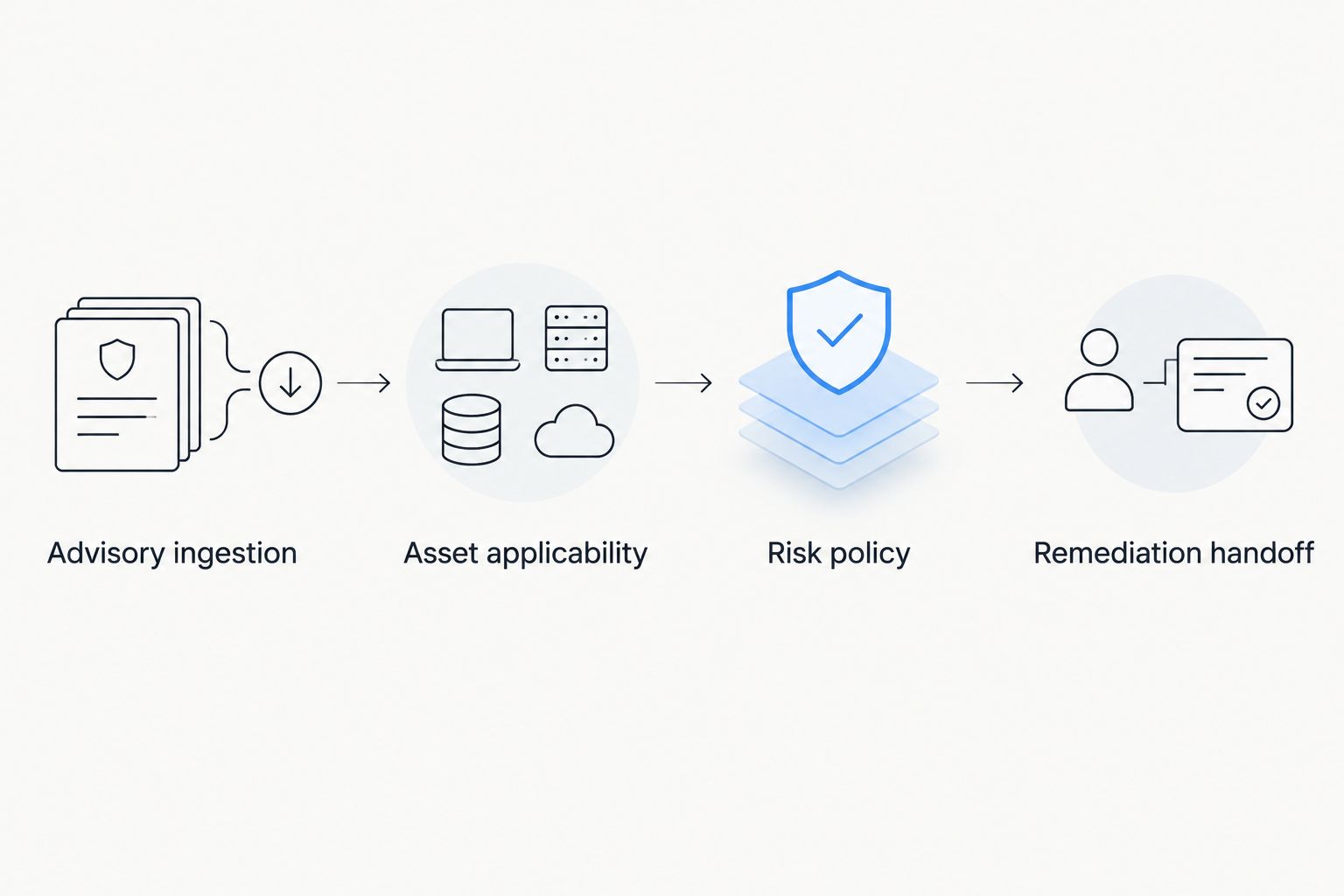
Risk policy
Use an explicit rule order before building a numerical model. In 2026, a policy that explains why an exposure moves ahead of another is more useful than an opaque score with no actionable reason.
CVSS describes vulnerability severity on a 0–10 scale; FIRST's CVSS specification defines that scale. EPSS estimates exploitation probability over the next 30 days and expresses probability between 0 and 1; FIRST's EPSS documentation defines that scope. Neither measure establishes your asset's business importance or proves a patch applies.
- Define priority conditions. Specify how confirmed exploitation, affected-asset exposure, business criticality, and source severity influence ordering. Document the evidence required for each condition.
- Keep signals distinct. Store severity, exploitation status, EPSS, exposure context, and business importance separately. Do not treat an exploitation probability as equivalent to an observed exploitation event.
- Set rule precedence. Decide which conditions override routine ordering. For example, your policy can escalate a confirmed applicable exposure with reported exploitation before routine findings without that evidence.
- Write a reason. Populate a custom
priority_reasonfield with the conditions that actually matched. Include the policy version and evaluation time alongside the decision. - Test exceptions. Replay representative findings with missing ownership, uncertain applicability, and accepted risk. Confirm that unknown values route to review rather than becoming low-priority defaults.
Expected result: every priority has an explainable basis, and incomplete evidence has a defined handling path. Re-running the same inputs under the same policy produces the same decision.
Choose a policy approach deliberately. These are implementation options, not claims about built-in Brinqa functionality.
| Policy approach | Best for | Advantage | Limitation |
|---|---|---|---|
| Ordered rules | Teams establishing an explainable workflow | Makes escalation conditions and missing-data handling explicit | Requires maintenance as policy changes |
| Weighted score | Teams with defined, consistently populated inputs | Supports granular ordering across comparable findings | Can conceal decisive conditions inside an aggregate score |
Start with ordered rules. Add weighted scoring only when you can explain the inputs, validate the ordering, and preserve escalation conditions that must not be averaged away.
Remediation handoff
Create remediation work only after applicability and policy evaluation. The 2026 handoff should carry enough evidence for the owner to act without reconstructing the advisory investigation.
- Define the work key. Build a stable
work_keyfrom the asset and remediation target. Decide whether your operational unit is an individual exposure or an update deployment covering several exposures. - Populate the assignment. Include the affected asset, applicable CVEs, remediation guidance, priority reason, accountable owner, and evidence timestamps. Set deadlines from your approved policy rather than inventing them in the integration.
- Upsert the work item. Search by the work key before creating work. Update changed evidence and priority on the existing item; do not create another ticket simply because ingestion ran again.
- Separate authorization from routing. Send eligible work through your change and deployment process. Priority does not bypass testing, approval requirements, rollback planning, or operational constraints.
- Require verification. After deployment, obtain fresh endpoint evidence or an appropriate rescan. Close the exposure only when the evidence supports remediation, not merely when the deployment task reports completion.
Expected result: each remediation unit has an accountable owner, a traceable priority, and a verification requirement. Repeated synchronization does not multiply assignments.
For Brinqa, validate the proposed source mappings, policy representation, and handoff behavior against your actual implementation before enabling unattended ticket creation. The platform's vulnerability and exposure management role does not eliminate the need to test the entire workflow.
Reprioritize whenever an advisory changes
The adjacent workflow is revision-driven reprioritization. New advisories create new candidate exposures; changed advisories require you to reevaluate existing exposures without starting the process over.
- Compare the newly retrieved source revision with the stored revision.
- Identify changes to affected products, exploitation information, severity, or remediation guidance.
- Reevaluate applicability and priority for linked assets.
- Update existing work items and record what changed.
- Reopen closed work only when new evidence establishes a remaining or newly applicable exposure.
Expected result: a meaningful advisory change updates the affected queue, while a metadata-only change does not automatically generate new patch work.
Apply the same principle to inventory changes. A newly discovered affected asset should enter evaluation even when its advisory is unchanged. Keep advisory-change triggers and asset-change triggers separate so you can diagnose which event produced an assignment.
Troubleshooting
Duplicate remediation tickets
Fix the work key and creation logic. Advisory revision identifiers belong in history, not necessarily in the identity of the remediation task. Add a uniqueness constraint or equivalent guard, and test concurrent runs so both cannot create the same assignment.
A CVE matches, but the update does not apply
Repair the product-level match. Check edition, version, build, architecture, and supersedence against Microsoft guidance. Keep the CVE association for investigation, but remove the patch assignment when evidence establishes that the proposed update is not applicable.
Findings disappear after an ingestion failure
Do not treat failed retrieval as deletion. Preserve the last successful records, flag source freshness, and retry failed processing. Reconcile removed records only after a successful source synchronization with defined deletion semantics.
Tickets close while scanners still report exposure
Compare evidence timestamps and detection details. A scan taken before deployment cannot verify the change. Obtain fresh evidence, check whether the required reboot or other remediation action occurred, and investigate continuing detections before closing the exposure.
High-priority work has no owner
Route ownership failures to an accountable review queue. Preserve the priority instead of downgrading it because routing failed. Correct the asset-to-owner mapping, then update the existing work item rather than creating a replacement.
Customize your workflow
Expand the workflow only after ingestion, applicability, routing, and verification behave predictably. Start with a bounded asset group and review its assignments before extending the same policy across different environments.
For your 2026 policy review, separate security urgency from deployment sequencing. Two equally urgent exposures can require different maintenance windows or validation steps; that operational difference should not rewrite the underlying risk evidence.
Use the guide to build a custom vulnerability severity scoring model when you need a more detailed ranking policy. Keep mandatory escalation rules visible even if you add a numerical score.
Treat Brinqa's vulnerability and exposure management layer as one part of the design. Evaluate its fit alongside the quality of your inventory, ownership data, and remediation evidence, rather than attributing workflow outcomes to the platform alone.
FAQ
What is an MSRC automated patch prioritization workflow?
An MSRC automated patch prioritization workflow joins Microsoft advisory data to affected assets, evaluates remediation priority, and routes actionable work. It also updates existing assignments when evidence changes and requires verification before closure.
Does an MSRC advisory prove that my server needs a patch?
No, an MSRC advisory does not establish applicability to your server by itself. Match the affected product and version, then check installed updates and Microsoft's remediation guidance.
Should I prioritize Microsoft patches using CVSS alone?
No, CVSS alone does not describe your organization's complete remediation priority. Combine severity with applicability, exploitation information, asset exposure, and business importance under an explicit policy.
Can I automate patch installation from this workflow?
Keep installation in a separately authorized deployment process. The prioritization workflow should provide the target, evidence, owner, and urgency without bypassing change controls or verification.
How do I stop advisory updates from creating duplicate tickets?
Use a stable work key and update the existing assignment when its evidence changes. Store advisory revisions in history instead of treating every revision as a new remediation task.
When should an automated patch ticket close?
Close the exposure when fresh evidence confirms the required remediation. A completed deployment task alone does not establish that the vulnerability is no longer present.
What should happen when asset ownership is missing?
Route the exposure to an accountable ownership-review queue without lowering its priority. Repair the mapping and update the same work item once the owner is established.
One last thing
Measure a dry run by its decisions, not its ticket volume. Replay unchanged input and confirm that it creates no duplicate work; then change applicability evidence and confirm that the existing assignment changes appropriately. This checks the property your production queue depends on: automation reacts to meaningful evidence, not merely to another scheduled run.