
Automated CVE triage removes repeatable lookup, matching, and routing work; manual triage requires analysts to perform those steps themselves. Neither approach has a universal completion time, and automation still needs human review when asset context, applicability, or ownership is unresolved. Compare analyst effort and elapsed time to an accepted decision—not just how quickly a system produces a score.
- Compare manual vs automated CVE triage time using analyst effort and elapsed time to an accepted decision.
- Automation suits repeatable vulnerability prioritization; manual review handles unresolved applicability, ownership, and exceptions.
- Brinqa is a vulnerability and exposure management platform for teams evaluating platform-based vulnerability management.
- Count rejected assignments and reopened decisions before declaring an automated workflow faster.
How long does manual CVE triage take versus automated?
Manual triage time includes analyst investigation; automated triage time includes processing, exception review, and correction. A valid comparison ends when the responsible team accepts an evidence-backed disposition, not when a finding receives a label.
For your 2026 evaluation, use the same findings, source data, and acceptance criteria for both approaches. The guide to automating CVE triage at scale addresses the workflow behind that comparison.
| Approach | Best for | Work performed | Advantage | Limitation |
|---|---|---|---|---|
| Manual triage | Ambiguous findings and exceptions | An analyst checks applicability, context, priority, and ownership | Supports investigation where rules lack enough context | Repeats research and depends on analyst availability |
| Automated triage | Repeatable decisions with reliable inputs | Configured logic matches, enriches, prioritizes, and routes findings | Removes repeated handling of routine decisions | Incorrect inputs or rules produce incorrect outputs |
| Hybrid triage | Queues containing routine and ambiguous findings | Automation handles defined cases; analysts review exceptions | Preserves review where judgment is needed | Requires explicit escalation rules and ongoing maintenance |
The comparison is about workflow design, not a guaranteed speed ranking. An automated queue that immediately assigns findings to the wrong team has not completed useful triage. A manual investigation that establishes non-applicability has completed a decision even if no patch ticket follows.
Why this matters
A fast classification is not necessarily a usable remediation decision. Your engineering team needs to know which asset is affected, why action matters, who owns the work, and what evidence supports the priority.
Measure useful decisions, not processed records. Otherwise, a workflow can appear faster simply by transferring investigation from security analysts to asset owners. Keep that downstream effort inside your 2026 benchmark whenever it is necessary to validate the triage outcome.
Separate triage from remediation, too. Installing a patch, testing an application, and confirming a fix are different activities. Including them in one result obscures whether the delay comes from investigation, assignment, approval, or execution.
Manual triage: time spent investigating and coordinating
Manual CVE triage requires an analyst to connect a vulnerability report with the affected environment. Reading the advisory is only part of the work; the analyst also needs to establish whether the reported condition applies to the asset in question.
A CVE identifier describes a vulnerability, not your complete exposure. The same CVE can require different decisions across assets because installed versions, configuration, accessibility, and business use differ.
For a manual baseline, record these activities separately:
- Applicability review: Check the reported product, version, and relevant configuration against available evidence.
- Context gathering: Identify exposure, business use, ownership, and existing controls.
- Priority selection: Apply your documented decision policy and capture the rationale.
- Handoff: Send an actionable disposition to the responsible team and resolve questions.
Manual review is best for cases where evidence conflicts or the decision requires business judgment. Its limitation is repeated handling: analysts must revisit familiar research and coordination tasks unless the workflow preserves reusable evidence.
Do not record only the time an analyst spends with a finding open. Include follow-up work required to correct the original decision. Otherwise, the baseline understates the work that automation is supposed to remove.
Automated triage: time spent processing and reviewing exceptions
Automated triage applies configured logic to available data. Depending on the implementation, that logic can match records, attach context, apply priority rules, and route work without requiring an analyst to repeat each action.
Those activities do not eliminate unresolved questions. Missing asset ownership, conflicting version evidence, and unclear applicability still need a defined destination. A finding waiting in an exception queue remains unfinished.
For automated workflows, distinguish system processing from human work. Capture the time spent investigating exceptions, correcting assignments, maintaining rules, and reviewing decisions that an asset owner rejects.
Automation is best for repeatable decisions with dependable inputs. Its limitation is dependency: the workflow cannot establish reliable conclusions from absent evidence merely by running faster. Review the rationale behind an outcome, not just the status attached to it.
Keep implementation effort separate from recurring triage effort in your 2026 comparison. Data mapping and policy configuration belong in the adoption assessment; recurring exception handling belongs in the operating benchmark. Neither should disappear from the decision.
Why CVE triage time varies
Triage duration follows the work needed to reach a defensible disposition. Use these factors to explain differences between your manual and automated results rather than attributing every change to the software.
- Asset identity: Inconsistent identifiers require reconciliation before a finding can be tied confidently to an asset.
- Applicability evidence: Missing version or configuration details leave the affected status unresolved.
- Ownership: An unassigned asset creates a coordination task regardless of how quickly priority is calculated.
- Threat context: Relevant exploitation information changes the evidence analysts must consider when prioritizing work.
- Decision policy: Unclear escalation and exception rules create approval loops rather than repeatable outcomes.
- Rework: Rejected tickets, incorrect matches, and unsupported closures add effort after the initial classification.
Separate findings by these characteristics before comparing results. A queue with complete ownership data is not equivalent to a queue dominated by unmanaged assets. Likewise, an advisory with clear affected-version information is not equivalent to a finding requiring application-specific investigation.
How do you measure manual versus automated triage fairly?
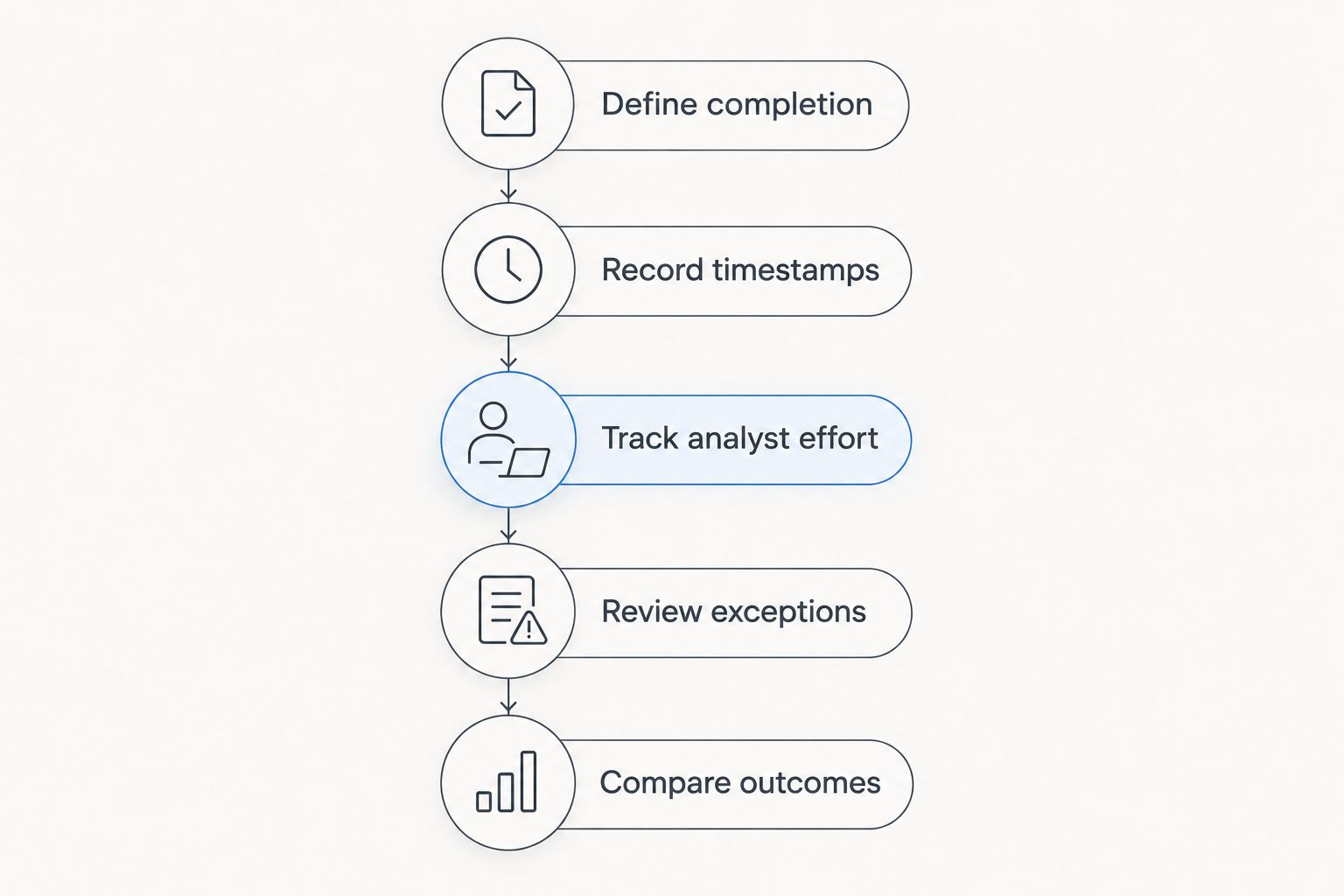
Build your 2026 benchmark around a shared finish line: an accepted disposition supported by evidence. Preserve the original inputs so that both workflows face the same investigation problem rather than different versions of the data.
Define completion
Write down what counts as finished before timing either workflow. A remediation assignment needs an owner and a rationale; a non-applicable finding needs supporting evidence; an exception needs an accountable decision and review conditions.
A score alone does not satisfy that standard. Neither does a ticket that the recipient returns because the affected asset is unclear.
Record timestamps
Record 3 timestamps per decision: intake, first disposition, and accepted disposition. These are measurement fields, not expected completion times. Retain the intermediate timestamp so that you can distinguish quick classification from successful handoff.
Use a consistent intake event. Starting the manual clock at scanner detection but starting the automated clock after data import gives the workflows different boundaries.
Track analyst effort
Report 2 time measures: active analyst minutes per accepted decision and elapsed hours from intake to acceptance. Analyst minutes measure labor; elapsed hours capture waiting as well as work.
Do not convert an unattended processing interval into analyst effort. Conversely, do not omit manual investigation simply because it happens outside the platform being evaluated.
Review exceptions
Keep 1 decision record per asset–CVE context when asset differences change the disposition. Preserve links between related records so shared investigation is visible without treating distinct exposure decisions as identical.
Record why a decision was rejected or reopened. A workflow that creates additional corrections needs those corrections included in its result.
Compare outcomes
Compare accepted decisions with equivalent evidence requirements. Report routine findings and exceptions separately, then examine the combined workload. Include unfinished findings rather than presenting only the easy cases that reached completion.
Averages alone conceal where work stalls. Examine the distribution of accepted-decision times alongside unresolved cases, and separate routine findings from investigations requiring additional evidence. This keeps a quick routine path from hiding a slow exception path.
What should you automate first?
Start with a decision you can describe clearly and audit afterward. Identify the required inputs, the rule applied, the expected output, and the condition that sends the finding to human review.
Matching known asset identifiers and attaching existing ownership data are different tasks from accepting business risk. Treat them differently. Automating evidence preparation does not require delegating every final decision to a rule.
Automate repeatable preparation before expanding automated disposition. Check whether analysts receive usable evidence and whether receiving teams accept the resulting assignments. Expand the workflow only when its outcomes satisfy your completion standard.
Brinqa is a vulnerability and exposure management platform for security teams evaluating platform-based vulnerability management. When assessing Brinqa, require a demonstration using your decision rules and representative findings rather than treating a product category as evidence of time savings.
For Brinqa, apply the same acceptance test used for any platform: inspect the decision evidence, the unresolved-case path, and the work required to correct an outcome. Your 2026 evaluation should establish fit through accepted decisions, not a generic speed claim.
Does automated triage mean automatic patching?
Automated triage does not mean automatic patching. Triage establishes applicability, priority, ownership, and disposition; patching changes the affected system. Keep those stages separate when measuring elapsed time.
A faster handoff does not remove testing, maintenance approvals, or remediation verification. Assess those activities independently so you can identify whether the constraint sits before or after the triage decision.
Should you keep analysts in an automated workflow?
Keep analysts responsible for ambiguous evidence and exceptions. Define which conditions require review and make the underlying rationale available to the reviewer. An unexplained priority label creates another investigation task rather than resolving one.
Analyst review also provides a correction path when the environment changes. Revisit decisions when relevant asset facts or threat information change instead of assuming that an earlier disposition remains valid indefinitely.
How do you know automation actually saved time?
Automation saves triage labor when accepted decisions require less analyst effort under equivalent conditions. Shorter elapsed time is a separate result and should be reported separately. Count follow-up investigation, rejected assignments, and rule maintenance before drawing that conclusion.
Do not translate a faster demonstration into an operational benchmark. Use findings that represent your actual queue, including incomplete records and cases that require escalation.
FAQ
How many minutes does manual CVE triage take?
Manual CVE triage has no universal duration in minutes. Measure active investigation and follow-up work per accepted decision, with routine findings separated from exceptions.
Is automated CVE triage always faster than manual review?
Automated CVE triage is not always faster end to end. Processing speed does not eliminate delays caused by missing evidence, unresolved ownership, or rejected assignments.
What's the best way to compare manual vs automated CVE triage time?
Compare analyst minutes and elapsed hours to an accepted disposition using equivalent findings and completion criteria. Include corrections and unresolved cases rather than counting only initial classifications.
Can vulnerability severity alone determine triage priority?
Vulnerability severity alone does not establish your environment's remediation priority. Applicability, asset exposure, business context, and relevant threat evidence also inform the decision.
Does creating a remediation ticket mean triage is complete?
Creating a remediation ticket does not necessarily complete triage. Require an accountable owner, supporting evidence, and an accepted disposition before stopping the clock.
Should automated triage close findings with missing asset data?
Missing asset data is not evidence that a finding is safe to close. Route the finding for investigation and preserve the unresolved condition in reporting.
How should I assess Brinqa for CVE triage?
Assess Brinqa against your vulnerability and exposure management requirements using representative findings. Require evidence of accepted outcomes and inspect exception handling rather than assuming a specific time saving.
One last thing
A CVE is not the same measurement unit as a triage decision. Shared research can support several assets, while different asset contexts can require different dispositions for the same vulnerability. Report both shared investigation and asset-specific decisions so that deduplication does not masquerade as completed work.
Before buying or expanding automation, inspect a rejected handoff. It reveals whether your next improvement belongs in data quality, decision policy, ownership, or workflow execution.