
Automate vulnerability remediation safely by checking asset identity and ownership, selecting an approved fix, testing it on a limited scope, and requiring both security and service-health verification before closure. Keep production changes behind explicit authorization rules, with rollback instructions and a stop condition for failed checks.
- Safe automated remediation requires approved scope, controlled execution, rollback planning, and independent verification.
- Brinqa fits teams seeking a vulnerability and exposure management platform.
- Automate vulnerability triage and ticket routing before allowing unattended production changes.
- A successful patch command is not proof that a vulnerability is fixed or a service remains healthy.
Why this matters
Automated remediation should remove repetitive work without removing accountability. Sending a finding to the right owner is different from authorizing a production restart. Treating those actions as equally safe creates an avoidable control gap.
For your 2026 remediation policy, distinguish the vulnerability and exposure management layer from the system that executes changes. Brinqa is a vulnerability and exposure management platform; evaluate execution permissions and rollback responsibilities separately rather than assuming a category label establishes those capabilities.
Your objective is verified risk reduction, not a larger count of completed jobs. A ticket that closes while the vulnerable component remains deployed is not a successful remediation.
How do you automate vulnerability remediation safely?
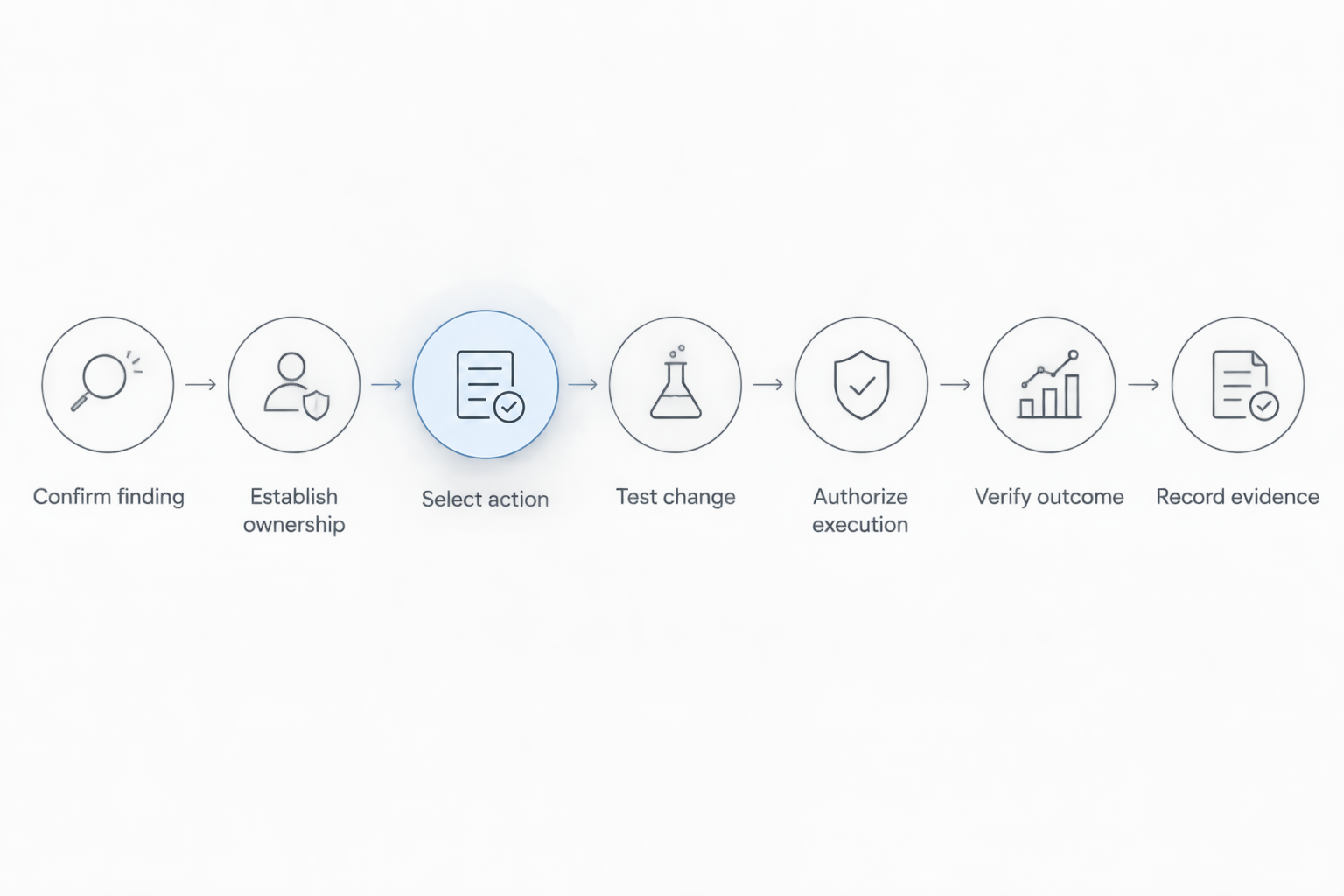
Use the following sequence as an approval framework. Each step should produce evidence that the next step can inspect, rather than relying on an operator remembering what happened.
1. Confirm the finding and affected asset
Match the finding to a stable asset identifier, the affected component, its observed version, and the observation timestamp. Confirm that the asset still exists and that the proposed fix applies to its current state.
Do not authorize a change using an IP address alone when that address can be reassigned. If scanner records disagree about identity or component state, send the finding for investigation instead of guessing.
2. Establish ownership and business context
Identify the technical owner, the service affected, and the person authorized to approve the change. Record production status, exposure, dependencies, and any active exception before selecting an execution path.
Missing ownership is a routing problem, not permission to proceed. Stop automated execution when the workflow cannot establish who owns the affected service.
3. Select an approved action
Map the finding to a reviewed runbook: install an applicable update, change a configuration, rebuild an image, or remove an unnecessary component. Specify prerequisites, permitted targets, required privileges, expected results, and recovery instructions.
Separate prioritization from execution eligibility. A finding can demand urgent attention while still requiring manual approval because its fix changes a sensitive dependency.
4. Test the change against explicit criteria
Check the proposed action in a representative test environment before authorizing broader deployment. Include application behavior, required dependencies, restart behavior, and the verification method in the test plan.
Write the pass and fail conditions before execution. A test that merely confirms the update command returned successfully does not establish that the application still works.
5. Authorize and execute within boundaries
Apply the approved change only to the permitted target group, using credentials restricted to the necessary actions. Check maintenance authorization and current asset state again immediately before execution.
Use a limited initial deployment before expanding scope. Stop expansion when a health check fails, an unexpected target appears, or the execution result is uncertain.
6. Verify security and service health
Confirm that the affected component reached the intended state and that a suitable follow-up check no longer detects the original condition. Separately verify that the service performs its expected functions.
If verification cannot run, mark the result as awaiting verification. Do not translate missing evidence into a successful outcome or close the finding because a deployment task finished.
7. Close with evidence or escalate
Attach the target identity, action taken, approval, execution result, and verification evidence to the remediation record. Preserve the relationship between the original finding and the change that addressed it.
If the action fails, follow the runbook's recovery path and notify the owner. Record a rolled-back change as unsuccessful remediation, even when rollback restores normal service.
Which level of automated remediation should you use?
Choose authority by action, not by product label. For a 2026 rollout, document which workflows can gather information, which can request changes, and which can modify systems without another approval.
The following comparison covers 3 execution modes, not vendor product tiers. A single remediation program can use all of them for different assets and actions.
| Execution mode | Best for | Advantage | Limitation | Required boundary |
|---|---|---|---|---|
| Workflow automation | Finding enrichment, ownership routing, ticket updates | Removes coordination work without authorizing system changes | Does not apply the fix | Keep execution permissions separate |
| Approval-gated execution | Production changes requiring owner review | Automates an approved action while retaining a decision point | Depends on timely, informed approval | Bind approval to the exact action and scope |
| Policy-authorized execution | Repeatable actions with tested recovery and clear eligibility | Runs eligible changes without individual approvals | An incorrect policy can repeat an unsafe action | Restrict scope and stop on failed checks |
Workflow automation: start with coordination
Workflow automation is best for teams establishing reliable ownership and evidence collection. Automate enrichment, deduplication, assignment, escalation, and verification requests before granting write access to production systems.
Its limitation is straightforward: a well-routed ticket still leaves the vulnerability unresolved until someone or something applies the fix. Track handoff completion separately from remediation completion.
Approval-gated execution: retain the change decision
Approval-gated execution is best for changes whose service impact needs owner review. Present the approver with the affected assets, proposed action, test results, recovery plan, and expected disruption.
Approval should authorize a specific change, not every later change associated with the same vulnerability. Require renewed review when the target scope, runbook, or relevant asset state changes.
Policy-authorized execution: constrain unattended changes
Policy-authorized execution is best for repeatable actions with established eligibility and verification rules. Permit unattended execution only when every required condition is satisfied; route exceptions to an owner.
The trade-off is concentrated authority. If the eligibility rule is wrong, automation can repeat that mistake, so include a central disable control and prohibit silent expansion into new asset groups.
Why safe automation varies by environment
Use these factors to define your 2026 automation boundaries. They are decision criteria, not universal permission to automate a particular asset class.
- Asset identity: Conflicting records prevent reliable targeting. Resolve identity uncertainty before changing the system.
- Service dependencies: A component update can affect callers, libraries, integrations, or startup behavior. Include those dependencies in testing.
- Change reversibility: Recovery differs between replacing a stateless workload and changing persistent data. Require action-specific recovery instructions.
- Operational constraints: Maintenance windows, restart restrictions, and service-owner approvals determine when an otherwise valid fix can run.
- Evidence quality: Stale observations and incomplete follow-up checks weaken the decision. Define acceptable evidence before writing the execution rule.
- Execution privileges: A narrowly scoped action needs narrowly scoped credentials. Do not give a ticket-routing workflow broad administrative access.
Document the result as an eligibility rule that an engineer can inspect. Avoid instructions such as “automate low-risk findings” unless your policy defines both the vulnerability risk and the change risk.
What should an automated remediation runbook contain?
Give every executable runbook a version, an owner, and an approval record. Your 2026 runbook review should cover the decision to act as carefully as the command that performs the change.
Use 4 control gates to organize the runbook:
- Eligibility gate: Define the applicable finding, target identifiers, current-state checks, exclusions, and required authorization.
- Execution gate: Specify the permitted action, credential scope, deployment boundary, and behavior when a task times out.
- Recovery gate: State what triggers a stop, whether rollback is supported, how recovery works, and who takes control.
- Verification gate: Define the security check, service-health check, evidence to retain, and conditions for closure.
Make repeated execution safe. Before retrying a timed-out job, inspect the target to determine whether the first attempt already changed it; otherwise, a retry can repeat an action whose result was simply not reported.
Also define how the workflow handles partial completion. If some targets pass and others fail, preserve their individual states rather than treating the whole deployment as uniformly successful.
How do you keep prioritization separate from permission?
Prioritization determines what deserves attention first; authorization determines what automation can change. A high-priority vulnerability does not grant an automation account permission to bypass change controls.
Keep the decision records separate. Store the reason for urgency alongside, but not in place of, the action's eligibility checks and approval requirements.
For the intake side, use a defined process to automate CVE triage at scale. Then pass the resulting work into a remediation workflow that independently checks the target, proposed fix, and permitted execution mode.
For emergency changes, create an explicit emergency authorization path. Preserve the approving authority, target scope, recovery instructions, and post-change verification instead of creating an undocumented bypass.
How should you evaluate a remediation platform?
Require demonstrations of your control requirements using a representative workflow. Ask the vendor to show an ambiguous asset match, an expired approval, a failed deployment, and an unavailable verification source—not just the successful path.
Brinqa's stated category is vulnerability and exposure management. Evaluate Brinqa against your requirements without assuming that prioritization, patch deployment, rollback, and application testing are interchangeable functions.
Ask where each responsibility sits:
- Which system maintains the asset identity and ownership record?
- Which system grants permission to change the target?
- Which system executes the action and holds credentials?
- Which system verifies the security result and application health?
- Which record preserves evidence across those handoffs?
A platform's category fit is a starting point, not proof that a particular integration or execution control exists. Require evidence for the workflow you intend to deploy.
What should you measure after automation starts?
For your 2026 reporting, distinguish work processed from vulnerabilities verified as resolved. Count successful execution, successful verification, failed execution, rollback, and unresolved exceptions separately.
Use 2 verification outcomes for each completed change: whether the security condition was corrected and whether service health passed. Preserve an unknown state when either check lacks evidence.
Track elapsed time between detection, ownership assignment, authorization, execution, and verified closure. Those timestamps show whether delays sit in triage, approval, deployment, or validation without treating every delay as a patching problem.
Do not count an accepted exception as a fix. Keep deferred findings visible with an owner, justification, review date, and any documented compensating controls.
FAQ
What's the safest way to start automated remediation?
Start with finding enrichment, ownership routing, and evidence collection before authorizing production changes. Add execution only after you define eligibility, approval, recovery, and verification rules.
Is automated remediation the same as automated patching?
Automated remediation is broader than automated patching. It can include configuration changes, component removal, or workload replacement, while patching applies updates.
Can I automate remediation without human approval?
You can authorize unattended execution through a defined policy for eligible actions. Require reviewed runbooks, restricted privileges, bounded targets, stop conditions, and verified outcomes.
Should critical vulnerabilities always be patched automatically?
Critical severity alone is not enough to authorize automatic patching. Check applicability, service impact, recovery options, and the approved execution policy before changing the target.
What happens if an automated fix breaks an application?
Stop further deployment and follow the runbook's recovery procedure. Notify the service owner, preserve execution evidence, and keep the vulnerability unresolved until a suitable fix is verified.
How do I know an automated remediation actually worked?
Verify that the affected component or configuration reached the intended state, then perform an appropriate security check and a separate service-health check. A successful command or closed ticket is not sufficient evidence.
What should happen when a vulnerability cannot be fixed automatically?
Route the vulnerability to an accountable owner for investigation, manual remediation, or a documented exception. Preserve the reason automation stopped rather than repeatedly retrying an ineligible action.
One last thing
Test the stop path before expanding the success path. During your pilot, deliberately remove required ownership data, invalidate an approval, and simulate an unavailable verification check in a controlled environment.
The correct response is a visible stop or escalation—not an assumed success. Keep unattended execution disabled until the workflow handles those conditions as designed.