Instead of manually sorting JFrog Xray findings and chasing container owners, build a JFrog Xray container remediation workflow that connects scanned images to deployed workloads, ranks actionable findings, and verifies replacement images before closure. Use this 2026 guide to define the data handoffs, ownership rules, and evidence your automation needs.
- A JFrog Xray container remediation workflow needs image identity, deployment context, ownership, and verification—not severity sorting alone.
- Brinqa fits security teams seeking a vulnerability and exposure management platform.
- Prioritize container vulnerabilities using exploitation evidence, workload exposure, business context, and available fixes.
- Close remediation only after the replacement image is scanned and affected workloads no longer run the vulnerable image.
Why this matters
A container scan identifies vulnerable components in an image. It does not, by itself, establish where that image runs, which team controls its source, or whether a replacement reached production. Those are separate evidence sources.
A resolved engineering ticket is not proof that a vulnerable container has stopped running. Your workflow must connect the original finding to a replacement artifact and then to deployment evidence.
Brinqa is a vulnerability and exposure management platform. Treat platform selection separately from the workflow design: establish which interfaces and mappings your environment supports before assigning any integration responsibility to a product.
For your 2026 rollout, define success as a traceable remediation path—not a larger collection of imported findings. Every queued action should identify the affected image, accountable owner, required change, and closure evidence.
Before you start
- Accounts and access: Obtain authorized access to JFrog Xray results, the relevant Artifactory repositories, deployment inventory, source repositories, and your work-tracking system. Use a dedicated integration identity with the permissions required for each handoff.
- Materials and mappings: Prepare an image-to-service inventory, service ownership map, remediation policy, and approved method for reading findings. Confirm the available API, export, or integration interface in your deployed versions before building automation.
- The gotcha: Container tags are mutable. Preserve the scanned image digest and the runtime image identity; a matching tag alone does not prove that you scanned the artifact running in production. For multi-platform images, distinguish the image index from platform-specific image manifests.
Keep credentials outside source code and ticket descriptions. Store them through your approved secret-management process, and test access with the integration identity rather than an administrator's personal account.
Configure finding intake
The intake stage should preserve scanner evidence while producing a consistent record for downstream processing. Do not start with ticket creation: first prove that your collection method captures the intended repositories and artifacts.
Scope and collection
- Select a bounded pilot covering 1 repository and 1 deployed service. Record the repository, service owner, environment, and image identities before collecting findings.
- Review Xray Policies and Watches if your intake depends on policy violations. Confirm that the watch scope covers the intended resources and that the policy evaluates the security findings you need.
- Distinguish vulnerability findings from policy violations in your collection design. A finding that does not trigger your chosen policy must not silently disappear from a vulnerability-management inventory.
- Choose an authorized collection interface supported by your deployment. Implement pagination, request-error handling, and checkpoints according to that interface's documented behavior.
- Preserve the source response or an auditable reference to it. Keep collection time separate from the scanner's observation time.
Expected result: You can trace each imported record back to an Xray finding and an exact scanned artifact. A successful connection alone is insufficient; reconcile the collected records against the selected source scope.
Finding identity
- Define a finding key using the source system, repository context, image digest, component identity, and vulnerability identifier. Preserve package ecosystem and version information where supplied.
- Retain the source identifier, severity, advisory details, scan status, and remediation information actually present in the result. Represent missing values explicitly instead of filling them with assumptions.
- Separate record identity from remediation grouping. Several image findings can belong to a shared engineering task without becoming the same finding.
- Replay the same collection batch 2 times. Check that the second pass updates existing records rather than creating duplicate findings or tasks.
Expected result: Repeated collection is repeatable without duplicate records, and every grouped task retains its underlying image-level evidence.
Configure deployment context and priority
Prioritization starts with identity matching. Do not rank an image as internet-facing merely because its service name resembles a public application. Join it to deployment and exposure evidence, and retain the source and observation time for each relationship.
Deployment context
- Join scanned artifacts to running workloads using resolved image identities. Preserve registry and repository context so similarly named images do not collide.
- Attach environment, workload, namespace where applicable, service, and business owner from your inventory. Keep technical ownership separate from business accountability.
- Add exposure evidence from approved sources. Distinguish direct exposure, exposure through an upstream service, and unknown exposure.
- Mark unmatched artifacts as unmatched. Distinguish images stored in a repository from images confirmed as deployed; neither condition establishes the other.
- Define freshness rules for inventory and scan evidence using your organization's requirements. Route stale relationships for review rather than treating old deployment data as current.
Expected result: Each deployed finding has a traceable workload relationship and owner, while unmatched or stale records remain visible in a separate queue.
Priority rules
For the 2026 workflow, write the decision order before implementing a numeric score. Explicit rules are easier to explain than a weighted result whose inputs nobody can reconstruct.
- Evaluate verified exploitation evidence and its relevance to the affected component. Preserve the evidence source and observation date.
- Evaluate confirmed deployment, exposure, and business impact. Keep unknown context distinct from confirmed absence of exposure.
- Evaluate remediation feasibility: an applicable component update, base-image update, removal, or documented mitigation. Do not label a finding fixable merely because an advisory lists a newer version.
- Retain scanner severity as an input, not the entire decision. Record the reason for the assigned priority in the remediation task.
- Apply approved exception rules separately. An exception changes the response decision; it does not erase the vulnerability evidence.
Expected result: An engineer can explain why a finding entered the queue and what evidence would change its priority.
Choose the prioritization approach
| Approach | Best for | Advantage | Limitation |
|---|---|---|---|
| Severity-led triage | Initial review when deployment context is incomplete | Uses the scanner's existing classification | Does not establish deployment, ownership, or business impact |
| Context-led triage | Remediation queues with reliable workload and ownership data | Connects findings to affected services and accountable teams | Requires maintained identity mappings and fresh context |
Use context-led triage for the remediation queue; use severity-led triage as an explicit fallback. Label fallback decisions so incomplete context does not appear equivalent to verified low exposure.
Brinqa belongs in the vulnerability and exposure management category. Evaluate the required data model, handoffs, and supported interfaces against your deployment; do not assume a native Xray connection or automatic runtime verification.
Configure remediation and closure
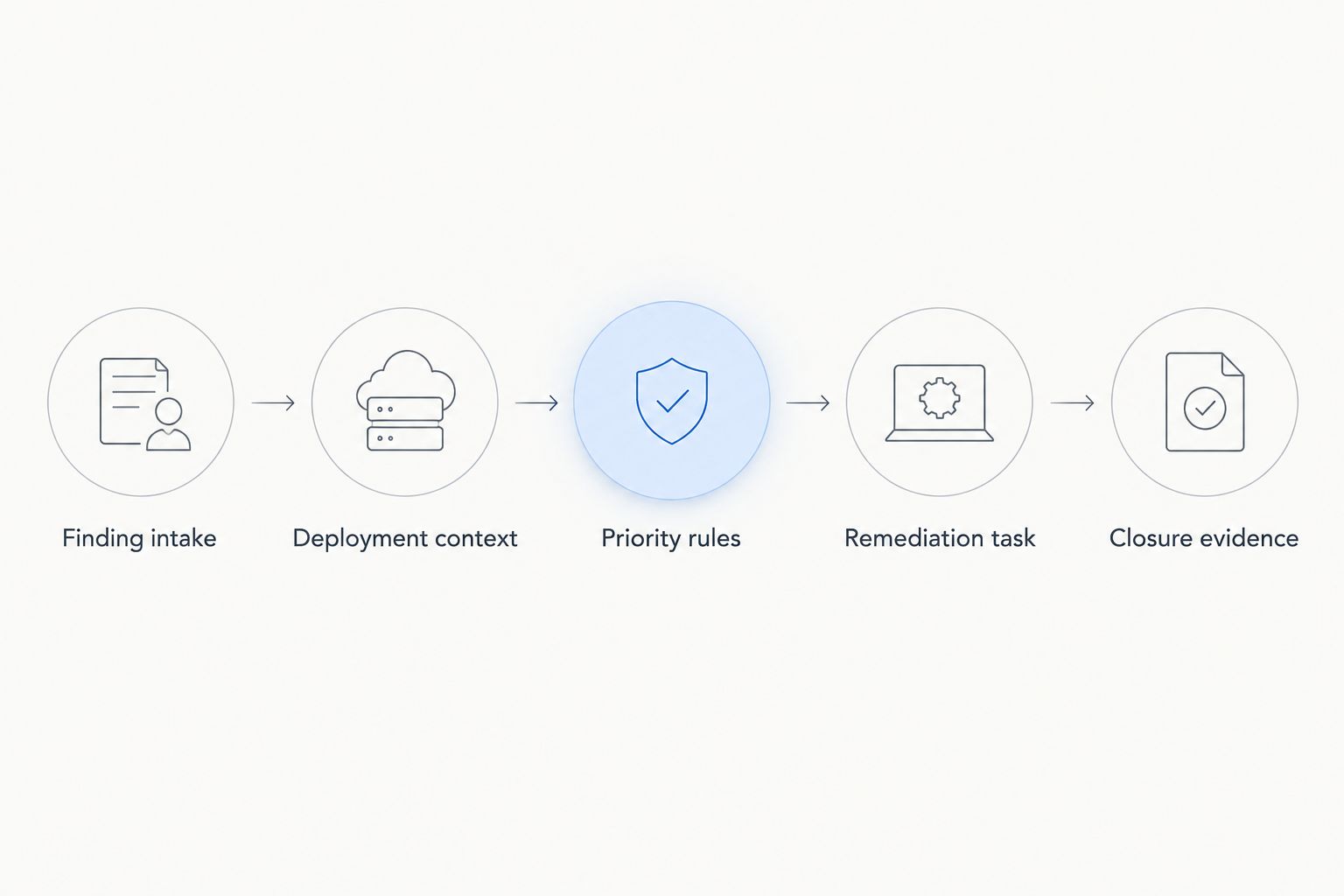
The remediation stage turns prioritized findings into source changes and deployment evidence. Keep its sequence explicit: Finding intake, Deployment context, Priority rules, Remediation task, and Closure evidence.
Remediation task
- Group findings by the change an owner can execute. A shared base-image update can justify a grouped task, but preserve the affected services and image digests underneath it.
- Assign the team that controls the relevant source or build input. Route base-image maintenance and application dependency changes according to actual ownership.
- Include the vulnerability identifier, affected component and version, original image digest, deployment scope, priority reason, and proposed action. Include the relevant source evidence rather than an unexplained severity label.
- Set the deadline using your approved remediation policy. Record the policy basis, assignment time, and exception status; do not invent a universal deadline for all containers.
- Define acceptance criteria before work starts: the intended component change, successful build and tests, replacement scan evidence, and affected deployment updates.
Expected result: The owner receives an actionable change request with a testable definition of done, not a copied scanner report.
Closure evidence
- Change the dependency, base image, or other responsible build input. Rebuild through the approved pipeline rather than relying on an untracked modification inside a running container.
- Capture the replacement image digest and scan results. Compare the relevant component and vulnerability evidence, not just the total finding count.
- Deploy the replacement through your normal release controls. Verify that affected workloads resolve to the intended replacement image identities.
- Check deployment scope, including delayed rollouts and rollback targets. A clean replacement scan does not establish that every affected workload adopted it.
- Close only when the defined evidence is present. If the response is an accepted exception or mitigation instead of removal, preserve that distinct outcome and its approval.
Expected result: A closed task points to the source change, replacement artifact, scan evidence, and deployment confirmation. Brinqa platform evaluation should include whether your intended configuration can retain and relate those records.
Reprioritize whenever finding or deployment context changes
A second workflow handles existing images whose risk changes without a new build. Vulnerability intelligence, exposure, service importance, or ownership can change while the image digest stays the same.
For 2026 operations, separate artifact change from risk-context change. The first requires evaluating a new artifact; the second requires reevaluating an existing record without manufacturing a duplicate finding.
- Collect updated findings and relevant context through supported interfaces. Use scheduled reconciliation when reliable event delivery is unavailable.
- Match updates to existing finding and artifact identities. Preserve the previous decision and the evidence supporting the new one.
- Reevaluate priority when a material input changes. Record which input changed and when the workflow observed it.
- Update an existing remediation task when the same engineering change remains appropriate. Create a separate task only when scope or responsibility genuinely requires it.
- Reopen resolved work only when evidence shows renewed vulnerability or exposure, such as deployment of a previously affected image.
Expected result: Changed risk produces an explained update, not a second ticket with an identical description.
Test 3 scenarios before expanding: a repeated source record, a changed vulnerability assessment, and deployment of an affected image after closure. These are validation cases, not claims about production performance.
Troubleshooting
Findings never reach the queue
Check repository scope, watch scope, policy conditions, and collection permissions. Then determine whether your integration collects vulnerabilities or only violations. Reconcile a known source finding through every stage instead of testing solely for a successful request.
Matching tags produce conflicting results
Resolve image digests at the scanned-artifact and deployed-workload levels. Check whether the tag changed or whether an image index points to different platform-specific manifests. Retain those distinctions instead of overwriting conflicting records.
Duplicate tickets appear after retries
Separate finding identity from task-group identity and make task creation repeatable without duplicates. Store the work-tracking identifier after creation, and handle partial failures so a retry updates the existing task rather than creating another.
A finding has no remediation owner
Check the service ownership map and the repository-to-build relationship. Route unresolved ownership to a named intake function rather than silently assigning every finding to security. Keep the ownership gap visible until accountability is established.
A closed finding returns
Check the running image digest before changing the closure decision. A rollback, incomplete rollout, renewed vulnerability assessment, or stale inventory requires different handling. Do not suppress the finding until you identify which evidence changed.
Customize your workflow
Expand only after the pilot demonstrates reliable identity matching, task updates, and closure evidence. Add repositories and services in controlled batches, keeping unmatched assets and collection failures visible.
For your 2026 operating review, measure collection freshness, ownership gaps, priority changes, and verified closure separately. A task count describes activity; it does not establish that vulnerable workloads were replaced.
Use the guide to build a vulnerability remediation workflow with Jira when designing ticket handoffs. Keep scanner evidence authoritative for the finding, deployment evidence authoritative for runtime state, and the work tracker authoritative for assignment and approval.
Add exception handling before broad rollout. Require an accountable approver, stated scope, supporting rationale, review date, and the conditions that invalidate the exception. A service exposed after approval needs reevaluation, not automatic inheritance of an earlier decision.
FAQ
What is a JFrog Xray container remediation workflow?
It connects Xray vulnerability findings to image identity, deployment context, remediation ownership, and verified closure. The workflow must track both the replacement artifact and whether affected workloads adopted it.
Can I prioritize container vulnerabilities using severity alone?
Severity alone does not establish deployment, exposure, or business impact. Use it as an explicit fallback when context is incomplete, and retain the reason for that fallback.
Should I match container findings by tag or digest?
Use resolved image digests as the artifact identity, with registry and repository context. Tags can change, and multi-platform images require distinguishing the image index from platform-specific manifests.
Does a clean replacement image scan mean remediation is complete?
No, a clean replacement scan does not prove that affected workloads stopped running the vulnerable image. Verify deployment adoption and retain the original and replacement image identities.
How should I handle findings without an available fix?
Keep the finding visible and evaluate documented mitigation or an approved exception. Record the accountable owner, rationale, review date, and evidence rather than marking the vulnerability removed.
Does this workflow require a native Brinqa integration with Xray?
The workflow design does not assume a native integration. Confirm the supported interfaces, mappings, and permissions in your deployed environment before assigning collection or automation responsibilities.
When should an existing remediation ticket be reopened?
Reopen it when evidence establishes renewed vulnerability or exposure within its scope. First distinguish a rollback or incomplete rollout from changed scanner intelligence and stale inventory.
One last thing
Keep the vulnerable image digest after closure. That identity gives you a direct way to recognize its return during a rollback or later deployment; a closed ticket title cannot provide the same artifact-level evidence.
Add this check to your 2026 release process: compare newly observed workload image identities against previously resolved affected artifacts. Route a confirmed match for reevaluation rather than assuming the earlier remediation still applies.