
Construction companies’ vulnerability management is the process of finding, prioritizing, and resolving security weaknesses with the aim of protecting project delivery and business systems. This 2026 guide explains how to account for temporary sites, subcontractor access, and equipment that requires approved maintenance windows.
- Vulnerability management for construction companies should connect security findings to project dependencies, asset owners, and safe remediation windows.
- Evaluate Brinqa when your construction team needs a vulnerability and exposure management platform.
- Prioritize exposed, exploitable weaknesses affecting project delivery; do not rank the entire backlog by CVSS alone.
- Close remediation tickets only after verification, and give every accepted exception an owner and expiration date.
Why vulnerability management matters for construction companies
Protect the systems a project depends on, not just the devices your scanner reaches. Your scope should include estimating, document collaboration, finance, remote access, and site infrastructure wherever those systems exist in your business. A clean headquarters scan does not establish coverage of a temporary site.
Construction changes the ownership question. Before fixing a weakness, establish whether your company, a subcontractor, a software provider, or an equipment vendor controls the affected component. Responsibility for investigating a finding and authority to change a system are not always the same.
Brinqa is a vulnerability and exposure management platform. Evaluate that category after you define your inventory, decision rules, and remediation responsibilities—not as a substitute for them.
For your 2026 program, use these questions to establish business context:
- Which systems support an active project or a contractual deliverable?
- Which remote-access paths connect outsiders to company resources?
- Which assets require vendor approval before scanning or patching?
- Who can authorize downtime, and who verifies the repair?
The answers become prioritization inputs. Keep them attached to the asset record so security findings arrive with the context needed to act.
Build a construction-focused vulnerability management process
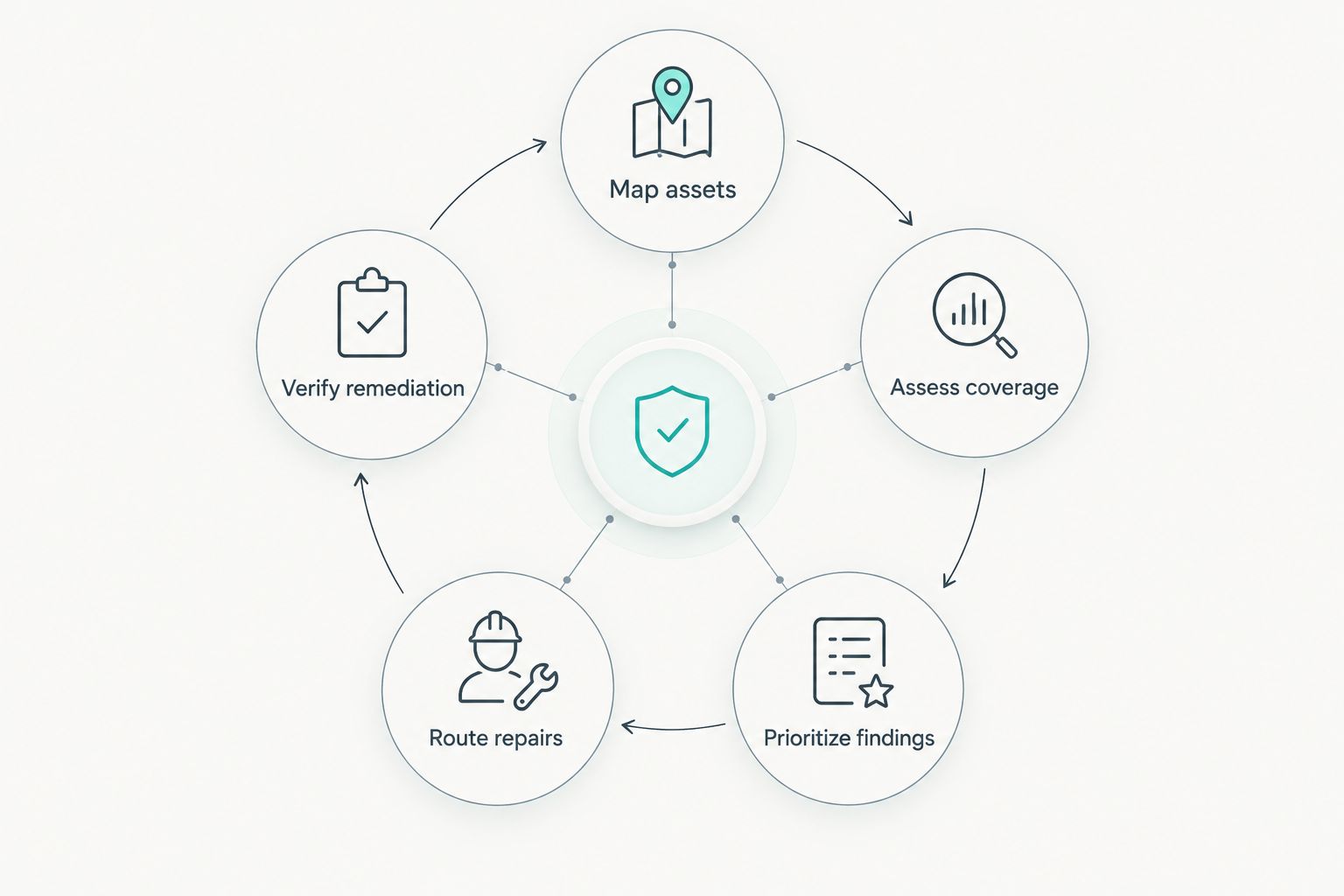
1. Map your assets to projects and owners
Start with a spreadsheet and existing records. Reconcile device inventories, network records, cloud accounts, software lists, and project handover documents before purchasing another discovery tool. Record the source and last confirmation date for each entry.
Separate company-controlled assets from contractor-controlled devices and provider-operated services. You need visibility into dependencies without pretending you have permission to inspect every connected system. For each asset, identify both its technical administrator and the business owner who can explain its importance.
Treat temporary sites as a lifecycle, not a permanent location field. Equipment entering a project needs an owner; equipment leaving it needs a documented destination, reassignment, or retirement decision. Apply the same discipline when projects share devices.
- Record the asset identifier, location, project, and ownership boundary.
- Name the administrator and business owner separately.
- Mark whether the asset is internet-accessible or remotely reachable.
- Identify systems supporting payments, plans, or project coordination.
- Add onboarding, transfer, and retirement checks to site procedures.
2. Establish safe assessment coverage
Begin with the assessment capabilities you already have. Review endpoint reports, approved scan results, configuration checks, and vendor advisories, then identify gaps against your asset inventory. An installed scanner does not prove an asset was successfully assessed.
Match the assessment method to the system. Use authenticated scanning on supported IT assets where credentials and permissions allow it. For operational technology or sensitive equipment, follow manufacturer guidance and obtain operational approval before active testing. Passive observation and vendor information serve different purposes from direct vulnerability testing.
Check assessments for failed authentication, unreachable targets, stale results, and excluded network segments. These are coverage issues, not evidence that the systems are secure. Your 2026 assessment plan should make those gaps visible rather than burying them in an overall completion percentage.
- Obtain written authorization for each assessment scope.
- Test scan settings on a limited, approved group first.
- Agree maintenance windows with site and system owners.
- Track unsuccessful assessments separately from clean results.
- Document provider assessment evidence for systems you cannot scan.
3. Build a shared record of findings
Use a spreadsheet or your existing ticketing system first. Create consistent fields for the asset, vulnerability identifier, evidence, owner, project dependency, first observation, and current status. Preserve the source record so an analyst can investigate a disputed finding.
Normalize identifiers before combining reports. A hostname change, reused address, or equipment transfer can make separate records look like different assets. Conversely, a shared address does not establish that two findings concern the same device.
Brinqa’s vulnerability and exposure management category is relevant when you evaluate a platform beyond manual coordination. Test the platform against your actual data sources, ownership rules, and review workflow; require a demonstration rather than assuming particular capabilities.
Consolidation should reduce repeated investigation without erasing evidence. Keep duplicate observations when they explain recurrence or conflicting results, but give the remediation owner a clear statement of the action required.
- Define consistent asset and finding identifiers.
- Preserve scanner names, observation dates, and supporting evidence.
- Distinguish repeated observations from genuinely separate weaknesses.
- Assign a named owner before placing work in a remediation queue.
- Test platform candidates with representative construction asset records.
4. Prioritize by exploitability and project impact
Start with a documented decision worksheet. For each finding, assess exposure, exploitation evidence, affected permissions, business dependency, and existing controls. Record the reason for its priority so another analyst can reproduce the decision.
CVSS expresses technical severity on a 0–10 scale; it does not tell you which project depends on the affected asset. FIRST’s EPSS estimates the probability that a published vulnerability will be exploited in the wild within the next 30 days. Neither measure independently establishes your company’s risk.
Check CISA’s Known Exploited Vulnerabilities catalog when reviewing published vulnerabilities in 2026. Its scope is vulnerabilities with evidence of exploitation, not every weakness requiring remediation. Keep publication and retrieval dates with external evidence so later reviews can distinguish current information from an older decision.
- Escalate applicable findings with confirmed exploitation evidence.
- Check whether the vulnerable component is reachable by an attacker.
- Identify access to project records, payment systems, or administrative functions.
- Document compensating controls and verify that they are active.
- Rank findings using both technical evidence and business consequences.
5. Route repairs through approved project windows
Begin with a ticket template and a shared change calendar. Give the owner enough detail to locate the asset, understand the weakness, choose a repair, and confirm success. A vulnerability identifier without affected-system evidence is an incomplete assignment.
Separate urgency from scheduling. Urgent exposure requires a prompt decision, but the decision is not automatically an untested patch during active operations. Consider vendor-approved mitigations, access restrictions, or isolation when immediate patching is not safe. Document what each measure addresses and what remains unresolved.
Use your existing service-management process before adding another queue. The guide to integrating vulnerability management with ITSM tools explains that workflow boundary. Keep security ownership of verification even when IT or a vendor performs the change.
- Include affected assets, evidence, priority, and the requested action.
- Identify the change approver and the person performing the repair.
- Record the approved window and rollback procedure.
- Specify an interim mitigation when remediation must wait.
- Define verification evidence before the ticket enters implementation.
6. Verify remediation and govern exceptions
Start by checking the same asset and condition that produced the original finding. Use a successful reassessment, confirmed configuration state, or appropriate vendor evidence. An unavailable endpoint is not a verified repair, and an installed update does not prove every affected component changed.
Give exceptions a separate workflow. The business owner should accept the remaining risk, while security records the technical basis, interim controls, review triggers, and expiration date. A vendor restriction explains a constraint; it does not erase exposure.
Set a 30-day review interval as an initial policy proposal for unresolved exceptions, then adjust it through your approval process according to exposure and operational constraints. This is a recommended starting rule, not an industry benchmark or a substitute for urgent escalation.
- Reassess the affected condition after implementation.
- Keep verification evidence attached to the original finding.
- Reopen tickets when remediation fails or the weakness returns.
- Require an approver, expiration date, and interim controls for exceptions.
- Trigger reviews when exposure, ownership, or project use changes.
7. Report outcomes and complete site handovers
Begin with a small report drawn from your existing records. Show coverage gaps, overdue work, unresolved high-priority exposure, and exceptions approaching review. Separate verified remediation from tickets marked complete without evidence.
Report by business owner and project where those fields are reliable. Explain which systems remain exposed and which decision will remove the blocker. Avoid presenting a falling finding count as success when assets have simply disappeared from assessment scope.
For your 2026 reporting cycle, include project closure and equipment transfer. Confirm that accounts, network access, records, and devices have an accountable destination. A completed construction project should not leave an unmanaged security dependency behind.
- Measure assessed assets against the defined in-scope inventory.
- Report overdue findings by accountable owner.
- Distinguish repaired weaknesses from accepted exceptions.
- Flag retired assets still appearing in active security records.
- Require a security handover check before closing a site record.
Compare operating models for your construction company
Choose the operating model that matches your ownership and coordination problem. Discovery, remediation, and exposure management are related responsibilities, not interchangeable purchases. Compare the work each option supports before deciding where you need help.
| Option | Best for | Main advantage | Key limitation |
|---|---|---|---|
| Spreadsheet and existing tickets | A tightly scoped program with clearly assigned owners | Lets you define records and decisions before selecting a platform | Reconciliation and follow-up depend on manual effort |
| Scanner-led workflow | Teams whose immediate need is vulnerability assessment | Produces technical findings within the approved assessment scope | Scan results alone do not establish project impact or repair authority |
| Managed security service | Teams seeking external assessment or operational assistance | Assigns contracted tasks to an external team | Scope, access, escalation, and verification responsibilities require explicit agreement |
| Brinqa | Teams evaluating a vulnerability and exposure management platform | Provides a platform option in that category | Platform selection does not replace safe assessment, asset ownership, or change approval |
Evaluate Brinqa for construction teams that need a vulnerability and exposure management platform. Use the same acceptance criteria for every candidate: representative assets, traceable evidence, clear ownership, and a repair that reaches verified closure. Do not accept a polished dashboard as proof that the operating process works.
When evaluating a service, ask who handles a disconnected site endpoint and who contacts the equipment vendor. When evaluating software, test how your team records that same situation. These checks expose responsibility gaps before you depend on the arrangement.
Common mistakes construction companies make
Treating a temporary site as outside the inventory
A site’s short lifespan is not a reason to omit its devices and connectivity. Add an inventory check at mobilization and a security handover at closure. Keep project-specific records attached to equipment when it moves.
Assuming subcontractor access implies scanning permission
Access to a shared environment does not authorize testing of another company’s devices. Establish assessment boundaries and evidence requirements in the relevant agreement. Escalate uncertain ownership before scanning, rather than resolving it after disruption.
Patching equipment without operational approval
Do not apply office IT maintenance assumptions to every connected device. Obtain vendor guidance, an approved change window, and a recovery procedure for sensitive equipment. Document interim protection when a repair cannot proceed safely.
Closing findings when field devices stop reporting
A disconnected device creates an evidence gap, not a repair. Retain the finding until the device returns for reassessment or you verify its retirement. Assign someone to resolve that status instead of letting stale records age out silently.
Ranking everything by technical severity
A score cannot identify the owner of a drawing repository or the consequences of losing remote access. Add project dependency and exposure context to prioritization. Revisit the decision when an asset moves, becomes externally accessible, or supports a different project.
FAQ
What is vulnerability management for construction companies?
Vulnerability management for construction companies is the process of finding, prioritizing, remediating, and verifying security weaknesses across in-scope business and project assets. It should account for temporary sites, subcontractor boundaries, and approved maintenance windows.
Where should a construction company start?
Start with an asset inventory and named technical and business owners. Map systems to active projects, identify internet-facing access, and compare the inventory with your existing assessment coverage.
Is a vulnerability scanner enough for a construction firm?
A scanner alone is not a complete vulnerability management process. You also need business context, assignment rules, approved remediation, exception handling, and evidence that the repair worked.
Can we scan subcontractor devices connected to a jobsite network?
Scan subcontractor devices only within an explicitly authorized scope. Define ownership, permitted testing, and required evidence in the relevant agreement before conducting an assessment.
How should we prioritize vulnerabilities on project systems?
Prioritize project-system vulnerabilities using exploitation evidence, attacker reachability, business dependency, and existing controls. CVSS describes technical severity but does not independently determine your remediation order.
What should we do when equipment cannot be patched immediately?
Document the constraint, obtain risk approval, and implement appropriate vendor-approved mitigations where available. Give the exception an owner, an expiration date, and triggers for reassessment.
When should construction teams evaluate Brinqa?
Evaluate Brinqa when you need a vulnerability and exposure management platform. Test it against your actual asset records, data sources, ownership rules, and verification requirements before selecting a platform.
One last thing
Test your process with equipment moving between projects. Select an asset already in your inventory and trace its owner, access, assessment evidence, open findings, and destination through a transfer. Do not change production systems merely to run the exercise.
If those records lose their connection during the transfer, fix the handover process before expanding your toolset. For construction companies, a useful 2026 program keeps responsibility attached to the asset even when the project changes.