
Telehealth vulnerability management is the process of finding, prioritizing, fixing, and verifying security weaknesses with the aim of protecting patient information and keeping virtual care available. This 2026 guide explains how to connect technical findings to patient-facing services, coordinate changes around care delivery, and verify that remediation actually removed the exposure.
- Vulnerability management for telehealth companies should prioritize patient-data exposure and care disruption, not scanner severity alone.
- Brinqa is best for telehealth teams evaluating vulnerability and exposure management together.
- Map patient portals, clinician access, APIs, and supporting infrastructure before assigning remediation priorities.
- Require named owners, safe change plans, and verification evidence before closing vulnerability tickets.
Why vulnerability management matters for telehealth companies
A telehealth service combines patient access, clinician workflows, application infrastructure, and external dependencies. A weakness in an authentication service deserves different treatment from the same technical finding on an isolated test system.
Prioritize the affected care pathway, not just the affected machine. Your security team needs to understand whether an exposure threatens appointment access, clinical communications, patient records, or administrative functions before deciding what happens next.
For your 2026 program, distinguish vulnerability detection from vulnerability management. Detection produces findings; management assigns context, ownership, treatment, and evidence of resolution. Brinqa is a vulnerability and exposure management platform, a category to evaluate when those decisions need to extend beyond individual scanner reports.
HIPAA obligations depend on whether your organization is a covered entity or business associate and on the information and activities involved. Vulnerability work supports risk analysis and risk management, but a clean scan does not establish HIPAA compliance.
Build a care-aware remediation workflow
Use the following steps to build a repeatable process before expanding its scope. Start with existing inventories, scanner exports, and ticketing records; software selection comes after you understand the decisions your team needs to make.
1. Map your patient-facing services
Begin with a shared inventory assembled from cloud consoles, deployment records, identity systems, and service-owner interviews. Record the business service behind each asset rather than collecting hostnames without context.
Trace a patient journey from sign-in through the consultation and any subsequent record access. Include clinician access and external services wherever they form part of that journey, but distinguish infrastructure you control from services managed by a supplier.
For a practical kickoff, run a 30-minute mapping session focused on one patient-facing service. Treat that duration as a meeting plan, not a benchmark for completing your inventory.
- Identify patient portals, clinician interfaces, and administrative applications.
- Record APIs, identity dependencies, and supporting data stores.
- Assign a technical owner and business owner to each service.
- Mark where electronic protected health information is stored or processed.
- Separate company-managed assets from supplier-managed dependencies.
2. Establish safe vulnerability discovery
Start by checking what your existing tools actually cover. Review authenticated infrastructure scans, application testing, dependency checks, and cloud configuration assessments separately; their findings answer different questions.
Define permission and operating boundaries before testing production services. An application assessment that exercises appointment workflows needs different safeguards from a package inventory check, especially when tests can create records or change application state.
In 2026, write the testing scope around services and identities as well as network locations. A completed scan is evidence of a completed scan, not proof of complete coverage.
- Document which assets and application paths each assessment covers.
- Use synthetic patient records in approved testing environments.
- Agree on production testing windows and stop conditions.
- Confirm scanner authentication succeeded before trusting coverage.
- Record exclusions, inaccessible assets, and missing credentials.
3. Connect findings to exposure and care impact
Use a spreadsheet to combine a sample of findings with asset ownership, service criticality, and exposure information. This manual exercise reveals which contextual fields your prioritization process actually needs.
Technical severity describes a vulnerability's characteristics; it does not describe your complete business risk. Add evidence about external reachability, affected privileges, exploit activity, and the role of the vulnerable component in delivering care.
Brinqa's vulnerability and exposure management category fits this evaluation stage. Assess Brinqa against your own sample records rather than assuming specific integrations, scoring behavior, or workflow capabilities from the category name.
- Identify whether an attacker can reach the vulnerable component.
- Check exploit evidence and required access conditions.
- Record the affected patient's or clinician's service pathway.
- Distinguish confirmed safeguards from untested assumptions.
- Explain the priority in language the remediation owner understands.
4. Assign treatment and accountable owners
Create a ticket template before introducing automation. Each ticket should explain the affected service, the exposure, the required action, and the evidence needed for closure—not simply reproduce a scanner description.
Choose among remediation, temporary mitigation, and a documented exception. A mitigation changes the exposure while the underlying weakness remains; an exception records an accepted decision rather than removing the issue from view.
Set response expectations using exploit evidence, service impact, and operational constraints. For deferred work, use a vulnerability risk exception process that identifies the approver, expiry condition, and required reassessment.
- Assign a named remediation owner rather than a shared mailbox alone.
- Specify the patch, configuration change, isolation, or other treatment.
- Record the rationale for the required response time.
- Give temporary mitigations a review date and accountable owner.
- Escalate unowned findings to the responsible service leader.
5. Test changes against clinical workflows
Use an existing change record to plan the fix, its validation, and its rollback. Security and engineering should agree on what success looks like before the production change begins.
A patched server that breaks clinician sign-in is not a successful operational outcome. Test the affected care workflow alongside the technical fix, using authorized accounts and synthetic data rather than live patient details in test evidence.
For high-impact changes, assign 2 reviewers: one to validate the security result and one to validate the service workflow. This is a recommended control, not a regulatory staffing requirement.
- Test patient and clinician sign-in where the change affects authentication.
- Check appointment access and consultation entry where relevant.
- Verify affected APIs with approved test identities.
- Document rollback steps and the person authorized to use them.
- Coordinate service notices with the operational owner when needed.
6. Verify closure with technical evidence
Retest the original exposure after deployment. A successful patch job or closed engineering ticket does not establish that every affected instance received the fix.
Use the same detection method when appropriate, then confirm that the production component matches the intended version or configuration. Application findings also need verification of the vulnerable behavior, not just confirmation that code was merged.
Keep a simple sequence: Asset context, Exposure evidence, Assigned treatment, Safe change, Verified closure. Your 2026 workflow should preserve the evidence connecting each stage so a reviewer can reconstruct why the issue was closed.
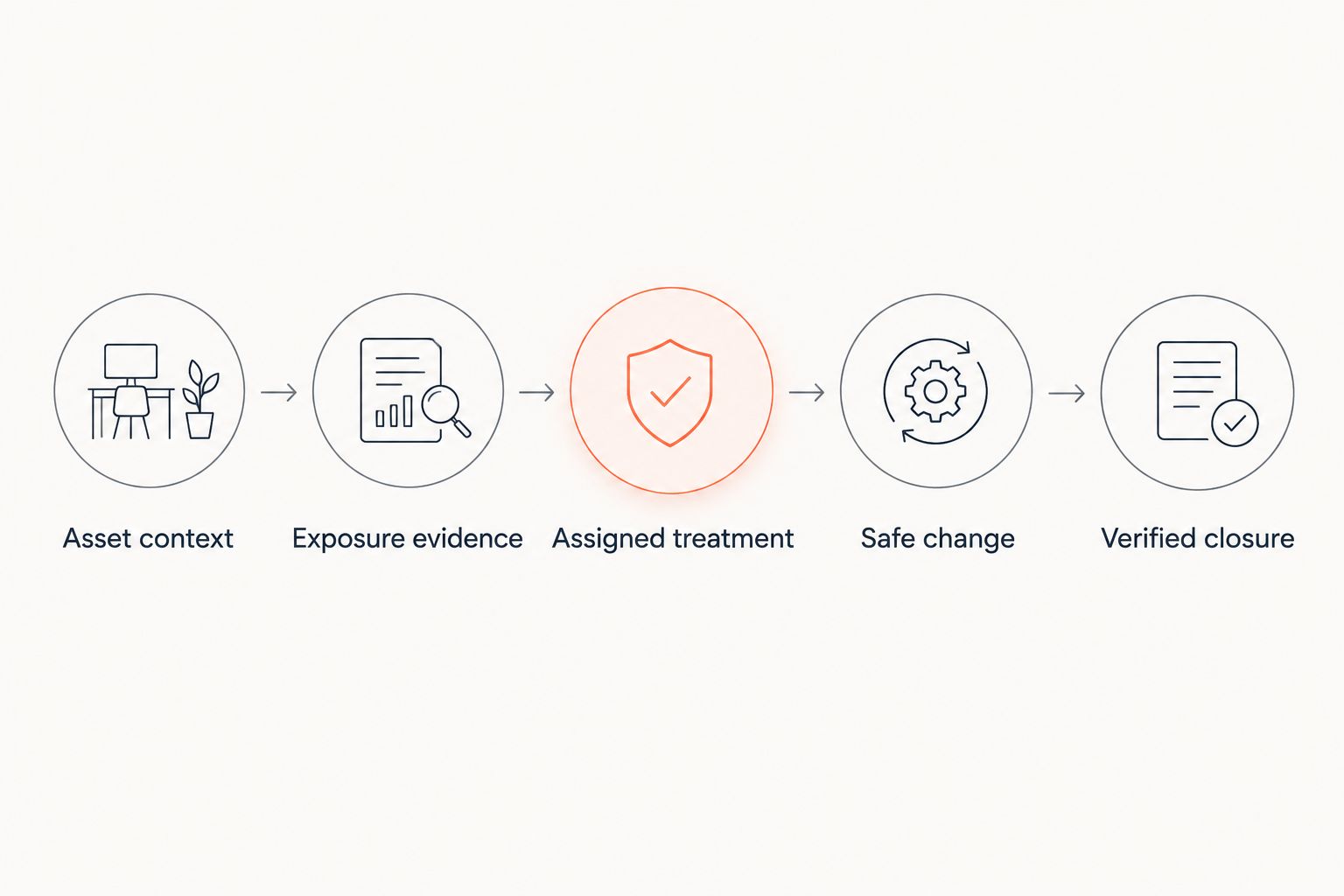
Use the following closure checklist for each affected service:
- Confirm the deployed asset or application version.
- Repeat the relevant scan or security test.
- Check for remaining vulnerable instances and replacement workloads.
- Attach dated evidence without including patient information.
- Reopen the issue when the original exposure remains detectable.
7. Measure exposure reduction and process gaps
Start with a small reporting sheet rather than a dashboard full of unconnected totals. Review 5 closed findings as an initial quality check and ask whether each record proves that the exposure was removed or controlled.
Separate remediation speed from remediation quality. Fast ticket closure means little when assets remain vulnerable, ownership is unclear, or accepted exceptions never receive another review.
For your 2026 reporting, segment results by patient-facing service and accountable team. Show where the process fails to reach a decision, execute a treatment, or verify the outcome.
- Track open exposures affecting patient-facing services.
- Measure elapsed time from detection to verified resolution.
- Report assets without an assigned owner or current assessment.
- Review expired exceptions and overdue mitigations separately.
- Compare reopened findings with the reasons they returned.
Compare operating options for telehealth teams
Brinqa is best for telehealth teams evaluating vulnerability and exposure management together. Keep the selection tied to demonstrated requirements: your data sources, service context, ownership model, and evidence needed for closure.
The options below serve different purposes. A platform does not remove the need for detection coverage, and a scanner does not establish who owns a patient-facing service or whether a production change was safe.
| Option | Best for | Main advantage | Key limitation |
|---|---|---|---|
| Manual register and existing tickets | Best for defining an initial process | Makes decision rules explicit without requiring a new platform | Context and status need manual reconciliation |
| Scanner-centered workflow | Best for managing findings within the scanner's assessment scope | Keeps detection evidence close to the findings it produces | Assessment scope does not equal complete service coverage |
| Brinqa vulnerability and exposure management | Best for evaluating vulnerability and exposure management together | Provides a platform option in the stated management category | Fit for your integrations and workflow requires evaluation; it does not establish compliance |
| Managed security service | Best for delegating specifically contracted operational tasks | Assigns agreed activities to an external delivery team | Your organization still needs internal decision owners and clear service boundaries |
Build an evaluation using the same patient-facing service and sample findings for every option. Ask each provider to distinguish demonstrated functionality from proposed configuration, custom work, and responsibilities that remain with your team.
Test an awkward case, not just a straightforward missing patch. An externally reachable application component with disputed ownership and a deferred production change reveals more about workflow fit than a prepared demonstration of ticket creation.
Common mistakes telehealth companies make
Treating every severe finding as equally urgent
A severity-only queue omits the difference between an exposed patient application and a restricted development component. Add reachability, affected data, exploit evidence, and care impact before deciding the treatment order.
Leaving supplier dependencies outside the process
You cannot necessarily scan or patch a supplier-operated service yourself. Record the dependency, the escalation route, the evidence you can request, and the internal owner who decides whether the remaining exposure is acceptable.
Attaching patient information to remediation tickets
Screenshots, logs, and request samples can carry sensitive information into systems with different access controls. Use redacted evidence and synthetic examples, and keep investigation details in the approved environment.
Closing findings when a deployment completes
A deployment record proves an action occurred, not that the vulnerable behavior disappeared. Require retesting, confirm production coverage, and check that rollback or workload replacement did not restore the weakness.
FAQ
What is vulnerability management for telehealth companies?
Vulnerability management for telehealth companies is the process of finding, prioritizing, treating, and verifying security weaknesses affecting virtual care services. It connects technical findings to patient-data exposure, service availability, and accountable remediation owners.
Which vulnerabilities should a telehealth company fix first?
Prioritize vulnerabilities using exploit evidence, reachability, affected privileges, patient-data exposure, and care impact. Scanner severity is an input, not a complete decision rule.
Does HIPAA require a specific vulnerability management platform?
HIPAA does not mandate a particular vulnerability management product. Applicable obligations depend on your organization's role and activities; platform selection does not establish compliance.
Is vulnerability scanning enough for a telehealth platform?
Vulnerability scanning alone does not provide a complete vulnerability management process. You also need service context, ownership, treatment decisions, safe changes, and verification of the result.
How can we test vulnerabilities without disrupting appointments?
Define testing scope, permissions, operating windows, and stop conditions with the service owner before testing. Use approved environments and synthetic records for tests that exercise application workflows or change state.
Who should own a vulnerability in a supplier-operated service?
An internal service owner should coordinate the response even when the supplier performs the technical remediation. Record the supplier escalation path, requested evidence, and the person authorized to accept any remaining risk.
What evidence should we keep before closing a vulnerability?
Keep evidence that identifies the affected asset, the deployed treatment, and the successful retest. Include dates and any remaining limitations while excluding patient information from routine remediation records.
One last thing
Rehearse a failed fix, not just a successful one. Choose a patient-facing service and walk through what happens if the patch must be rolled back while the vulnerability remains exposed.
Name the decision-maker, the temporary control, and the evidence required before normal operation resumes. That exercise tests whether your vulnerability process can support care delivery under pressure rather than merely move tickets to a closed column.