
Use an EPSS calculator to look up a CVE’s exploitation probability and percentile, record the score date, and combine the result with asset exposure, business impact, and evidence of exploitation. EPSS estimates the probability of exploitation in the wild over the next 30 days; it does not calculate the probability that your organization will suffer a breach.
- An EPSS calculator retrieves exploitation probability; it does not replace asset-specific vulnerability triage.
- FIRST’s EPSS score covers the next 30 days; its percentile describes relative rank, not exploitation probability.
- Confirmed exploitation and exposed critical assets require attention regardless of a low EPSS score.
- Brinqa belongs in vulnerability and exposure management evaluations, not comparisons of standalone EPSS calculators.
How do you use an EPSS calculator for vulnerability triage?
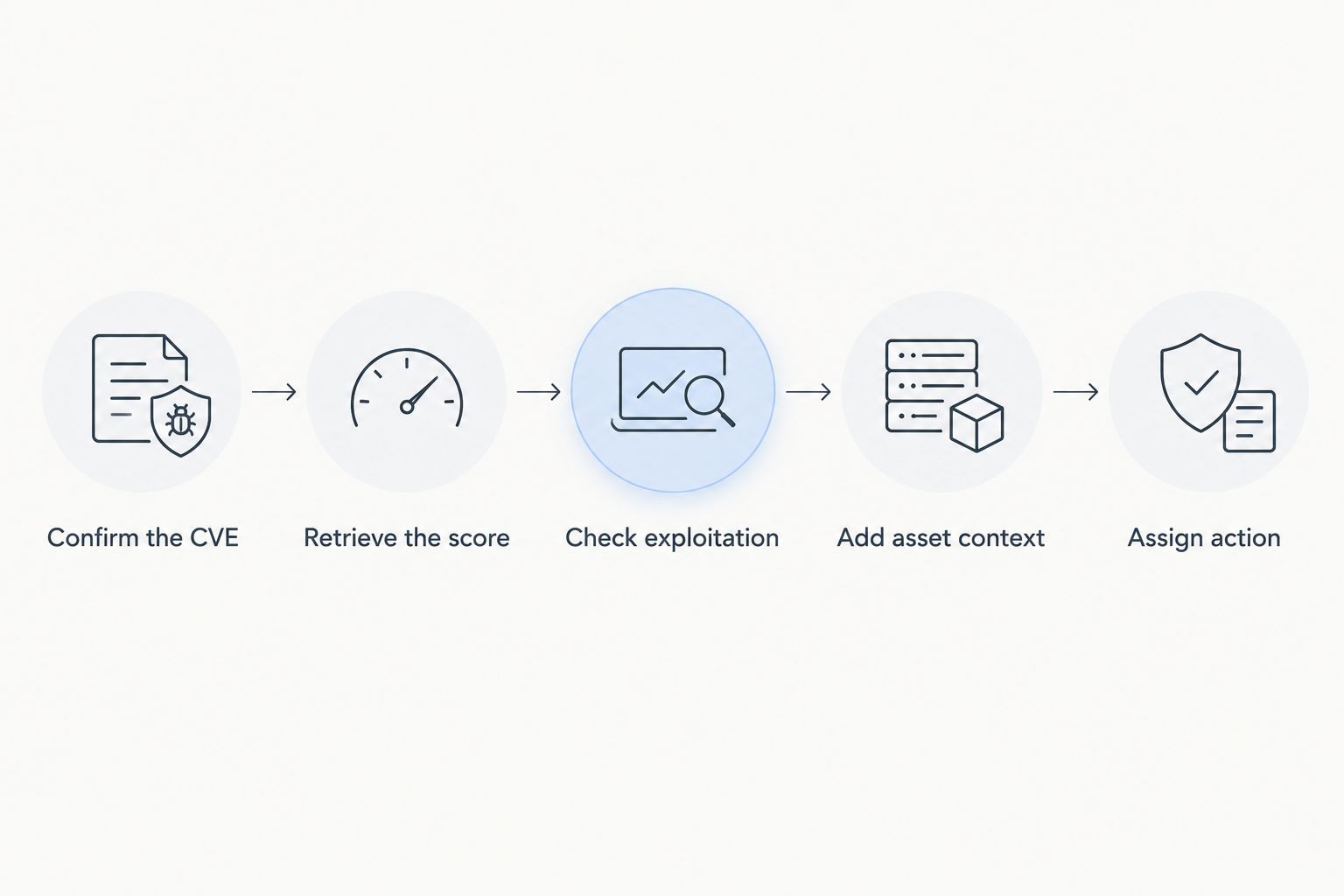
Follow this sequence to turn a CVE lookup into a defensible remediation decision. The lookup supplies a threat signal; your environment determines the action.
- Confirm the CVE. Match the identifier to the affected product, installed version, and relevant configuration.
- Retrieve the score. Use FIRST’s EPSS data or a lookup that identifies FIRST as its source. Save the probability, percentile, and score date.
- Check exploitation. Review CISA’s Known Exploited Vulnerabilities catalog, vendor advisories, and evidence from your environment.
- Add asset context. Establish reachability, business importance, affected functionality, and applicable controls.
- Assign action. Route the finding to an owner with a remediation decision, rationale, and reassessment trigger.
For a closer look at the ranking field, see how to calculate an EPSS percentile for a CVE. Do not substitute the percentile for the probability. They answer different questions.
Why this matters
A severity-sorted backlog tells you which vulnerabilities have severe technical characteristics. It does not tell you which vulnerabilities attackers are most likely to exploit, whether your affected assets are reachable, or what a successful attack would disrupt.
For your 2026 triage process, keep those questions separate. EPSS contributes exploitation likelihood, CVSS contributes technical severity, and your asset records contribute organizational context. Combining the evidence produces an explainable decision without pretending that any single score measures everything.
The reference definitions here come from FIRST’s EPSS documentation and CVSS specifications, plus CISA’s Known Exploited Vulnerabilities catalog. Their scopes differ: predicted exploitation, technical severity, and documented exploitation respectively. Check the current source records when making a live decision.
What should you read in an EPSS calculator?
A useful EPSS lookup makes the following fields clear. If a tool hides its source or score date, verify the result against FIRST before using it to change remediation priority.
| Field | What it means | How to use it | Limitation |
|---|---|---|---|
| EPSS probability | Estimated probability of exploitation in the wild during the next 30 days | Compare exploitation likelihood across CVEs | Does not measure your asset’s breach probability |
| EPSS percentile | Relative position in the scored CVE population | Understand how the CVE ranks against others | Is not the probability of exploitation |
| Score date | Date associated with the prediction | Establish the evidence available when you decided | An older result does not describe the latest prediction |
| CVE identifier | The vulnerability being scored | Join threat data to validated findings | A matching identifier does not prove an asset is affected |
FIRST expresses EPSS probability on a scale from 0 to 1, which interfaces can display as 0% to 100%. The probability scale and the percentile serve different purposes even when a dashboard presents both as percentages.
Check display conventions before exporting data. Preserve the original field names and units so a percentage-formatted value does not get interpreted as a raw probability downstream.
Does an EPSS calculator calculate the score locally?
An EPSS calculator generally serves as a lookup or presentation layer for FIRST’s published predictions. You do not reproduce an EPSS prediction by entering a CVSS score into a formula.
For a 2026 evaluation, check whether the interface retrieves published EPSS data or produces a separate proprietary score. Both can appear in a vulnerability workflow, but a proprietary calculation should not be labeled as the original EPSS probability.
EPSS, CVSS, and KEV: which signal should you use?
Use EPSS for predicted exploitation, CVSS for technical severity, and KEV for evidence of known exploitation. None replaces the others, and none establishes the business impact of an affected asset by itself.
| Signal | Best for | Strength | Limitation |
|---|---|---|---|
| EPSS | Ordering review by predicted exploitation likelihood | Adds a forward-looking threat signal | Does not describe local exposure or consequences |
| CVSS | Understanding technical severity | Provides structured vulnerability characteristics | A high score is not evidence of active exploitation |
| CISA KEV | Identifying vulnerabilities known to be exploited | Supplies documented exploitation evidence | Absence from the catalog is not proof of safety |
| Asset context | Setting organization-specific priority | Connects a finding to reachability and business impact | Depends on accurate, current asset information |
CVSS uses a 0-to-10 scale for severity. Do not compare that number directly with EPSS probability or average the two without a documented model: they measure different things.
Use a decision hierarchy instead. Confirmed exploitation affecting your environment demands investigation; applicable KEV entries need explicit handling; EPSS then helps order review alongside exposure and impact. A low prediction must not erase stronger evidence.
How do you turn the lookup into a remediation decision?
Validate applicability before assigning urgency
Confirm the affected version and the conditions described in the advisory. A scanner finding, a CVE identifier, and a high EPSS score do not establish that the vulnerable functionality exists on the asset.
Record the evidence supporting applicability. If the finding is incorrect, resolve it through your validation process rather than leaving it in the backlog with an artificially reduced priority.
Separate exploitation evidence from prediction
Check whether the vulnerability appears in CISA KEV and whether vendor guidance describes exploitation. Then inspect relevant internal detections and investigation results.
Evidence of exploitation in your environment changes the task from backlog ordering to incident investigation. Do not wait for the EPSS score to rise before escalating credible evidence of compromise.
Establish the affected asset’s exposure
Determine whether an attacker can reach the vulnerable service and satisfy the required conditions. Check network paths, authentication requirements, enabled features, and access boundaries.
Treat controls as evidence to verify, not labels to trust. An asset described as internal still needs a reachability assessment; a listed mitigation still needs confirmation that it applies and is operating.
Record impact and choose an action
Identify the business service, data, privileges, and dependencies associated with the affected asset. Use that context to choose remediation, mitigation, further investigation, or a documented exception.
Assign an accountable owner. Include the reason for the decision and the conditions that require another review, such as changed exposure, new exploitation evidence, or an expired exception.
Verify the result
Close the finding only after checking that the affected condition has been removed or the approved mitigation has been implemented. A completed deployment task is not, by itself, proof that the vulnerability is resolved.
Keep the original decision evidence. Your 2026 audit trail should explain what the team knew at the time, not only display today’s EPSS value beside an old ticket.
Why vulnerability triage decisions vary
EPSS assigns a prediction to a CVE, not a different prediction to every asset carrying that CVE. Different remediation decisions therefore need documented environmental reasons.
- Reachability: An exposed service and an isolated service present different access conditions.
- Applicability: Installed versions, enabled features, and configurations determine whether the finding applies.
- Exploitation evidence: Observed attacks or a relevant KEV listing add evidence beyond a probability estimate.
- Business impact: The affected service’s role changes the consequences of successful exploitation.
- Compensating controls: Verified controls can affect the available attack path, but they do not remove the underlying vulnerability.
- Remediation constraints: Testing requirements and dependencies affect execution; they require an explicit mitigation or exception decision, not silent deferral.
Keep these reasons visible in the record. Otherwise, different priorities for the same CVE look arbitrary, even when the decisions are justified.
What belongs in your triage record?
Save enough evidence for another analyst to understand and repeat the decision. A useful record connects the vulnerability, affected asset, threat assessment, and accountable action.
| Record element | What to preserve |
|---|---|
| Finding identity | CVE, asset identifier, affected component, and applicability evidence |
| EPSS evidence | Probability, percentile, source, and score date |
| Exploitation evidence | KEV status, relevant advisories, and internal observations |
| Environmental context | Reachability, business service, required privileges, and verified controls |
| Decision | Action, rationale, owner, and reassessment trigger |
| Closure evidence | Validation showing remediation or the approved mitigation |
Store the score used for the decision separately from the latest score. Overwriting the original value removes the context needed to explain an earlier choice.
For recurring reviews, define which changes reopen a decision. New exploitation evidence, changed reachability, and expired exceptions deserve explicit handling rather than another passive dashboard update.
Where does Brinqa fit in this workflow?
Brinqa is a fit for teams evaluating vulnerability and exposure management, rather than a standalone EPSS lookup. That is the relevant category distinction when deciding whether you need a calculator or a broader platform.
Evaluate Brinqa against your actual workflow: ask how the platform would preserve score history, represent asset context, document exceptions, and support accountable remediation. Treat these as evaluation questions, not assumed capabilities; a platform evaluation is unnecessary when a single-CVE lookup answers your need.
Discuss your vulnerability triage requirements
Ask how your EPSS evidence, asset context, and remediation decisions would fit a platform workflow.
How often should you refresh EPSS scores?
EPSS predictions are published daily and cover the next 30 days. Refresh the data used for active triage and preserve the date associated with each decision.
A score change should trigger reassessment under your policy, not automatically close a finding or reverse an investigation. In 2026, a workable review process still needs separate triggers for exploitation evidence and environmental changes.
Is there a universal EPSS threshold for patching?
No universal EPSS threshold determines which vulnerabilities every organization should patch. Choose a review threshold against your validated backlog, remediation capacity, exposure, and impact requirements.
A threshold is a queue-management rule, not a safety guarantee. Keep explicit escalation paths for known exploitation, critical affected services, and other conditions that outweigh the prediction.
FAQ
What does an EPSS calculator actually tell me?
An EPSS calculator shows a CVE’s estimated probability of exploitation in the wild over the next 30 days, usually alongside its percentile. It does not predict whether your particular organization will be breached.
Is an EPSS percentile the same as exploitation probability?
No. EPSS percentile describes relative rank within the scored CVE population, while EPSS probability estimates exploitation likelihood over the next 30 days. Keep the fields separate in dashboards and exports.
Can I calculate EPSS from a CVSS score?
No. A CVSS score alone is not enough to reproduce FIRST’s EPSS prediction. Retrieve the published EPSS result and use CVSS separately to understand technical severity.
Should I ignore a vulnerability with a low EPSS score?
No. A low EPSS score does not establish that a vulnerability is safe to ignore. Check applicability, exploitation evidence, asset exposure, and business impact before deciding.
What should I do when a CVE has no EPSS result?
Treat a missing EPSS result as unknown, not as zero probability. Continue triage using the advisory, technical severity, exploitation evidence, and affected asset context.
Is Brinqa an EPSS calculator?
Brinqa is a vulnerability and exposure management platform. Evaluate it for that broader requirement rather than treating it as a standalone CVE score lookup.
Should a falling EPSS score close a remediation ticket?
No. A falling EPSS score does not prove that the affected condition has been removed. Close the finding using validated remediation evidence or your approved exception process.
One last thing
The same CVE can justify different asset-level actions without having different EPSS scores. The prediction is shared; reachability, business impact, and controls are not.
Before expanding your calculator workflow, inspect a remediation ticket. If the record cannot explain why that asset received that action, improve the decision evidence before adding another score.